> ## Documentation Index
> Fetch the complete documentation index at: https://docs.soloent.ai/llms.txt
> Use this file to discover all available pages before exploring further.
# API Configuration
> Set up AI model API keys in SoloEnt
Configure API keys to enable SoloEnt's AI writing features.
## Entry points
### Quick config from chat
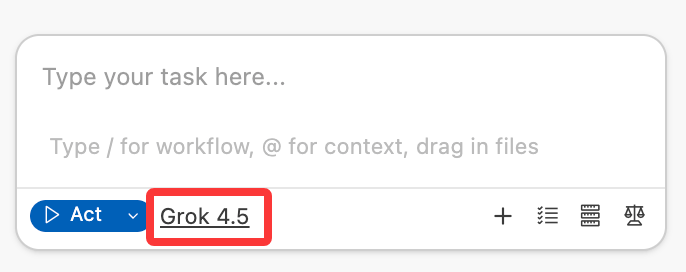
Click the model name at the bottom of the Agent chat to open the model settings panel.
 ### Via settings panel
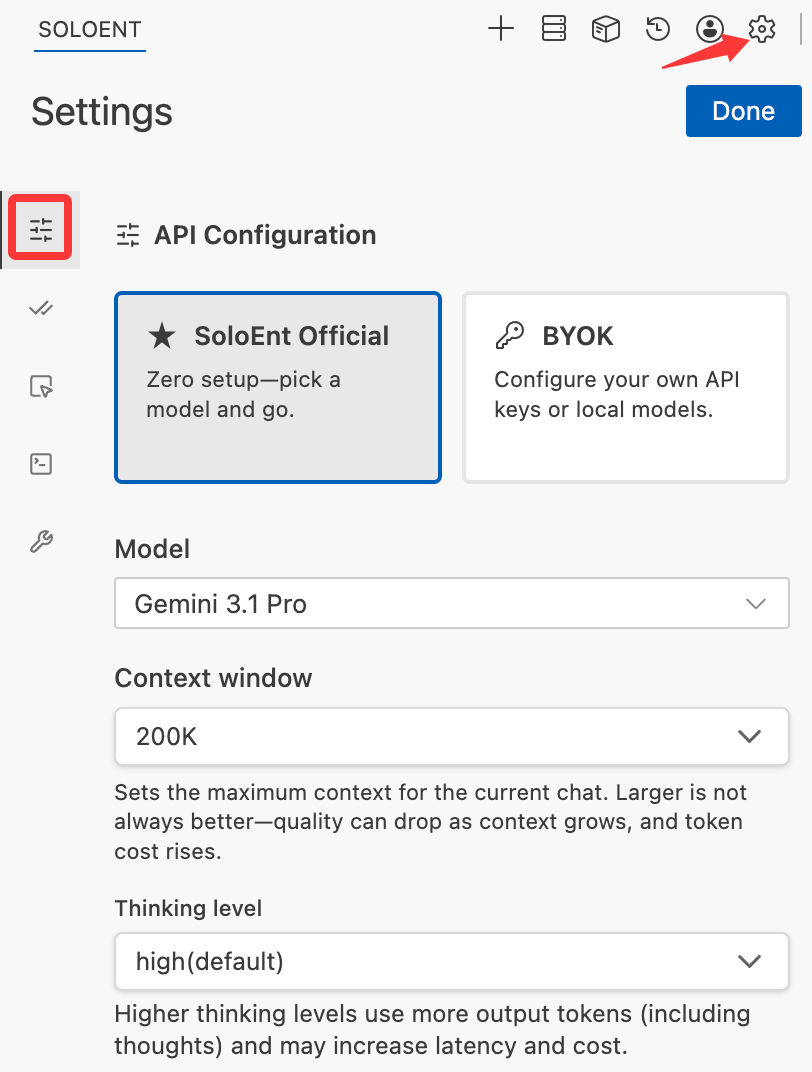
Click the settings icon in the Agent panel.
Choose whether to use official models directly or configure your own model (BYOK).
### Via settings panel
Click the settings icon in the Agent panel.
Choose whether to use official models directly or configure your own model (BYOK).
 ## Official API
SoloEnt provides an official API. Once logged in, you can use it directly without setting up any third-party keys.
### Free models
Official free models are available immediately after login. The available free models and discounts are updated regularly with ongoing campaigns.
Every registered user gets a trial credit of **\$0.5**; join [platform activities](https://soloent.ai/en/activities) to earn more free credit.
## Official API
SoloEnt provides an official API. Once logged in, you can use it directly without setting up any third-party keys.
### Free models
Official free models are available immediately after login. The available free models and discounts are updated regularly with ongoing campaigns.
Every registered user gets a trial credit of **\$0.5**; join [platform activities](https://soloent.ai/en/activities) to earn more free credit.
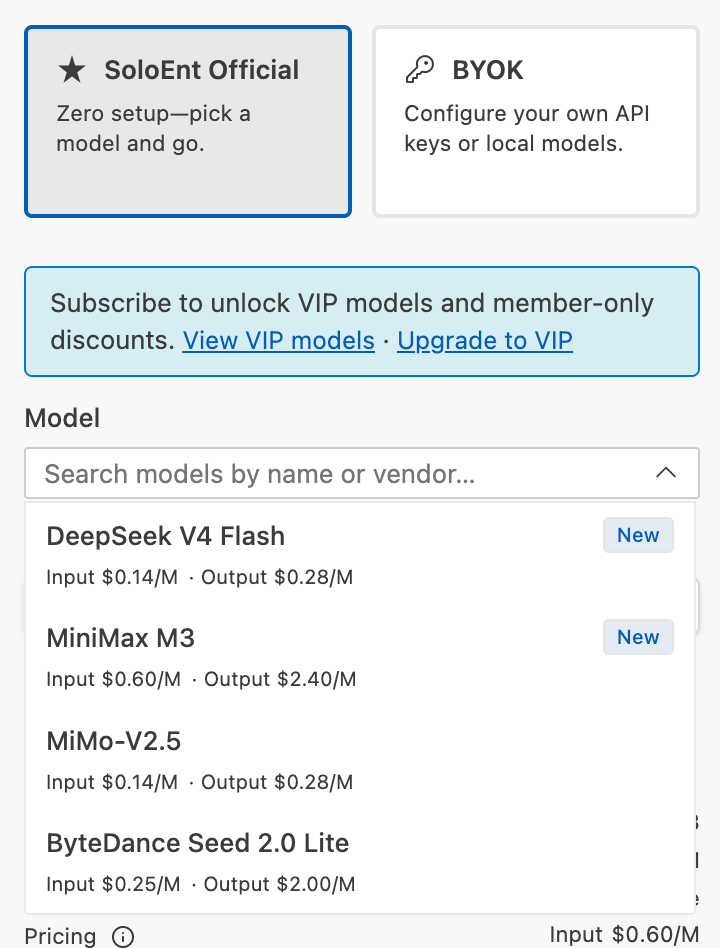 Free models are for trying out the tool. Response times may be slower or less consistent during periods of high demand.
### Subscription models (VIP)
Lite, Pro, and Max subscribers can use all models in the VIP list — covering the latest models from top providers including Anthropic, OpenAI, Google, and DeepSeek — without configuring any third-party API key.
SoloEnt API pricing matches the official pricing of each model provider, with no additional fees, and different models offer different discounts from time to time.
See all official models and the latest discounts at [soloent.ai/en/models](https://soloent.ai/en/models).
***
## Third-party API key configuration
An API key is your authentication credential for accessing AI models — typically a random string:
```
sk-abc123xyz456def789ghi012jkl345mno678pqr901stu234
```
**Important:** API access is billed separately from monthly subscriptions. A \$20 subscription does not include API usage. For example, a Gemini membership you subscribe to cannot be used as an API here.
### Where to get API keys
#### Popular providers
| Provider | Latest Models | Best For |
| --------------- | ---------------------------------- | --------------------------------------------------- |
| **OpenAI** | GPT-5.6 | Writing research, general writing |
| **Anthropic** | Claude Sonnet-5 / Opus-5 / Fable-5 | Story planning, strategic thinking, prose writing |
| **Google** | Gemini-3.1-pro | Fast, cost-effective, prose writing, multimodal |
| **xAI** | Grok-4.5 | Real-time info, flexible content policy, multimodal |
| **DeepSeek** | DeepSeek-V4-pro | Budget-friendly, flexible content policy |
| **Zhipu AI** | GLM-5.2 | Story planning, Chinese content |
| **Moonshot AI** | Kimi-K3 | Long context, Chinese content |
| **OpenRouter** | Multiple models | Unified access, model comparison |
See the [complete API directory](../resources/api-directory) for detailed provider information and registration steps.
Explore free tier options and community resources
### Filling in the API details you purchased
#### Standard configuration (official providers)
For OpenAI, Anthropic, Google, and select aggregators — find the corresponding provider in the API Provider dropdown and enter only the API Key:
```plaintext theme={null}
API Key: sk-abc123xyz456...
```
#### OpenAI-compatible configuration (third-party)
Select **OpenAI Compatible** from the API Provider dropdown to configure a third-party provider.
Free models are for trying out the tool. Response times may be slower or less consistent during periods of high demand.
### Subscription models (VIP)
Lite, Pro, and Max subscribers can use all models in the VIP list — covering the latest models from top providers including Anthropic, OpenAI, Google, and DeepSeek — without configuring any third-party API key.
SoloEnt API pricing matches the official pricing of each model provider, with no additional fees, and different models offer different discounts from time to time.
See all official models and the latest discounts at [soloent.ai/en/models](https://soloent.ai/en/models).
***
## Third-party API key configuration
An API key is your authentication credential for accessing AI models — typically a random string:
```
sk-abc123xyz456def789ghi012jkl345mno678pqr901stu234
```
**Important:** API access is billed separately from monthly subscriptions. A \$20 subscription does not include API usage. For example, a Gemini membership you subscribe to cannot be used as an API here.
### Where to get API keys
#### Popular providers
| Provider | Latest Models | Best For |
| --------------- | ---------------------------------- | --------------------------------------------------- |
| **OpenAI** | GPT-5.6 | Writing research, general writing |
| **Anthropic** | Claude Sonnet-5 / Opus-5 / Fable-5 | Story planning, strategic thinking, prose writing |
| **Google** | Gemini-3.1-pro | Fast, cost-effective, prose writing, multimodal |
| **xAI** | Grok-4.5 | Real-time info, flexible content policy, multimodal |
| **DeepSeek** | DeepSeek-V4-pro | Budget-friendly, flexible content policy |
| **Zhipu AI** | GLM-5.2 | Story planning, Chinese content |
| **Moonshot AI** | Kimi-K3 | Long context, Chinese content |
| **OpenRouter** | Multiple models | Unified access, model comparison |
See the [complete API directory](../resources/api-directory) for detailed provider information and registration steps.
Explore free tier options and community resources
### Filling in the API details you purchased
#### Standard configuration (official providers)
For OpenAI, Anthropic, Google, and select aggregators — find the corresponding provider in the API Provider dropdown and enter only the API Key:
```plaintext theme={null}
API Key: sk-abc123xyz456...
```
#### OpenAI-compatible configuration (third-party)
Select **OpenAI Compatible** from the API Provider dropdown to configure a third-party provider.
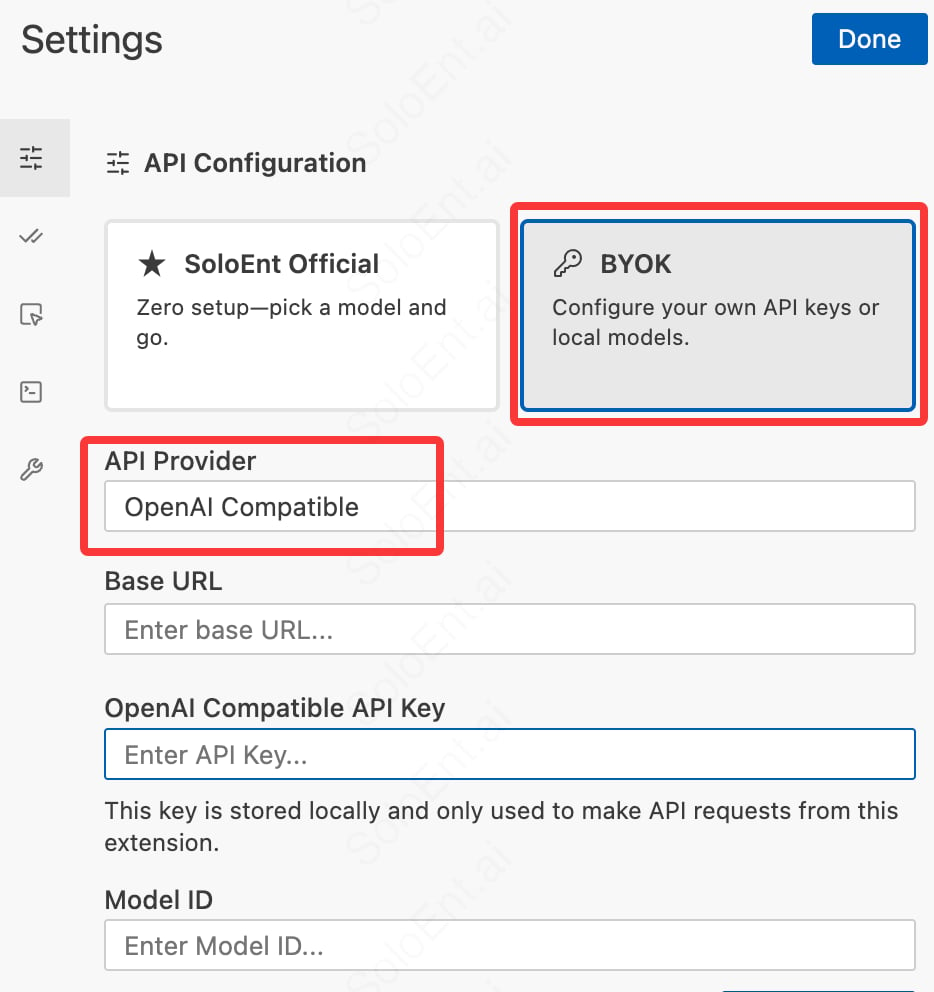 Most third-party providers require all three fields:
API endpoint URL (e.g., `https://api.provider.com/v1`)
Your API key
Model identifier (e.g., `gpt-4-turbo`)
All three fields are required. Confirm with your provider before purchasing.
#### Local LLMs
Run AI models on your own computer for privacy and offline access.
| Solution | Models | Best For |
| ------------- | ------------------------- | ----------------------------- |
| **Ollama** | Llama 3.1, Qwen, DeepSeek | Easy setup, macOS/Linux |
| **LM Studio** | Multiple open models | GUI interface, cross-platform |
| **vLLM** | Custom deployments | High performance, production |
Complete guide to running models locally
## Using a Codex / Claude Code subscription in SoloEnt
If you already have an OpenAI Codex or Claude Code subscription, you can reuse that subscription's quota directly in SoloEnt while enjoying SoloEnt's professional writing Skills — no need to buy a separate API key.
#### Using a Codex subscription
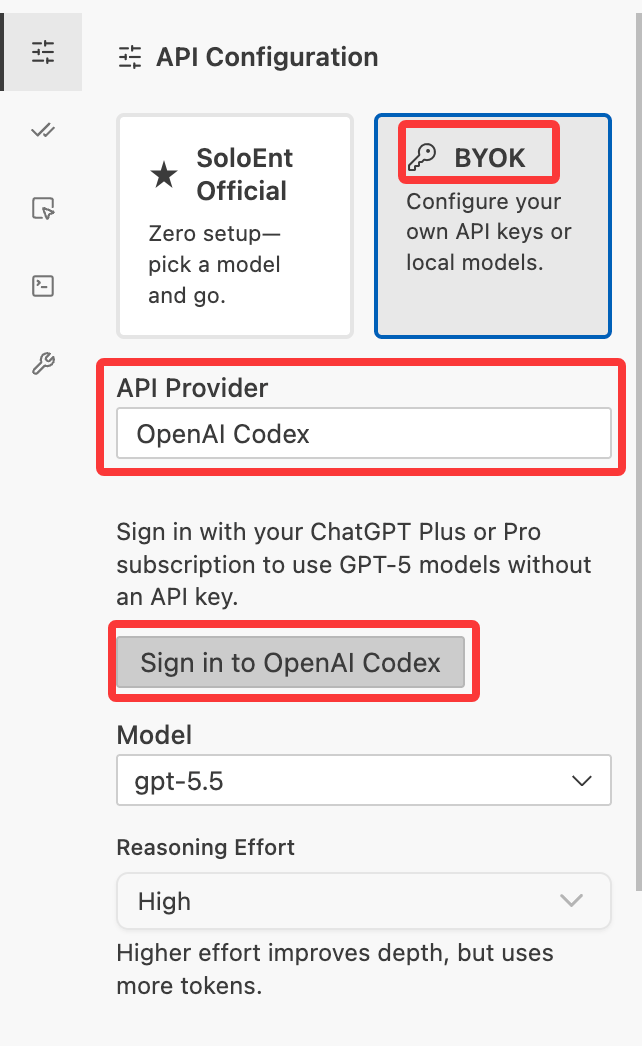
Select **BYOK**, choose **OpenAI Codex** in the API Provider list, and click to sign in to OpenAI Codex. Once signed in, you can select the models Codex provides (such as GPT-5.x) from the model list. No extra API key is needed when using a ChatGPT Plus or Pro subscription.
Most third-party providers require all three fields:
API endpoint URL (e.g., `https://api.provider.com/v1`)
Your API key
Model identifier (e.g., `gpt-4-turbo`)
All three fields are required. Confirm with your provider before purchasing.
#### Local LLMs
Run AI models on your own computer for privacy and offline access.
| Solution | Models | Best For |
| ------------- | ------------------------- | ----------------------------- |
| **Ollama** | Llama 3.1, Qwen, DeepSeek | Easy setup, macOS/Linux |
| **LM Studio** | Multiple open models | GUI interface, cross-platform |
| **vLLM** | Custom deployments | High performance, production |
Complete guide to running models locally
## Using a Codex / Claude Code subscription in SoloEnt
If you already have an OpenAI Codex or Claude Code subscription, you can reuse that subscription's quota directly in SoloEnt while enjoying SoloEnt's professional writing Skills — no need to buy a separate API key.
#### Using a Codex subscription
Select **BYOK**, choose **OpenAI Codex** in the API Provider list, and click to sign in to OpenAI Codex. Once signed in, you can select the models Codex provides (such as GPT-5.x) from the model list. No extra API key is needed when using a ChatGPT Plus or Pro subscription.
 #### Using a Claude Code subscription
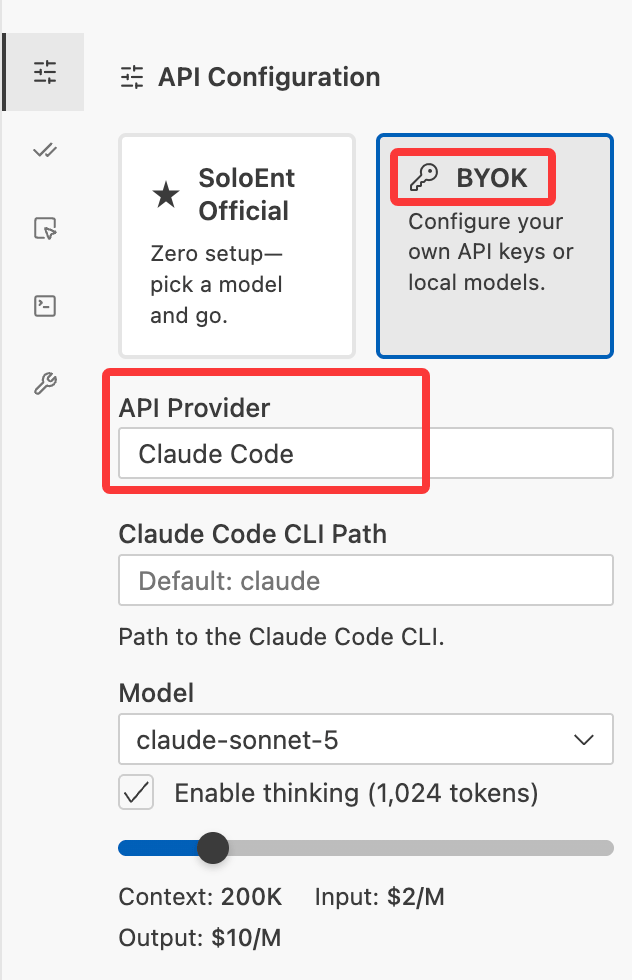
First install the **Claude Code CLI** on your computer and bind your Claude Code subscription account, making sure Claude Code runs correctly locally. Then select **BYOK**, choose **Claude Code** from the list, and — with no other setup — pick the Claude model you want directly from the model list.
#### Using a Claude Code subscription
First install the **Claude Code CLI** on your computer and bind your Claude Code subscription account, making sure Claude Code runs correctly locally. Then select **BYOK**, choose **Claude Code** from the list, and — with no other setup — pick the Claude model you want directly from the model list.
 ## Common error codes
| Cause | Error Code | Error Message |
| -------------------- | :--------: | ------------------------------------------------------ |
| Missing model | `400` | `Missing model` |
| Budget exceeded | `403` | `Budget exceeded` |
| Free quota exhausted | `403` | `Daily free quota used up, please try again tomorrow.` |
| Model not found | `404` | `Model not found` |
Other errors caused by instability in third-party models cannot be accurately diagnosed by SoloEnt at this time.
## Other FAQ
* Verify you copied the entire key
* Check if the key has expired
* Regenerate from the provider dashboard
* Check your internet connection
* Verify the Base URL (for OpenAI Compatible configuration)
* Try without a VPN
## Next steps
Set your preferred language
Create your first project
Run AI models on your computer
Get free access to AI models
## Common error codes
| Cause | Error Code | Error Message |
| -------------------- | :--------: | ------------------------------------------------------ |
| Missing model | `400` | `Missing model` |
| Budget exceeded | `403` | `Budget exceeded` |
| Free quota exhausted | `403` | `Daily free quota used up, please try again tomorrow.` |
| Model not found | `404` | `Model not found` |
Other errors caused by instability in third-party models cannot be accurately diagnosed by SoloEnt at this time.
## Other FAQ
* Verify you copied the entire key
* Check if the key has expired
* Regenerate from the provider dashboard
* Check your internet connection
* Verify the Base URL (for OpenAI Compatible configuration)
* Try without a VPN
## Next steps
Set your preferred language
Create your first project
Run AI models on your computer
Get free access to AI models