> ## Documentation Index
> Fetch the complete documentation index at: https://docs.soloent.ai/llms.txt
> Use this file to discover all available pages before exploring further.
# Auto-approve settings
> Control which actions SoloEnt can take without asking for your approval each time
By default, SoloEnt asks you to approve every action it takes—reading files, saving content, browsing the web. Auto-approve lets you skip those confirmation prompts for actions you trust.
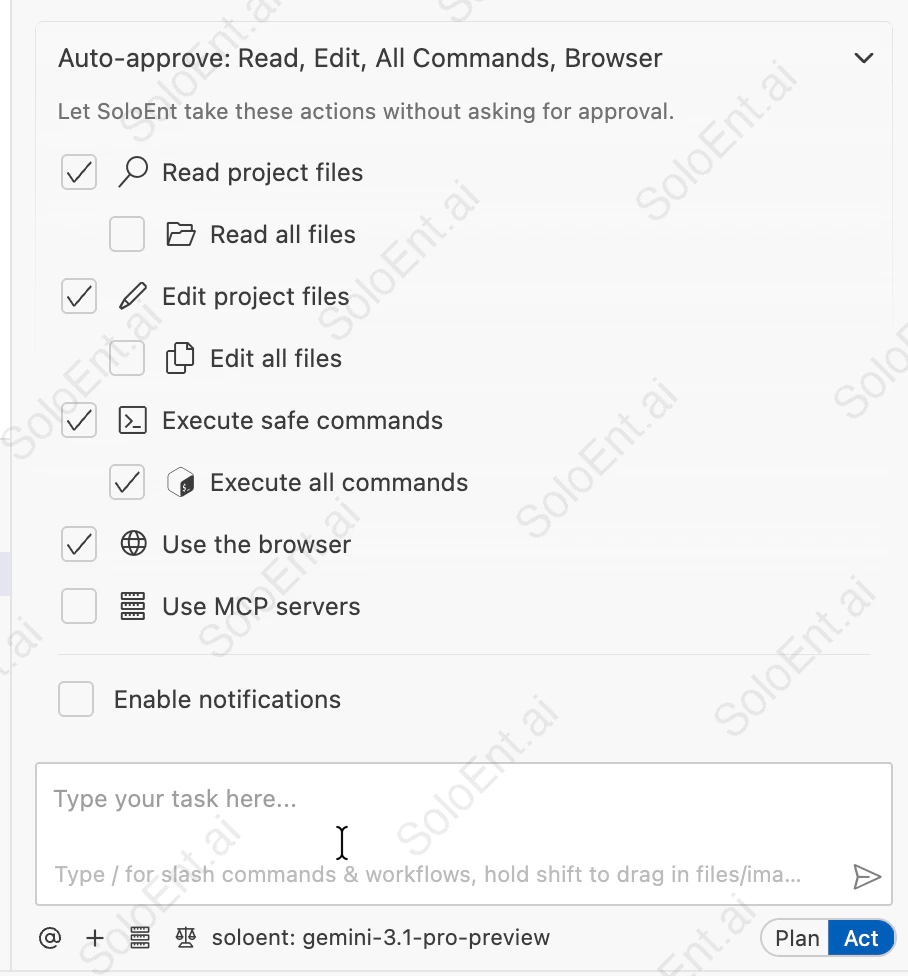 ## Recommended setup for writers
Most writers do well with this baseline:
**Read project files** — lets SoloEnt read your chapters, outlines, and character sheets without asking each time
**Edit project files** — lets SoloEnt write content directly to your files, so nothing gets lost
**Execute safe commands** — workflows rely on commands to run and save their reports automatically
**Use the browser** — lets SoloEnt look up facts, names, or references while you write
**Execute all commands** and **Use MCP servers** are not needed for writing work — leave them off.
## What each permission does
| Permission | What it means for writers |
| ------------------------- | ----------------------------------------------------------------------------------------------------- |
| **Read project files** | SoloEnt can read your chapters, outlines, and character sheets as context |
| Read all files | SoloEnt can read files outside your project folder |
| **Edit project files** | SoloEnt saves generated content directly to your files |
| Edit all files | SoloEnt can edit files outside your project folder |
| **Execute safe commands** | Powers workflows — reads project files, runs the workflow, and saves reports to the required location |
| Execute all commands | Runs any system command — not needed for writing |
| **Use the browser** | SoloEnt can look up information online while helping you write |
| Use MCP servers | Advanced tool integrations — not needed for most writers |
| Enable notifications | Sends an alert when a long-running task finishes |
"Read all files" and "Edit all files" only extend access outside your project folder. If the base toggle is off, these sub-options have no effect.
## Common writing scenarios
Enable **Execute safe commands**. SoloEnt's built-in workflows (like `/review` for chapter quality checks and `/marketing` for publishing strategy) need this permission to read your project files, run the workflow, and save reports to the `notes/` folder. Without it, every step pauses for manual confirmation.
Enable **Edit project files**. SoloEnt saves content directly to your files as it generates—you won't lose work if you close the window or something interrupts the session.
With edit access enabled, SoloEnt can overwrite existing content. Review changes carefully, and use the chat history to recover anything unexpected.
Enable **Use the browser**. SoloEnt can look up historical facts, place names, terminology, or any reference material without you having to switch tabs.
Leave everything off. SoloEnt can still talk through ideas, suggest plot directions, and help you think—it just won't read or touch your files unless you paste content directly into the chat.
Enable **Enable notifications**. You'll get an alert when the task finishes, so you don't have to keep checking back.
## Next steps
Learn the three-panel workspace
Set up your API keys
## Recommended setup for writers
Most writers do well with this baseline:
**Read project files** — lets SoloEnt read your chapters, outlines, and character sheets without asking each time
**Edit project files** — lets SoloEnt write content directly to your files, so nothing gets lost
**Execute safe commands** — workflows rely on commands to run and save their reports automatically
**Use the browser** — lets SoloEnt look up facts, names, or references while you write
**Execute all commands** and **Use MCP servers** are not needed for writing work — leave them off.
## What each permission does
| Permission | What it means for writers |
| ------------------------- | ----------------------------------------------------------------------------------------------------- |
| **Read project files** | SoloEnt can read your chapters, outlines, and character sheets as context |
| Read all files | SoloEnt can read files outside your project folder |
| **Edit project files** | SoloEnt saves generated content directly to your files |
| Edit all files | SoloEnt can edit files outside your project folder |
| **Execute safe commands** | Powers workflows — reads project files, runs the workflow, and saves reports to the required location |
| Execute all commands | Runs any system command — not needed for writing |
| **Use the browser** | SoloEnt can look up information online while helping you write |
| Use MCP servers | Advanced tool integrations — not needed for most writers |
| Enable notifications | Sends an alert when a long-running task finishes |
"Read all files" and "Edit all files" only extend access outside your project folder. If the base toggle is off, these sub-options have no effect.
## Common writing scenarios
Enable **Execute safe commands**. SoloEnt's built-in workflows (like `/review` for chapter quality checks and `/marketing` for publishing strategy) need this permission to read your project files, run the workflow, and save reports to the `notes/` folder. Without it, every step pauses for manual confirmation.
Enable **Edit project files**. SoloEnt saves content directly to your files as it generates—you won't lose work if you close the window or something interrupts the session.
With edit access enabled, SoloEnt can overwrite existing content. Review changes carefully, and use the chat history to recover anything unexpected.
Enable **Use the browser**. SoloEnt can look up historical facts, place names, terminology, or any reference material without you having to switch tabs.
Leave everything off. SoloEnt can still talk through ideas, suggest plot directions, and help you think—it just won't read or touch your files unless you paste content directly into the chat.
Enable **Enable notifications**. You'll get an alert when the task finishes, so you don't have to keep checking back.
## Next steps
Learn the three-panel workspace
Set up your API keys