> ## Documentation Index
> Fetch the complete documentation index at: https://docs.soloent.ai/llms.txt
> Use this file to discover all available pages before exploring further.
# Make the payment
> Complete your SoloEnt subscription securely with Stripe or Creem
SoloEnt uses [Stripe](https://stripe.com) / [Creem](https://creem.io) as payment processors. Both act as Merchants of Record (MoR), handling checkout, payment processing, and compliance.
## Payment process
There are two ways to access the subscription dashboard:
* **Option 1**: Click your account avatar in the top-right corner of the Agent to open the menu, then select **Dashboard**
* **Option 2**: Click **Upgrade subscription** at the bottom of the free model list
Both options take you to [account.soloent.ai/en/dashboard](https://account.soloent.ai/en/dashboard/).
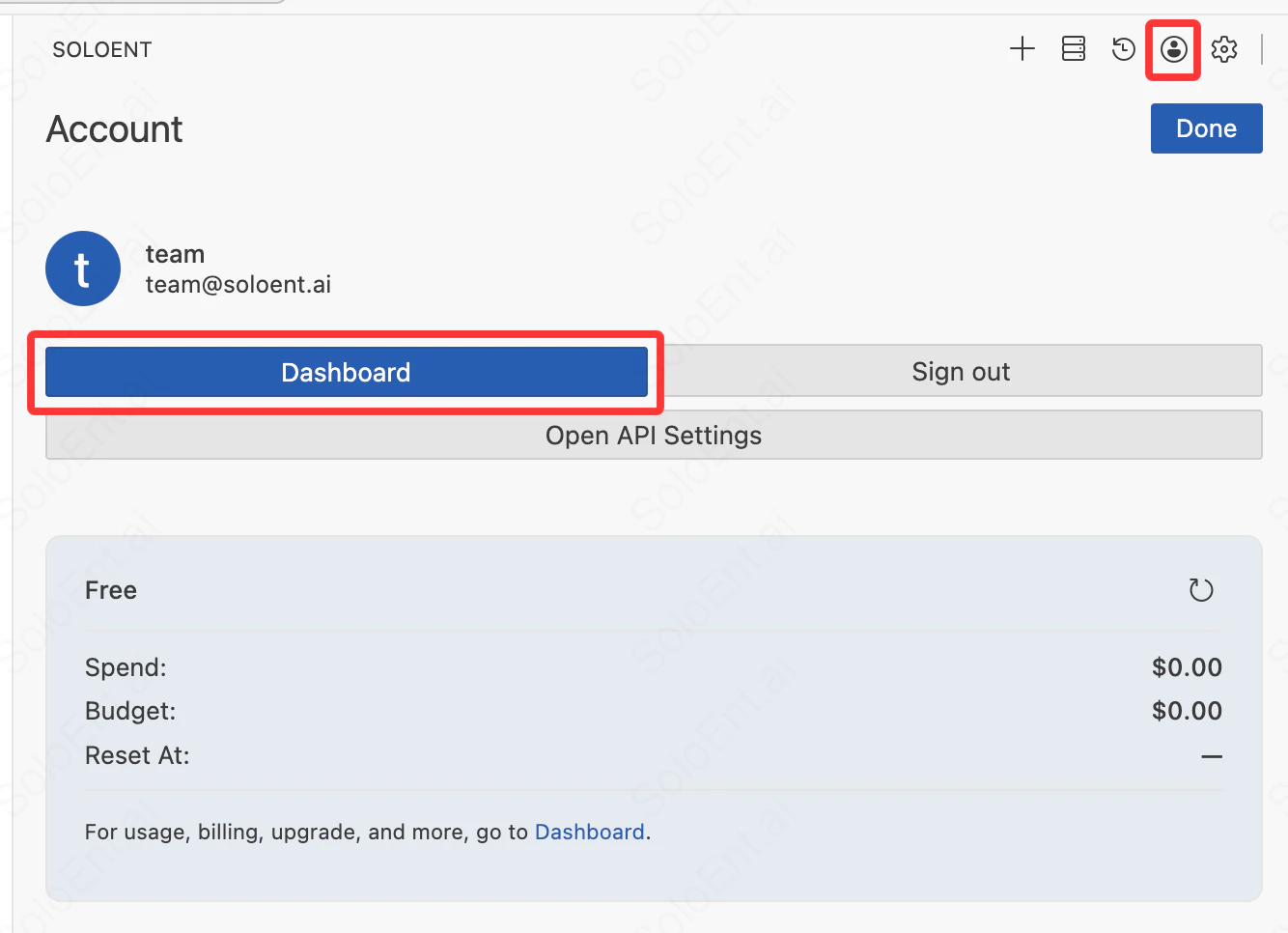 In the dashboard, navigate to **Subscription Plan** in the left sidebar to view available plans. Choose your plan (Lite, Pro, or Max) and billing cycle (monthly or yearly).
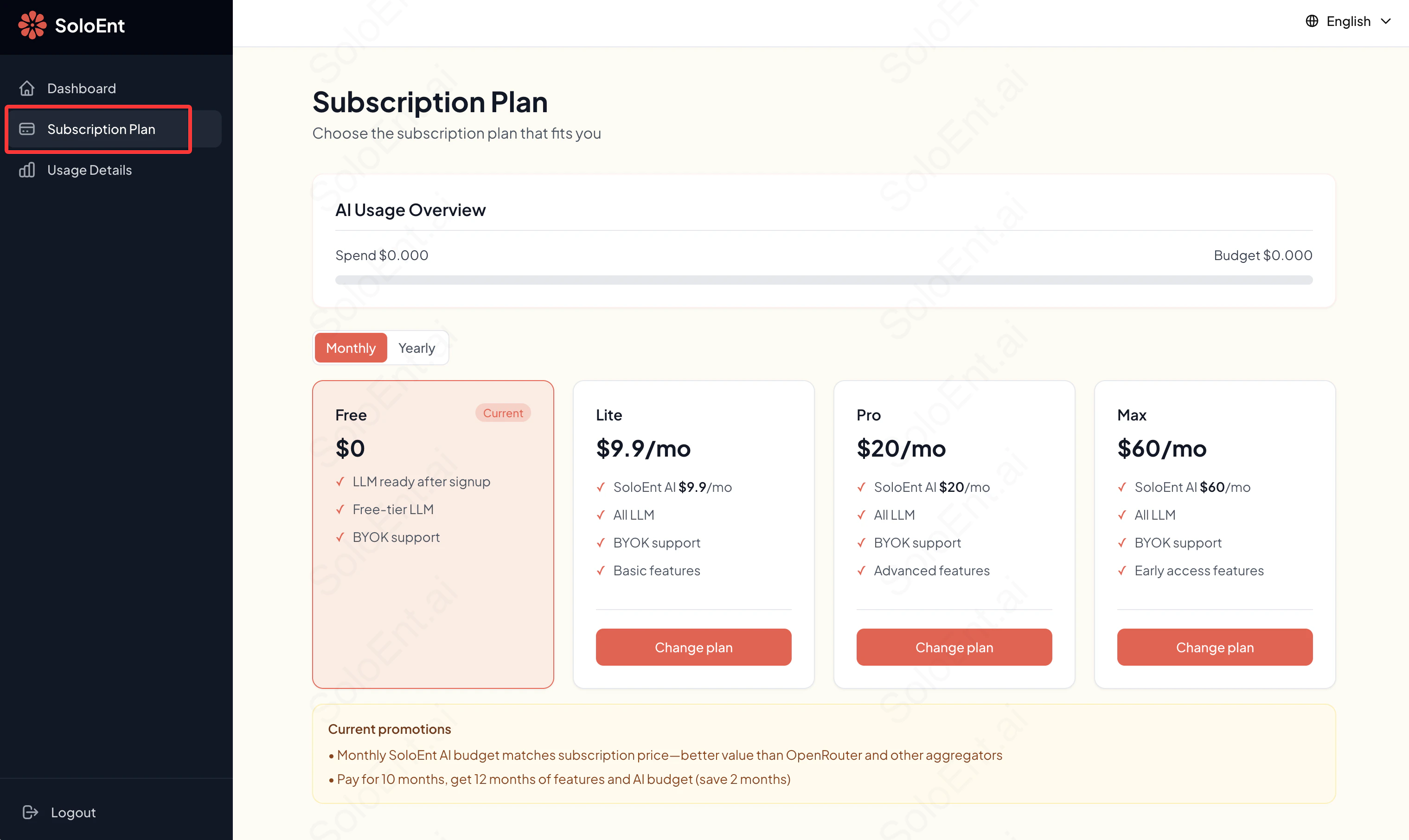 Click **Change plan** to start the checkout process. You will be redirected to Stripe's or Creem's secure checkout page.
Enter your payment information on the checkout page. Major credit cards and other regional payment methods are supported.
Click **Change plan** to start the checkout process. You will be redirected to Stripe's or Creem's secure checkout page.
Enter your payment information on the checkout page. Major credit cards and other regional payment methods are supported.
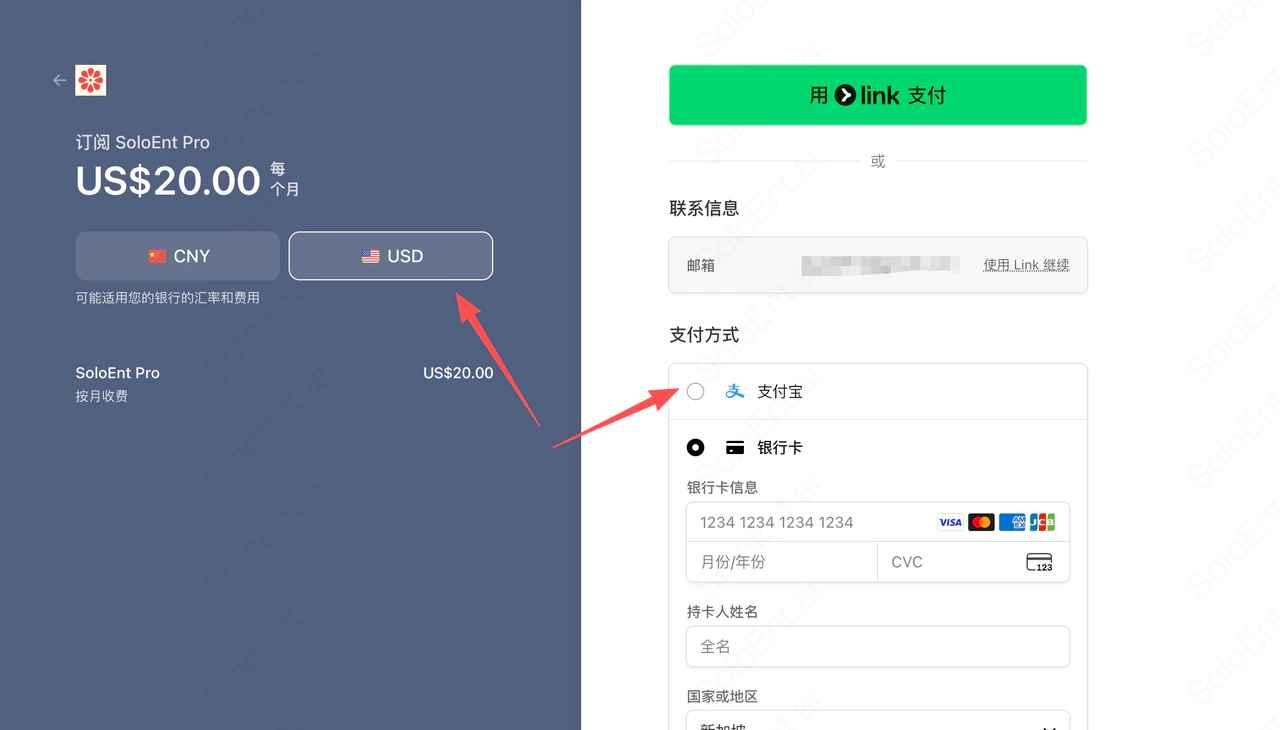 Review your order and confirm. You will receive a confirmation email and your subscription will be activated.
After payment, you will be redirected back to SoloEnt. Your new plan features are available immediately.
## Security tips
Never share your payment details, API keys, or account credentials with anyone. SoloEnt, Stripe, and Creem will never ask for your full card number or password via email or chat.
**When making payments:**
* **Verify the URL** — Ensure you are on a legitimate domain (soloent.ai, stripe.com, or creem.io) before entering payment details.
* **Use secure connections** — Check for the padlock icon (HTTPS) in your browser's address bar.
* **Avoid public Wi‑Fi** — Prefer a private or trusted network when completing checkout.
* **Monitor your statements** — Review your bank or card statements to confirm charges match your subscription.
* **Keep credentials private** — Do not share your SoloEnt account password or session tokens.
Stripe and Creem use industry-standard encryption and act as Merchants of Record, handling fraud prevention and payment compliance. API keys and webhooks are secured with authentication and HMAC-SHA256 signing.
## Unlimited top-up credits
Subscribers on Lite, Pro, or Max plans can purchase additional credits at any time once their monthly quota is used up — there is no cap on top-ups.
Review your order and confirm. You will receive a confirmation email and your subscription will be activated.
After payment, you will be redirected back to SoloEnt. Your new plan features are available immediately.
## Security tips
Never share your payment details, API keys, or account credentials with anyone. SoloEnt, Stripe, and Creem will never ask for your full card number or password via email or chat.
**When making payments:**
* **Verify the URL** — Ensure you are on a legitimate domain (soloent.ai, stripe.com, or creem.io) before entering payment details.
* **Use secure connections** — Check for the padlock icon (HTTPS) in your browser's address bar.
* **Avoid public Wi‑Fi** — Prefer a private or trusted network when completing checkout.
* **Monitor your statements** — Review your bank or card statements to confirm charges match your subscription.
* **Keep credentials private** — Do not share your SoloEnt account password or session tokens.
Stripe and Creem use industry-standard encryption and act as Merchants of Record, handling fraud prevention and payment compliance. API keys and webhooks are secured with authentication and HMAC-SHA256 signing.
## Unlimited top-up credits
Subscribers on Lite, Pro, or Max plans can purchase additional credits at any time once their monthly quota is used up — there is no cap on top-ups.
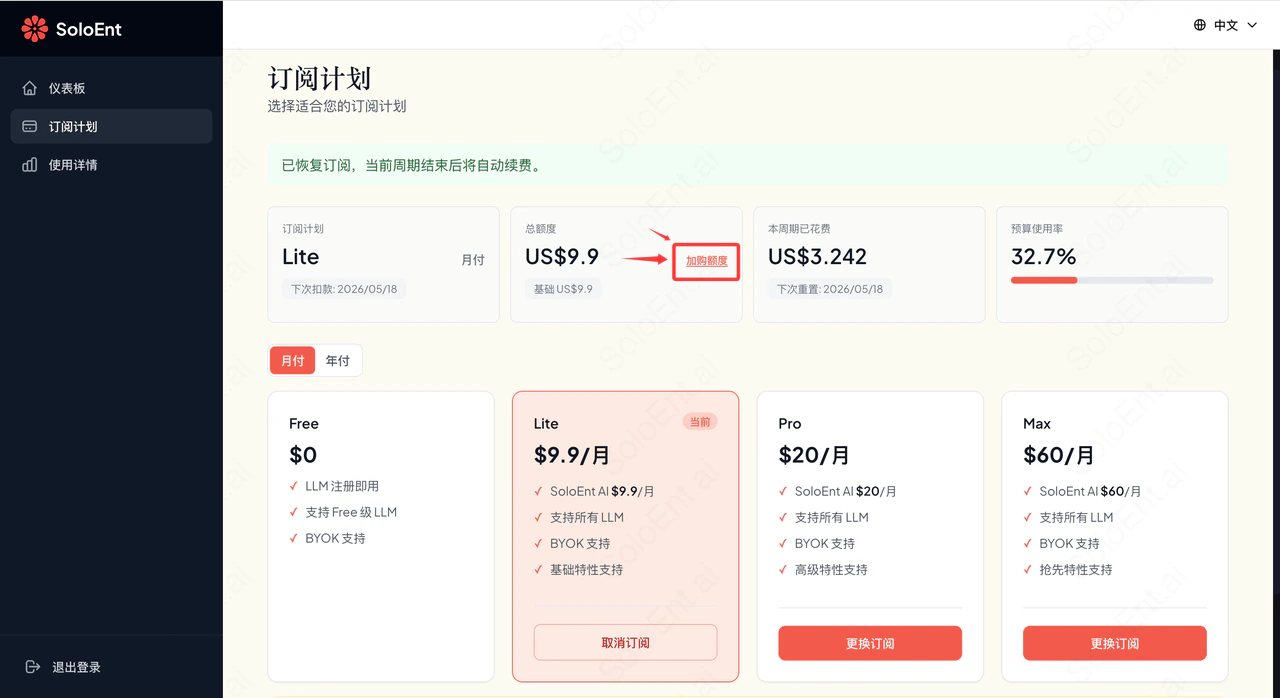 Top-up credits apply to the current billing cycle only. They do not carry over to the next cycle, and are reset when your subscription renews or if you change plans (upgrade, downgrade, or switch billing period).
## Troubleshooting
**Payment declined**
Check that your card details are correct and that your card supports international transactions. Some banks block overseas payments by default — contact your bank to authorize the charge, then retry.
**Subscription not activated after payment**
Wait a few minutes and refresh your dashboard. If your plan has not updated, contact support with your payment confirmation email.
**Duplicate charge**
If you see more than one charge for the same period, contact support immediately with your transaction IDs.
## Customer service
For billing issues, payment questions, or account problems, reach the SoloEnt team at:
[team@soloent.ai](mailto:team@soloent.ai)
When contacting support, include:
* Your account email
* A description of the issue
* Your payment confirmation number or transaction ID (if applicable)
For fastest response, join the [Discord community](https://discord.com/invite/NUh3skEFuY) where the team is active.
## Next steps
Compare plans and pricing
Balance, invoices, and cancellation
Top-up credits apply to the current billing cycle only. They do not carry over to the next cycle, and are reset when your subscription renews or if you change plans (upgrade, downgrade, or switch billing period).
## Troubleshooting
**Payment declined**
Check that your card details are correct and that your card supports international transactions. Some banks block overseas payments by default — contact your bank to authorize the charge, then retry.
**Subscription not activated after payment**
Wait a few minutes and refresh your dashboard. If your plan has not updated, contact support with your payment confirmation email.
**Duplicate charge**
If you see more than one charge for the same period, contact support immediately with your transaction IDs.
## Customer service
For billing issues, payment questions, or account problems, reach the SoloEnt team at:
[team@soloent.ai](mailto:team@soloent.ai)
When contacting support, include:
* Your account email
* A description of the issue
* Your payment confirmation number or transaction ID (if applicable)
For fastest response, join the [Discord community](https://discord.com/invite/NUh3skEFuY) where the team is active.
## Next steps
Compare plans and pricing
Balance, invoices, and cancellation