> ## Documentation Index
> Fetch the complete documentation index at: https://docs.soloent.ai/llms.txt
> Use this file to discover all available pages before exploring further.
# Agent Image Generation
> Have the Agent generate covers, character cards, and illustrations directly from natural language — no model switching required
Image tools are available from **v0.11.0** and are **members-only**.
From v0.11.0, the Agent supports an image-generation tool. Once enabled, you can chat with the Agent as usual and complete image tasks with natural language.
## Where to enable
In **Settings**, you can turn **SoloEnt Image Tools** on or off.
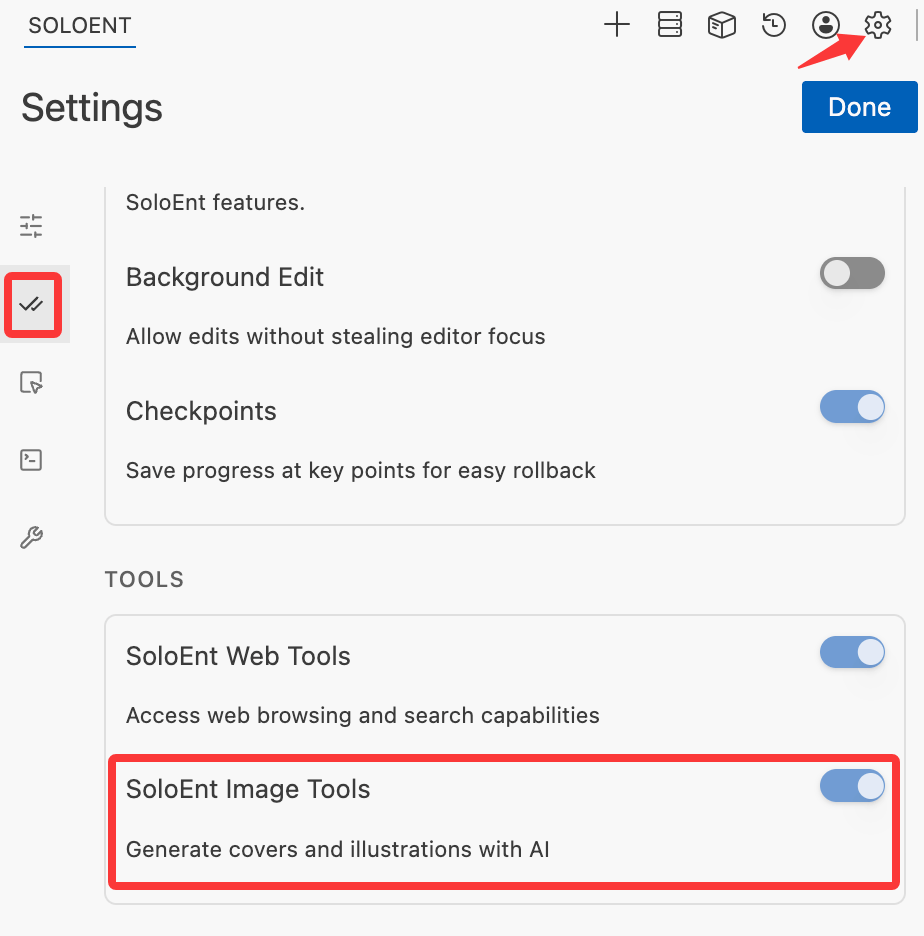 Once enabled, note that:
* You complete image tasks by **talking to the Agent in natural language**
* **No model switching is required** — run the skill with the model you normally use, and image generation calls the service automatically
* The image service is **provided officially**, automatically consumes your account's AI credits, and is **members-only**
## Make covers or character cards with a Skill
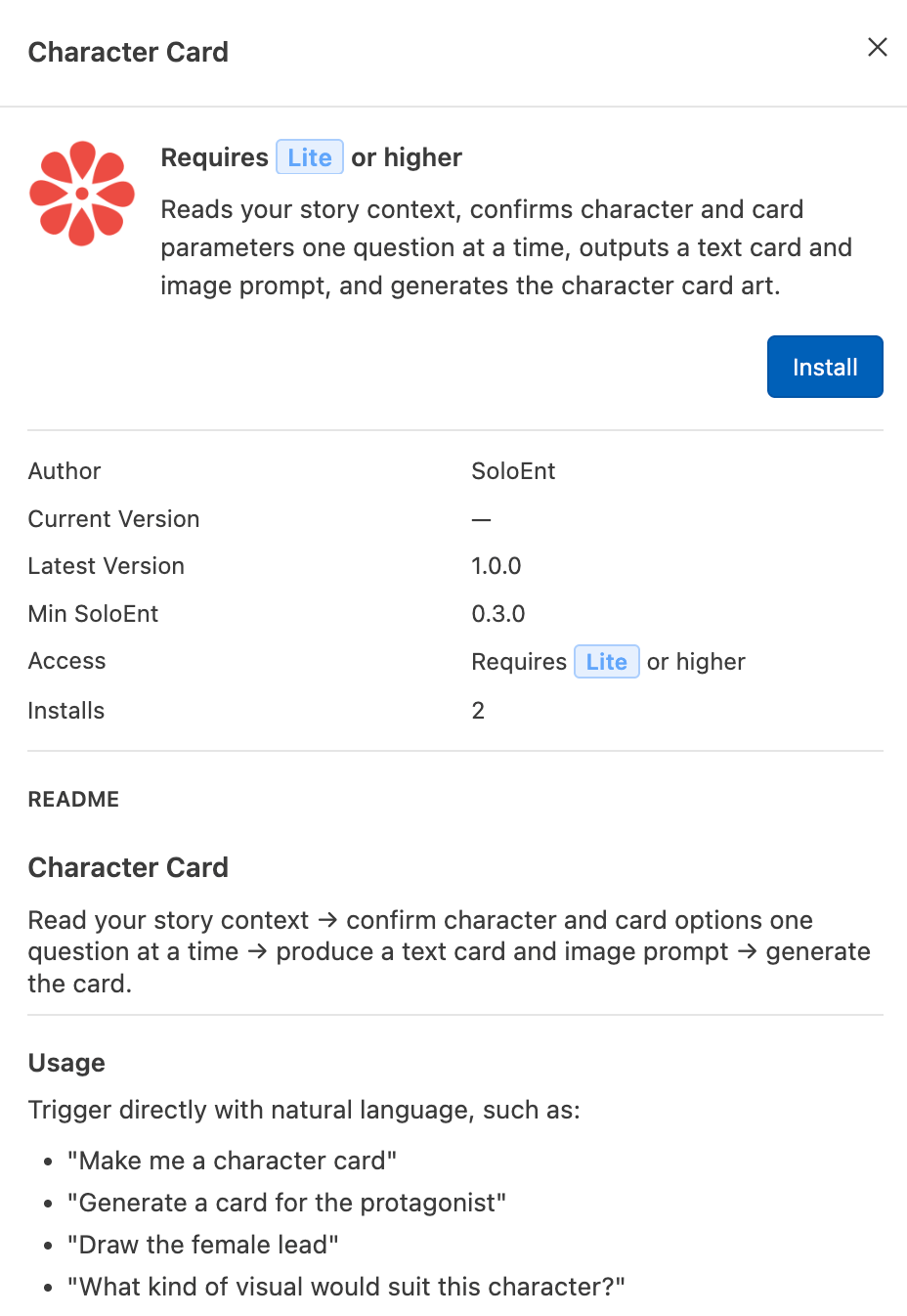
With a writing Skill, you can have the Agent generate covers, character cards, or illustrations directly from your novel's worldbuilding and character settings. The example below uses a "character card" Skill.
Install the "character card" Skill in your project (available in one click from the [Marketplace](/en/tips/marketplace)).
Once enabled, note that:
* You complete image tasks by **talking to the Agent in natural language**
* **No model switching is required** — run the skill with the model you normally use, and image generation calls the service automatically
* The image service is **provided officially**, automatically consumes your account's AI credits, and is **members-only**
## Make covers or character cards with a Skill
With a writing Skill, you can have the Agent generate covers, character cards, or illustrations directly from your novel's worldbuilding and character settings. The example below uses a "character card" Skill.
Install the "character card" Skill in your project (available in one click from the [Marketplace](/en/tips/marketplace)).
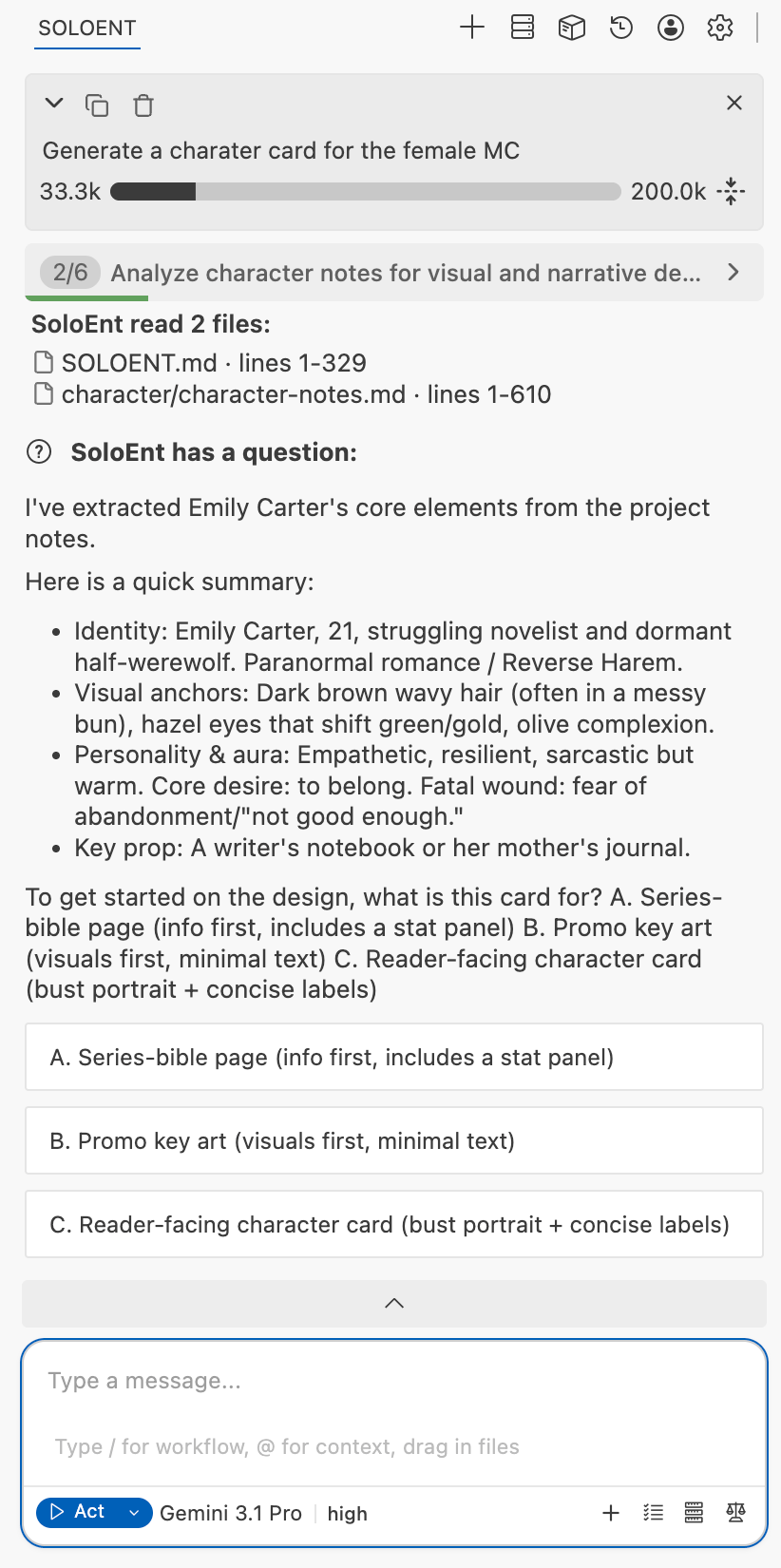
 Following the Skill's usage, make your request in the chat window, for example "Generate a character card for the female lead."
* The Skill automatically locates and reads the files related to that character's settings and confirms the details with you
* Pick a model you normally use with **strong execution ability**; this model does not affect the image generation
Following the Skill's usage, make your request in the chat window, for example "Generate a character card for the female lead."
* The Skill automatically locates and reads the files related to that character's settings and confirms the details with you
* Pick a model you normally use with **strong execution ability**; this model does not affect the image generation
 After you answer all of the Skill's guided questions, it produces an image **generation prompt** (an example is in the collapsed block below).
Once the prompt matches the character card you have in mind, confirm generation and the Agent will automatically call the image tool.
After you answer all of the Skill's guided questions, it produces an image **generation prompt** (an example is in the collapsed block below).
Once the prompt matches the character card you have in mind, confirm generation and the Agent will automatically call the image tool.
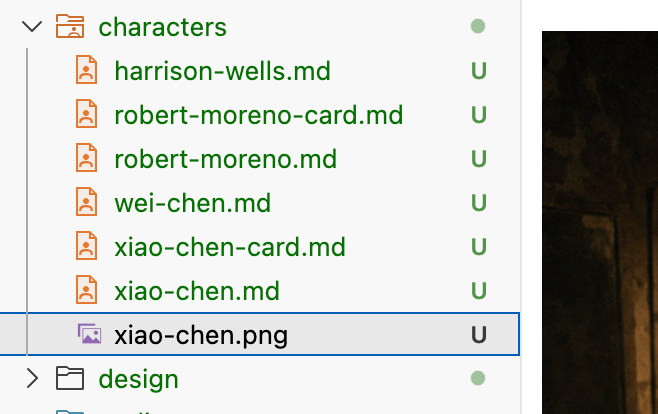
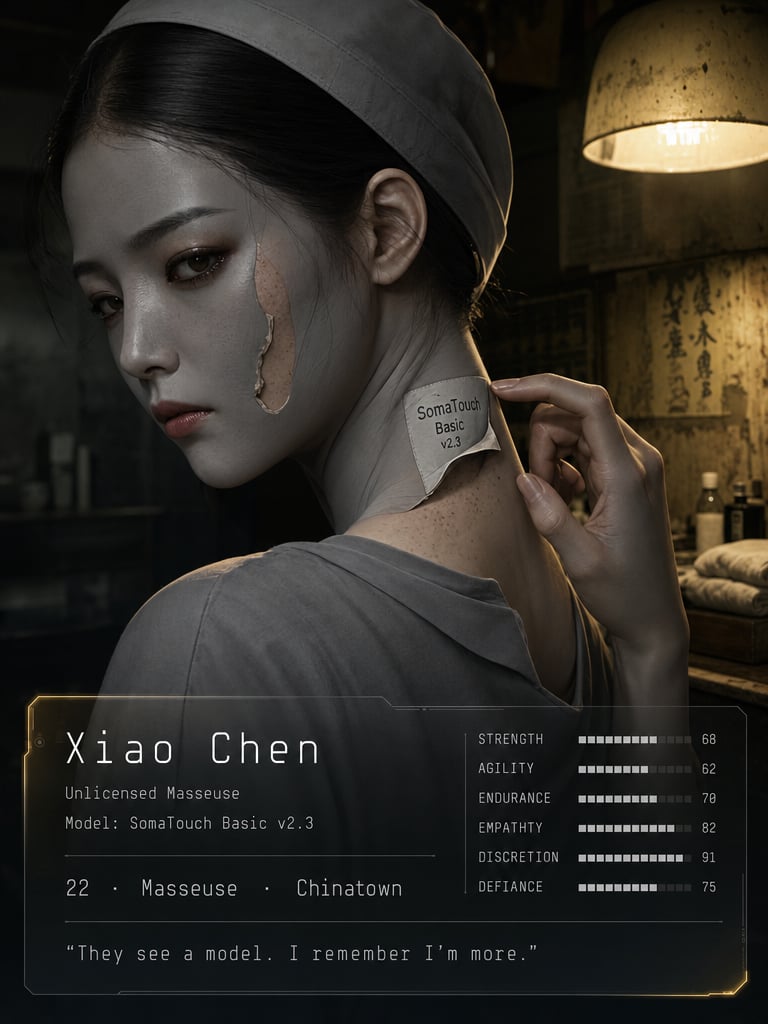
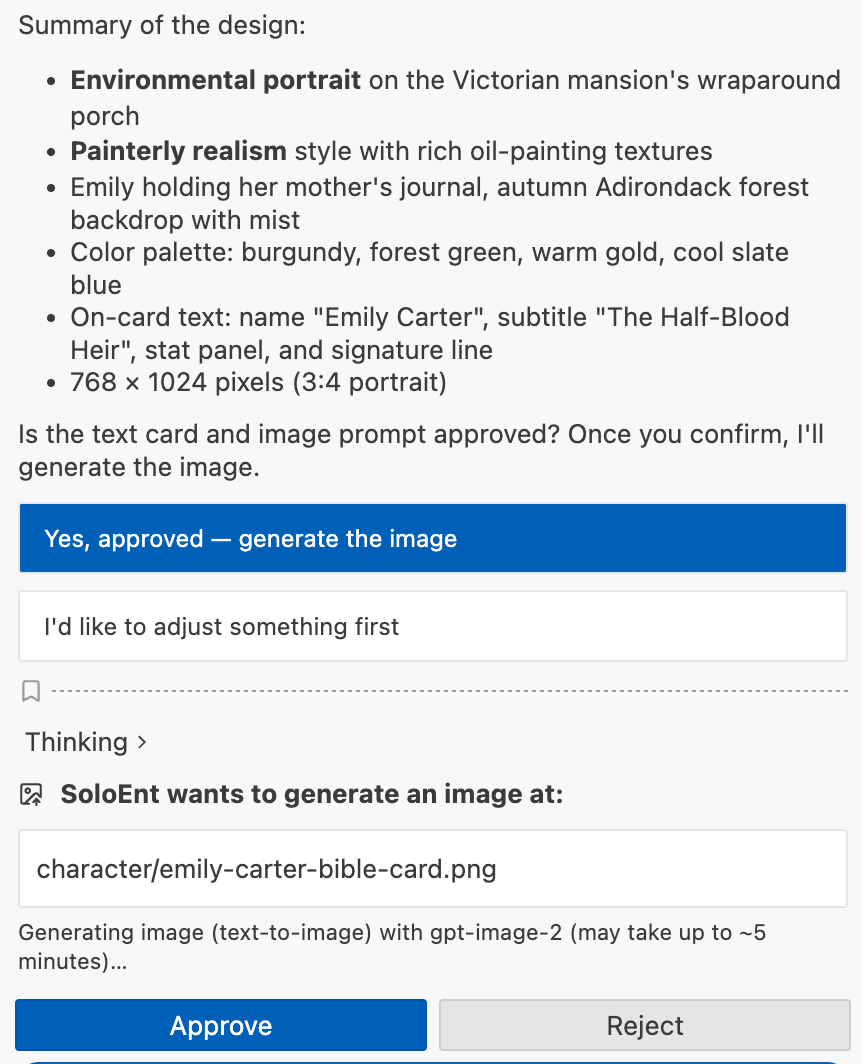 The generated image appears directly in your project folder.
 **Text character card**
```text theme={null}
Name: Xiao Chen
Age / Identity: 22 · unlicensed masseuse · Chen's Massage (Chinatown)
Visual anchors: (1) white model label "SomaTouch Basic v2.3" on the back of the neck; (2) the edge of the grey concealing spray peels up, revealing real skin tone and faint freckles underneath; (3) slightly thin but strong hands with thin calluses on the palms (an android hand would have no calluses).
Core desire: to be seen as a real person, rather than pretending to be a machine.
Fatal wound: her true identity is Harrison Wells's illegitimate daughter — but she does not know it herself.
Key prop: the neck model label (put on every day, peeled off every day — both disguise and shackle).
Signature line: "Every day I pretend to be a machine. But I know I'm not."
```
**Generation prompt** (submitted to the model)
```text theme={null}
Character key visual illustration for a near-future dystopian sci-fi novel, restrained cold tone with hidden warmth, cinematic film still aesthetic, low-key lighting with film grain, like "Her" or "Arrival".
Subject: 22-year-old female, unlicensed masseuse disguised as an android, quiet and restrained aura hiding stubborn defiance, black straight hair tucked under a cap showing only a standardized hairline, deep brown eyes (hollow and distant during work, warm when makeup removed), pale skin covered by Soma standard grey concealing spray.
Signature traits: (1) white model label "SomaTouch Basic v2.3" on the back of her neck; (2) grey concealing spray on face and neck — one edge peeling up to reveal real pale skin with faint freckles underneath; (3) slender but powerful hands with thin calluses on palms (android hands don't have calluses).
Costume: simple grey short-sleeve T-shirt, low neckline exposing the neck label, dark trousers, old canvas sneakers; cheap but clean, practical and unadorned.
Pose and expression: full body standing in a dim massage parlor back room, body slightly turned away but face turned toward the viewer — like a candid moment caught on camera; one hand unconsciously touching the edge of the neck label, gaze restrained but pupils holding a trace of living warmth and unease; lips slightly pursed, not smiling, not angry, just quietly existing.
Key prop: white model label "SomaTouch Basic v2.3" on the back of the neck, one corner peeling up to reveal real skin and freckles; an old massage table faintly visible behind her.
Background: blurred dim underground massage parlor back room — warm yellow old bulb, peeling wallpaper, massage supplies stacked in corners; overall dark, a single side light from above illuminating the character's silhouette, creating a cinematic lonely atmosphere.
Color: primary cold grey (Soma standard color / disguise) + secondary warm yellow (old lamp / true humanity) + accent deep brown (eyes), cold-warm contrast pointing to "humanity beneath a machine shell".
Composition: full body standing, 9:16 vertical portrait, camera slightly below eye level (subtle low angle), main light from warm yellow lamp above and to the side, half-lit half-shadow, film grain texture.
Style: cinematic film still aesthetic, low-key lighting, restrained mood like "Her" or "Arrival", film grain, naturalistic lighting, highly detailed.
Aspect ratio: 9:16 portrait, 576x1024 pixels.
On-card text: minimal text at bottom — small name "Xiao Chen" in thin white type on a translucent dark strip, no stat panel, no long quote, visual-first key visual treatment, subtle and integrated into the scene.
Negative: no watermark, no garbled characters, no misspelled text, no unintended text, no extra limbs, no extra fingers, no over-designed text frames, no large text blocks.
```
**Text character card**
```text theme={null}
Name: Xiao Chen
Age / Identity: 22 · unlicensed masseuse · Chen's Massage (Chinatown)
Visual anchors: (1) white model label "SomaTouch Basic v2.3" on the back of the neck; (2) the edge of the grey concealing spray peels up, revealing real skin tone and faint freckles underneath; (3) slightly thin but strong hands with thin calluses on the palms (an android hand would have no calluses).
Core desire: to be seen as a real person, rather than pretending to be a machine.
Fatal wound: her true identity is Harrison Wells's illegitimate daughter — but she does not know it herself.
Key prop: the neck model label (put on every day, peeled off every day — both disguise and shackle).
Signature line: "Every day I pretend to be a machine. But I know I'm not."
```
**Generation prompt** (submitted to the model)
```text theme={null}
Character key visual illustration for a near-future dystopian sci-fi novel, restrained cold tone with hidden warmth, cinematic film still aesthetic, low-key lighting with film grain, like "Her" or "Arrival".
Subject: 22-year-old female, unlicensed masseuse disguised as an android, quiet and restrained aura hiding stubborn defiance, black straight hair tucked under a cap showing only a standardized hairline, deep brown eyes (hollow and distant during work, warm when makeup removed), pale skin covered by Soma standard grey concealing spray.
Signature traits: (1) white model label "SomaTouch Basic v2.3" on the back of her neck; (2) grey concealing spray on face and neck — one edge peeling up to reveal real pale skin with faint freckles underneath; (3) slender but powerful hands with thin calluses on palms (android hands don't have calluses).
Costume: simple grey short-sleeve T-shirt, low neckline exposing the neck label, dark trousers, old canvas sneakers; cheap but clean, practical and unadorned.
Pose and expression: full body standing in a dim massage parlor back room, body slightly turned away but face turned toward the viewer — like a candid moment caught on camera; one hand unconsciously touching the edge of the neck label, gaze restrained but pupils holding a trace of living warmth and unease; lips slightly pursed, not smiling, not angry, just quietly existing.
Key prop: white model label "SomaTouch Basic v2.3" on the back of the neck, one corner peeling up to reveal real skin and freckles; an old massage table faintly visible behind her.
Background: blurred dim underground massage parlor back room — warm yellow old bulb, peeling wallpaper, massage supplies stacked in corners; overall dark, a single side light from above illuminating the character's silhouette, creating a cinematic lonely atmosphere.
Color: primary cold grey (Soma standard color / disguise) + secondary warm yellow (old lamp / true humanity) + accent deep brown (eyes), cold-warm contrast pointing to "humanity beneath a machine shell".
Composition: full body standing, 9:16 vertical portrait, camera slightly below eye level (subtle low angle), main light from warm yellow lamp above and to the side, half-lit half-shadow, film grain texture.
Style: cinematic film still aesthetic, low-key lighting, restrained mood like "Her" or "Arrival", film grain, naturalistic lighting, highly detailed.
Aspect ratio: 9:16 portrait, 576x1024 pixels.
On-card text: minimal text at bottom — small name "Xiao Chen" in thin white type on a translucent dark strip, no stat panel, no long quote, visual-first key visual treatment, subtle and integrated into the scene.
Negative: no watermark, no garbled characters, no misspelled text, no unintended text, no extra limbs, no extra fingers, no over-designed text frames, no large text blocks.
```
 Learn how to create and use Skills, and pair them with image generation for covers and character cards
Install official writing skill packs in one click
Learn how to create and use Skills, and pair them with image generation for covers and character cards
Install official writing skill packs in one click