> ## Documentation Index
> Fetch the complete documentation index at: https://docs.soloent.ai/llms.txt
> Use this file to discover all available pages before exploring further.
# Commands
> Powerful workflows at your fingertips with slash commands
SoloEnt includes built-in **slash commands** that give you instant access to professional writing workflows. Just type `/` in the editor to invoke these specialized tools.
Think of commands like power tools in your workshop. Instead of manually checking every detail, you invoke a command and let the Agent run a comprehensive workflow for you.
## How to Use Commands
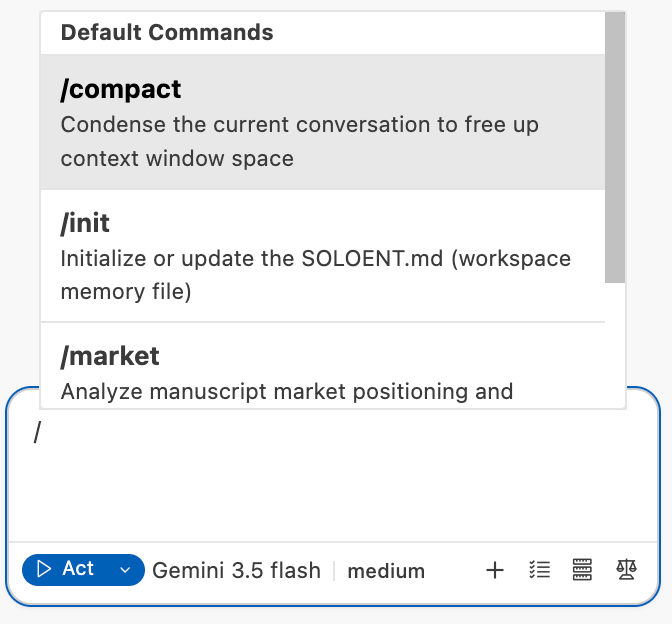 Press `/` (forward slash) to open the command palette.
Choose from the list of available commands (e.g., `review`, `market`).
The Agent automatically executes the pre-configured workflow and generates a detailed report.
The Agent saves the report to your `notes/` directory and provides actionable suggestions.
## Built-in Commands
SoloEnt currently provides four official commands. Here is what each does at a glance:
| Command | What it does |
| -------------- | ------------------------------------------------------------------------------------------------------------------------------ |
| **`/init`** | Manually initialize the project memory file `SOLOENT.md` — see the [SOLOENT.md guide](/en/tips/SoloEnt) |
| **`/compact`** | Manually compact the current session's context to save tokens — see [Using the Context Window Wisely](/en/tips/context-window) |
| **`/review`** | Run a multi-layered quality review on a chapter (details below) |
| **`/market`** | Analyze your work's publishing/marketing strategy (details below) |
### `/review` - Quality Assurance
The `/review` command runs a multi-layered quality assurance process on your chapter:
* **Word count**: Checks if chapter length matches your target
* **Outline alignment**: Verifies the chapter follows your planned outline
* **Story continuity**: Compares with story outline and act structure
* **Chapter flow**: Checks consistency with previous chapter
* **Character integrity**: Verifies characters act according to their profiles
* **World rules**: Ensures no violations of established world-building
* **Style guide compliance**: Checks against your stylistic guidelines (Section 5 of SOLOENT.md)
* **Character voice**: Ensures characters speak and act consistently
* **Tone consistency**: Verifies the chapter maintains the intended atmosphere
* **Hook quality**: Ensures chapter ends with a compelling hook
* **Ending pitfalls**: Flags repeated words, long inner monologues, or weak endings
* **Next chapter connection**: Verifies smooth transition to next chapter
* **Originality check**: Verifies text doesn't reproduce copyrighted material
* **Repeated phrases**: Detects overused words or phrases
* **Em dash overuse**: Flags unnecessary em dash usage
* **List pattern abuse**: Catches "word, word, word" patterns common in AI writing
We highly suggest you run `/review` after completing each chapter, before moving to the next. This catches issues early when they're easier to fix.
**Output:**
The Agent generates a detailed review report saved to:
```
notes/review-chapter-{number}-{date}.md
```
### `/market` - Publishing Strategy
The `/market` command analyzes your completed manuscript and generates a comprehensive publishing strategy:
* **Primary genre**: Identifies your book's genre and subgenre
* **Word count**: Calculates per-chapter and total word count
* **Market category**: Determines MG/YA/Adult and Fiction/Non-fiction classification
* **Logline**: Crafts a one-sentence hook for your story
* **Main selling points**: Identifies unique elements that make your book marketable
* **Comparable titles**: Suggests "comp titles" for query letters
* **Best-fit route**: Traditional, Hybrid, Self-publishing, or Fandom platforms
* **Rationale**: Explains why this route fits your manuscript
* **Target platforms**: Specific publishers, imprints, or self-publishing platforms
* **Next steps**: Query letter, editing needs, cover design, etc.
* **Comparable titles**: Books similar to yours and their success metrics
* **Timeline**: Expected timeline to publication
* **Budget**: Estimated costs (for self-publishing or hybrid routes)
Run `/market` when your manuscript is complete or near-complete. This helps you plan your publishing strategy before diving into the query process.
**Output:**
The Agent generates a marketing plan saved to:
```
notes/marketing-plan-{date}.md
```
## More Advanced Tips
Learn how commands interact with your project constitution
Use Plan Mode to structure your story before writing
Press `/` (forward slash) to open the command palette.
Choose from the list of available commands (e.g., `review`, `market`).
The Agent automatically executes the pre-configured workflow and generates a detailed report.
The Agent saves the report to your `notes/` directory and provides actionable suggestions.
## Built-in Commands
SoloEnt currently provides four official commands. Here is what each does at a glance:
| Command | What it does |
| -------------- | ------------------------------------------------------------------------------------------------------------------------------ |
| **`/init`** | Manually initialize the project memory file `SOLOENT.md` — see the [SOLOENT.md guide](/en/tips/SoloEnt) |
| **`/compact`** | Manually compact the current session's context to save tokens — see [Using the Context Window Wisely](/en/tips/context-window) |
| **`/review`** | Run a multi-layered quality review on a chapter (details below) |
| **`/market`** | Analyze your work's publishing/marketing strategy (details below) |
### `/review` - Quality Assurance
The `/review` command runs a multi-layered quality assurance process on your chapter:
* **Word count**: Checks if chapter length matches your target
* **Outline alignment**: Verifies the chapter follows your planned outline
* **Story continuity**: Compares with story outline and act structure
* **Chapter flow**: Checks consistency with previous chapter
* **Character integrity**: Verifies characters act according to their profiles
* **World rules**: Ensures no violations of established world-building
* **Style guide compliance**: Checks against your stylistic guidelines (Section 5 of SOLOENT.md)
* **Character voice**: Ensures characters speak and act consistently
* **Tone consistency**: Verifies the chapter maintains the intended atmosphere
* **Hook quality**: Ensures chapter ends with a compelling hook
* **Ending pitfalls**: Flags repeated words, long inner monologues, or weak endings
* **Next chapter connection**: Verifies smooth transition to next chapter
* **Originality check**: Verifies text doesn't reproduce copyrighted material
* **Repeated phrases**: Detects overused words or phrases
* **Em dash overuse**: Flags unnecessary em dash usage
* **List pattern abuse**: Catches "word, word, word" patterns common in AI writing
We highly suggest you run `/review` after completing each chapter, before moving to the next. This catches issues early when they're easier to fix.
**Output:**
The Agent generates a detailed review report saved to:
```
notes/review-chapter-{number}-{date}.md
```
### `/market` - Publishing Strategy
The `/market` command analyzes your completed manuscript and generates a comprehensive publishing strategy:
* **Primary genre**: Identifies your book's genre and subgenre
* **Word count**: Calculates per-chapter and total word count
* **Market category**: Determines MG/YA/Adult and Fiction/Non-fiction classification
* **Logline**: Crafts a one-sentence hook for your story
* **Main selling points**: Identifies unique elements that make your book marketable
* **Comparable titles**: Suggests "comp titles" for query letters
* **Best-fit route**: Traditional, Hybrid, Self-publishing, or Fandom platforms
* **Rationale**: Explains why this route fits your manuscript
* **Target platforms**: Specific publishers, imprints, or self-publishing platforms
* **Next steps**: Query letter, editing needs, cover design, etc.
* **Comparable titles**: Books similar to yours and their success metrics
* **Timeline**: Expected timeline to publication
* **Budget**: Estimated costs (for self-publishing or hybrid routes)
Run `/market` when your manuscript is complete or near-complete. This helps you plan your publishing strategy before diving into the query process.
**Output:**
The Agent generates a marketing plan saved to:
```
notes/marketing-plan-{date}.md
```
## More Advanced Tips
Learn how commands interact with your project constitution
Use Plan Mode to structure your story before writing