> ## Documentation Index
> Fetch the complete documentation index at: https://docs.soloent.ai/llms.txt
> Use this file to discover all available pages before exploring further.
# Marketplace
> Browse and install official writing plugins—Rules, Workflows, Skills, and combinations—with a single tap
Marketplace is available from **v0.3.0**.
Marketplace requires v0.3.0 or later
The Marketplace is the official distribution channel for writing plugins. Each plugin may contain Rules, Workflows, Skills, or a combination of all three — designed for a specific writing scenario, such as a "romance continuation assistant" or a "chapter review workflow." No manual configuration needed; once installed, follow the plugin's documentation to start using it.
## Opening the Marketplace
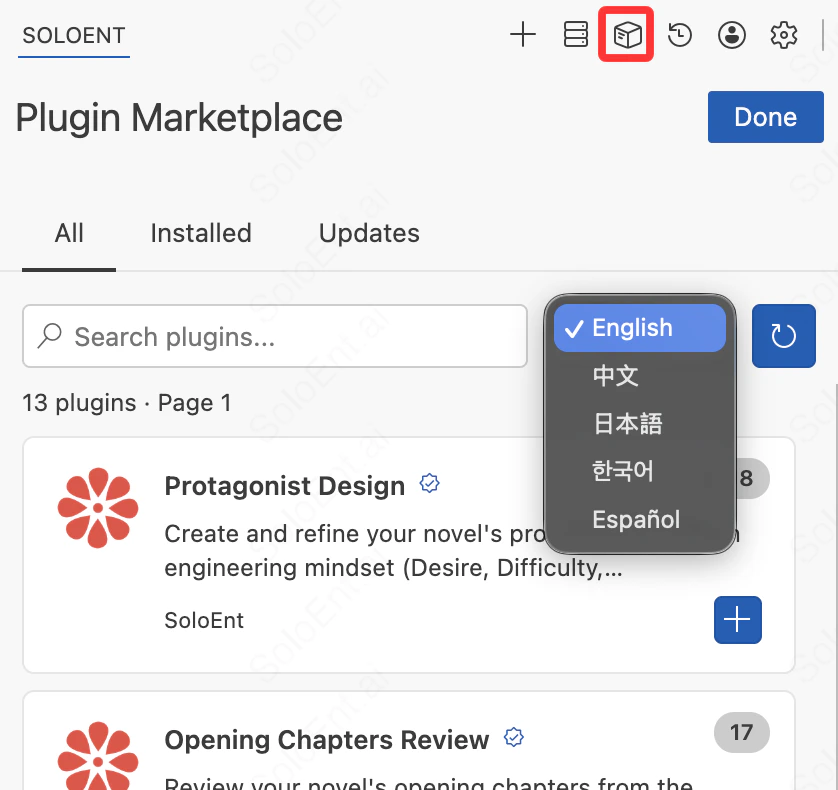
Click the **Marketplace icon** at the top of the SoloEnt Agent panel to open the Plugin Marketplace. You can browse in two ways:
* Search by keyword using the search bar
* Use the language filter in the top-right corner to find plugins suited for a specific language
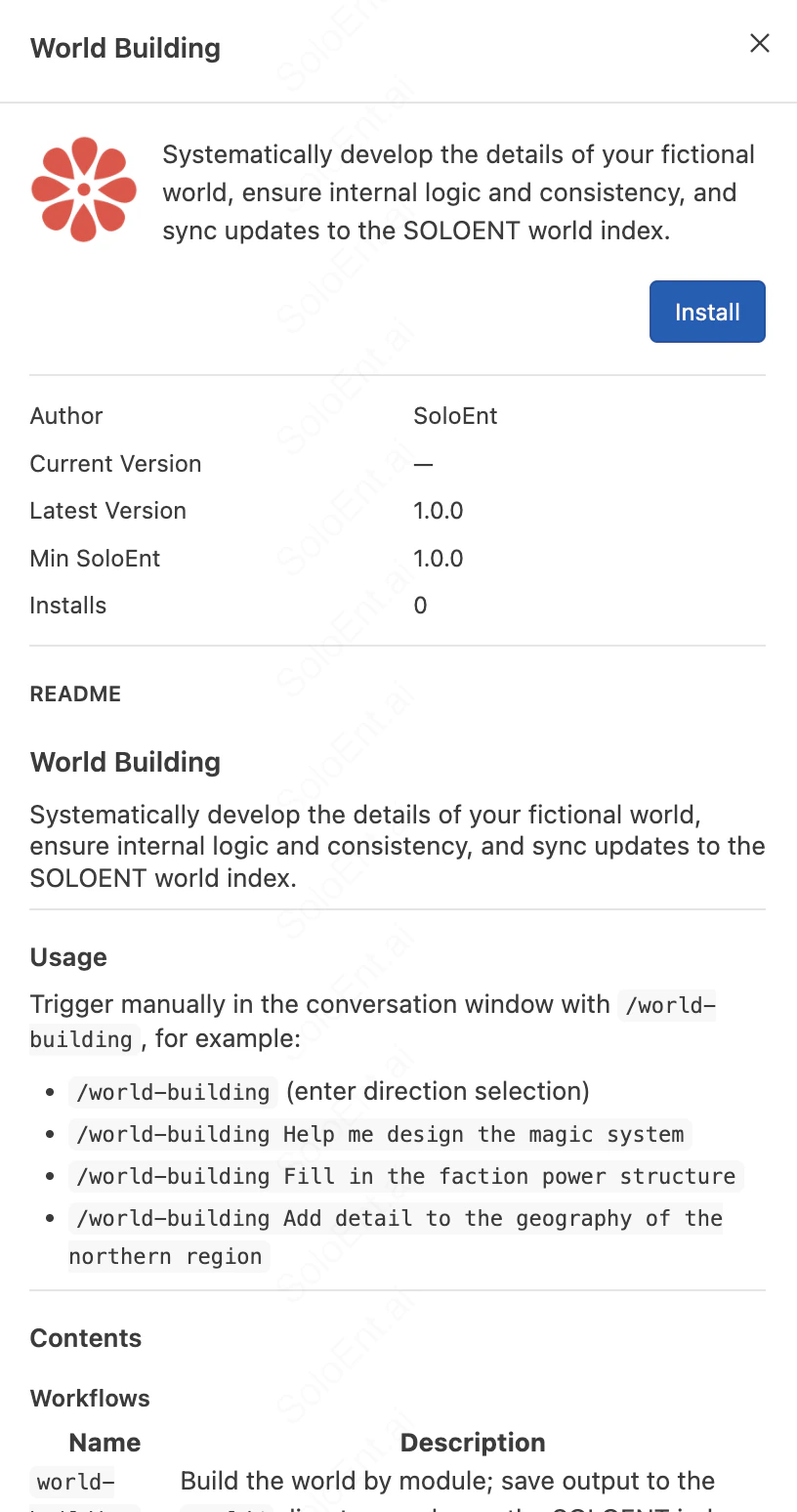
 Click a plugin to open its detail page. Each plugin detail shows:
* **Name and summary**: a sentence or two describing what problem this plugin solves
* **Installs**: how many users have installed this plugin
* **Usage**: how to invoke or trigger the plugin
* **Contents**: what combination of Rules, Workflows, and Skills it includes
* **Core rules**: a quick overview of the plugin's underlying logic
* **Version**: the currently available version number
Click a plugin to open its detail page. Each plugin detail shows:
* **Name and summary**: a sentence or two describing what problem this plugin solves
* **Installs**: how many users have installed this plugin
* **Usage**: how to invoke or trigger the plugin
* **Contents**: what combination of Rules, Workflows, and Skills it includes
* **Core rules**: a quick overview of the plugin's underlying logic
* **Version**: the currently available version number
 View community and official plugins on the SoloEnt website
## Installing a plugin
You must have a project open before installing. Plugins install into the currently active project by default, not your global directory.
Before installing any plugin, open the writing project you want to use it in.
Browse or search the Marketplace, then click a plugin card to read its full documentation.
Click the **Install** button on the plugin detail page. Once complete, the plugin appears in the **Installed** tab.
## Verifying the installation
After installation, check the following locations to confirm the files were written successfully:
| Content type | Where to look |
| ------------ | --------------------------- |
| Rule | Agent panel → Rules tab |
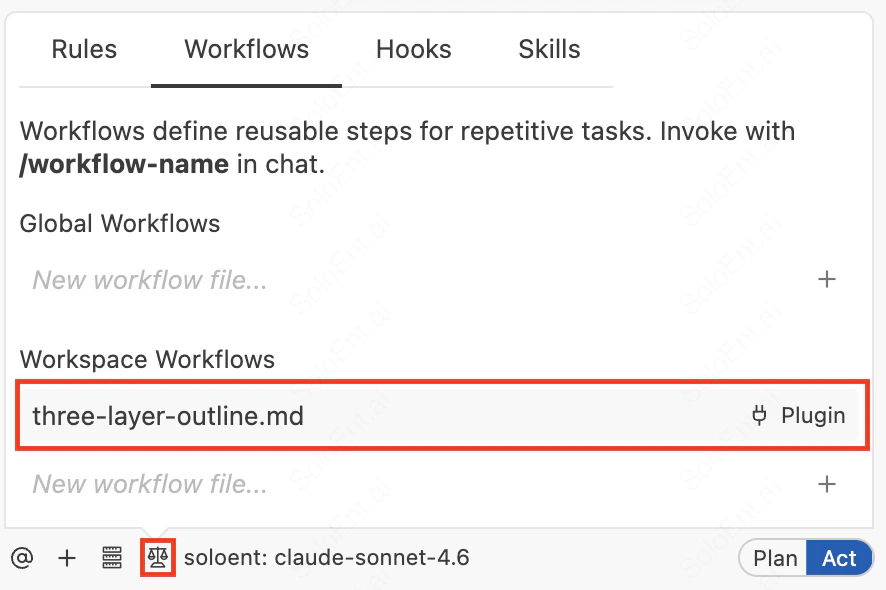
| Workflow | Agent panel → Workflows tab |
| Skill | Agent panel → Skills tab |
For combined plugins, files will appear in multiple locations.
View community and official plugins on the SoloEnt website
## Installing a plugin
You must have a project open before installing. Plugins install into the currently active project by default, not your global directory.
Before installing any plugin, open the writing project you want to use it in.
Browse or search the Marketplace, then click a plugin card to read its full documentation.
Click the **Install** button on the plugin detail page. Once complete, the plugin appears in the **Installed** tab.
## Verifying the installation
After installation, check the following locations to confirm the files were written successfully:
| Content type | Where to look |
| ------------ | --------------------------- |
| Rule | Agent panel → Rules tab |
| Workflow | Agent panel → Workflows tab |
| Skill | Agent panel → Skills tab |
For combined plugins, files will appear in multiple locations.
 ## Using a plugin
Each plugin's detail page includes usage instructions covering:
* **How to trigger it**: how to invoke the included Workflows or Skills
* **Prerequisites**: what you need to have ready before using (for example, an open chapter file)
* **Expected output**: what the plugin produces when it runs
Open the Agent panel and follow the trigger instructions in the documentation.
* **Rule** takes effect automatically after installation — no manual invocation needed
* **Workflow** is triggered using the corresponding command
* **Skill** activates automatically based on context
After installing, read the plugin's full documentation before using it.
## Coming in future versions
A future release will allow users to upload their own plugins, making it possible to share the Rules, Workflows, and Skills you've refined with other writers.
Learn how Skills work and create your own from scratch
Understand Workflow structure and customize your writing process
## Using a plugin
Each plugin's detail page includes usage instructions covering:
* **How to trigger it**: how to invoke the included Workflows or Skills
* **Prerequisites**: what you need to have ready before using (for example, an open chapter file)
* **Expected output**: what the plugin produces when it runs
Open the Agent panel and follow the trigger instructions in the documentation.
* **Rule** takes effect automatically after installation — no manual invocation needed
* **Workflow** is triggered using the corresponding command
* **Skill** activates automatically based on context
After installing, read the plugin's full documentation before using it.
## Coming in future versions
A future release will allow users to upload their own plugins, making it possible to share the Rules, Workflows, and Skills you've refined with other writers.
Learn how Skills work and create your own from scratch
Understand Workflow structure and customize your writing process