> ## Documentation Index
> Fetch the complete documentation index at: https://docs.soloent.ai/llms.txt
> Use this file to discover all available pages before exploring further.
# Skills
> Package specialized Agent knowledge into reusable instruction sets that activate only when you need them
Skills are markdown files that give the Agent deep, task-specific knowledge for a particular type of work. Define one for short story creation, one for analysis the book, one for screenplay formatting — and the Agent loads only the skill that's relevant to what you are doing right now.
## How skills work
Skills use progressive loading to keep context lean. When you open a project, the Agent sees a list of available skills with their names and descriptions — a few dozen words each. That is all it loads at startup.
When you ask for something that matches a skill's description, the Agent activates that skill and loads its full instructions. A skill for short story creation stays dormant while you are working on a query letter. A skill for horror fiction does not consume context when you are outlining a thriller.
| Level | When loaded | Content |
| -------------------- | ----------------------- | --------------------------------------- |
| **Metadata** | Always, at startup | Name and description from frontmatter |
| **Instructions** | When skill is triggered | Full SKILL.md body |
| **Supporting files** | As needed | Templates, scripts, reference documents |
## Where skills live
Every skill is a directory containing a `SKILL.md` file. The directory name becomes the skill name. Skills can also include supporting files in three optional subdirectories.
```text theme={null}
your-novel/
├── .soloent/
│ └── skills/ # Workspace skills (this project only)
│ └── short-story/
│ ├── SKILL.md # Required: name, description, instructions
│ ├── templates/ # Optional: output templates, format guides
│ │ ├── chapter-outline.md
│ │ └── character-profile.md
│ ├── docs/ # Optional: reference material, lookup tables
│ │ └── genre-conventions.md
│ └── scripts/ # Optional: processing scripts the Agent can run
│ └── word-count.py
├── SOLOENT.md
├── chapters/
└── ...
```
Supporting files are loaded only when the instructions reference them — they do not consume context at startup. A template stays dormant until the Agent reaches the step that calls for it. A reference document is read only when the Agent needs to look something up.
**Global skills** are stored in the system-level skills directory and are available across all your projects. Use them for general-purpose capabilities you apply consistently — a skill for generating opening hooks, or one that guides the Agent through your standard manuscript review process.
**Workspace skills** live in `.soloent/skills/` at your project root. Use them for capabilities tied to a specific project or genre — a skill built around the particular rules of your romance series, or one calibrated to the explicit level and narrative register of your current story.
When a global and workspace skill share the same name, the workspace skill takes precedence.
### Toggling skills
Every skill has a toggle to enable or disable it without deleting the file. Disable a skill when you do not need it for the current task — this keeps it out of context and avoids unintended activation.
## Creating a skill
The `SKILL.md` file has two parts: a frontmatter block (metadata) and the instruction body.
```markdown theme={null}
---
name: my-skill
description: Describe when to trigger this skill, not what it does.
---
Instructions for the Agent to follow when this skill is activated.
```
Two required frontmatter fields:
* `name` must **exactly** match the directory name
* `description` describes **when to trigger** this skill, not what it does (under 1,024 characters)
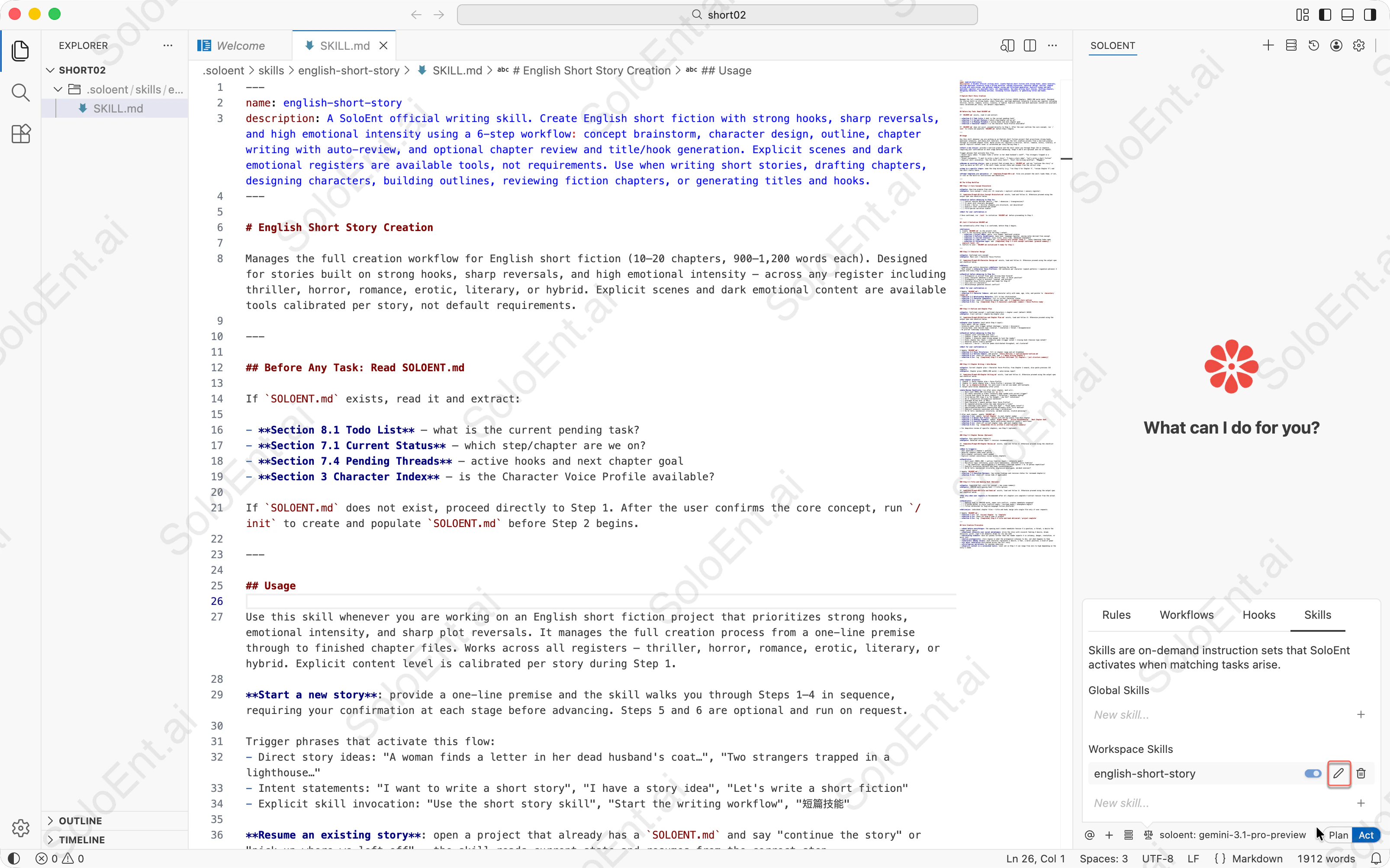 Click the fourth icon from the left in the Agent panel,and switch the Skills manager.
Click "New skill..." and enter a name (e.g., `short-story`) and click on "+" . The Agent creates a skill directory with a template `SKILL.md` file.
Edit the `SKILL.md` file:
* Update the `description` to specify when this skill should trigger
* Add your instructions, checklists, and workflow steps in the body
* Optionally add supporting files in `templates/` or `docs/` subdirectories
This is the official `english-short-story` skill file — a **domain expert** type skill with a complete 6-step workflow, checklists, and stop conditions. Copy and paste it directly.
```markdown theme={null}
---
name: english-short-story
description: A SoloEnt official writing skill. Create English short fiction with strong hooks, sharp reversals, and high emotional intensity using a 6-step workflow: concept brainstorm, character design, outline, chapter writing with auto-review, and optional chapter review and title/hook generation. Explicit scenes and dark emotional registers are available tools, not requirements. Use when writing short stories, drafting chapters, designing characters, building outlines, reviewing fiction chapters, or generating titles and hooks.
---
# English Short Story
Manages the full creation workflow for English short fiction (10–20 chapters, 900–1,200 words each). Designed for stories built on strong hooks, sharp reversals, and high emotional intensity — across any register including thriller, horror, romance, erotic, literary, or hybrid. Explicit scenes and dark emotional content are available tools calibrated per story, not default requirements.
---
## Before Any Task: Read SOLOENT.md
If `SOLOENT.md` exists, read it and extract:
- **Section 8.1 Todo List** — what is the current pending task?
- **Section 7.1 Current Status** — which step/chapter are we on?
- **Section 7.4 Pending Threads** — active hooks and next chapter goal
- **Section 3 Character Index** — is the Character Voice Profile available?
If `SOLOENT.md` does not exist, proceed directly to Step 1. After the user confirms the core concept, run `/init` to create and populate `SOLOENT.md` before Step 2 begins.
---
## Usage
Use this skill whenever you are working on an English short fiction project that prioritizes strong hooks, emotional intensity, and sharp plot reversals. It manages the full creation process from a one-line premise through to finished chapter files. Works across all registers — thriller, horror, romance, erotic, literary, or hybrid. Explicit content level is calibrated per story during Step 1.
**Start a new story**: provide a one-line premise and the skill walks you through Steps 1–4 in sequence, requiring your confirmation at each stage before advancing. Steps 5 and 6 are optional and run on request.
Trigger phrases that activate this flow:
- Direct story ideas: "A woman finds a letter in her dead husband's coat…", "Two strangers trapped in a lighthouse…"
- Intent statements: "I want to write a short story", "I have a story idea", "Let's write a short fiction"
- Explicit skill invocation: "Use the short story skill", "Start the writing workflow", "短篇技能"
**Resume an existing story**: open a project that already has a `SOLOENT.md` and say "continue the story" or "pick up where we left off" — the skill reads current state and resumes from the correct step.
**Jump to a specific step**: name the step directly (e.g. "run Step 4 for Chapter 3", "review Chapter 5") and the skill starts there.
**Prompt templates are optional**: if `templates/Prompt-0X-*.md` files are present the skill loads them; if not, it runs on the built-in instructions and checklists.
---
## The 6-Step Workflow
### Step 1 — Core Concept Brainstorm
**Input**: One-line premise from user
**Output**: Core concept + story arc (3+ reversals + explicit calibration + sensory register)
If `templates/Prompt-01-Core Concept Brainstorm.md` exists, load and follow it. Otherwise proceed using the output spec and checklist below.
**Checklist before advancing to Step 2**:
- [ ] Central tension defined (desire / fear / obsession / transgression)?
- [ ] 3+ major plot reversals designed?
- [ ] Erotic / horror / thriller elements are structural, not decorative?
- [ ] Explicit level calibrated and noted?
- [ ] First-person narration viable?
**Wait for user confirmation.**
→ Once confirmed, run `/init` to initialize `SOLOENT.md` before proceeding to Step 2.
---
## /init — Initialize SOLOENT.md
Run automatically after Step 1 is confirmed, before Step 2 begins.
**Actions**:
1. Create `SOLOENT.md` in the project root.
2. Fill in the following fields from the Step 1 output:
- **Section 1 Project DNA**: genre, core themes, emotional promise
- **Section 5 Stylistic Guidelines**: base tone, language register, pacing notes derived from concept
- **Section 7.1 Current Status**: story title, story time, immediate atmosphere
- **Section 8.1 Todo List**: check off `[x] Confirm core concept (Step 1)`, leave remaining todos open
- **Section 8.2 Milestone Log**: add `[Completed] Step 1 — core concept confirmed: [premise summary] / explicit level: [X]`
3. Confirm to user: `SOLOENT.md initialized — ready for Step 2.`
---
### Step 2 — Character Design
**Input**: Confirmed core concept
**Output**: Main cast + Character Voice Profile
If `templates/Prompt-02-Character Design.md` exists, load and follow it. Otherwise proceed using the output spec and checklist below.
**Rules**:
- Complete and confirm characters **before** touching the outline
- Must output a **Character Voice Profile**: 1–2 sentences per character (speech patterns + signature phrases) — pasted into every Step 4 prompt
**Checklist before advancing to Step 3**:
- [ ] Protagonist is active? Clear goal driving them forward?
- [ ] Every character embodies a value, desire, fear, or moral position?
- [ ] Protagonist's voice is distinct, layered, and evolves?
- [ ] Character Voice Profile output and ready for Step 4?
- [ ] Core cast ≤ 4 characters?
- [ ] Relationships generate natural conflict?
**Wait for user confirmation.**
→ Update `SOLOENT.md`:
- **Section 3.1 Character Index**: add each character entry with name, age, role, and pointer to `characters/[name].md`
- **Section 3.2 Relationship Network**: fill in key relationships
- **Section 7.2 Character Snapshot**: fill in current character states
- **Section 8.1**: check off character design todo, add `[ ] Complete story outline`
- **Section 8.2**: log `[Completed] Step 2 — characters confirmed: [names] / Voice Profile ready`
---
### Step 3 — Outline and Chapter Plan
**Input**: Confirmed concept + confirmed characters + chapter count (default 10–20)
**Output**: 3-act outline + chapter-by-chapter plan
If `templates/Prompt-03-Outline and Chapter Plan.md` exists, load and follow it. Otherwise proceed using the output spec and checklist below.
**Chapter plan format** (must match Step 4 input):
- Story beats: 3–5 per chapter
- Intensity peak: note trigger method (dialogue / action / discovery)
- Closing hook: note tension type (reversal / revelation / threat / disappearance)
- No pre-set timestamp transitions
**Checklist before advancing to Step 4**:
- [ ] Chapter count confirmed with user?
- [ ] Chapter 1 opens on immediate conflict?
- [ ] Chapter 1 intensity peak strong enough to lock the reader?
- [ ] Every chapter has: beats + intensity peak (trigger noted) + closing hook (tension type noted)?
- [ ] Reversal points clearly marked?
- [ ] Explicit / horror / thriller peaks distributed throughout, not clustered?
**Wait for user confirmation.**
→ Update `SOLOENT.md`:
- **Section 4.1 Story Structure**: fill in chapter range and act breakdown
- **Section 4.2 Outline Index**: add pointer `[Story Outline] -> outline/master-outline.md`
- **Section 8.1**: check off outline todo, add `[ ] Begin writing Chapter 1`
- **Section 8.2**: log `[Completed] Step 3 — outline confirmed: [X] chapters / [act structure summary]`
---
### Step 4 — Chapter Writing + Auto-Review
**Input**: Current chapter plan + Character Voice Profile; from Chapter 2 onward, also paste previous 1–2 chapters
**Output**: Chapter prose (900–1,200 words) + auto-review report
If `templates/Prompt-04-Chapter Writing.md` exists, load and follow it. Otherwise proceed using the output spec and checklist below.
**Per-chapter process**:
1. Chapter 1: paste chapter plan + Voice Profile
2. Chapter 2+: paste chapter plan + Voice Profile + previous 1–2 chapters
3. Run `wc -w chapters/ch-XX.md` for word count — do not use model self-estimate
4. Output auto-review immediately after prose
**Auto-Review Checklist** (run after every chapter, mark ✅/❌):
- [ ] Word count 900–1,200 (verified via `wc -w`)?
- [ ] All beats executed in order? Intensity peak landed with correct trigger?
- [ ] Closing hook sharp? No moral summary / reflection / epiphany ending?
- [ ] First-person POV clean — no "he thought / she felt" violations?
- [ ] No 3+ consecutive introspective sentences?
- [ ] Dialogue drives plot (≥ 50%)?
- [ ] Each character's speech matches their Voice Profile?
- [ ] No repeated phrasing within the same character's lines?
- [ ] No timestamp scene openers ("The next day…" / "Three weeks later…")?
- [ ] Age/occupation/backstory communicated obliquely after first mention?
- [ ] Explicit intensity consistent with Step 1 calibration?
- [ ] No AI tells (mechanical structures, em-dash overuse, clichéd phrasing)?
→ After each chapter, update `SOLOENT.md`:
- **Section 7.1**: update `Current Chapter` to next chapter number
- **Section 7.3 Recent Plot Flow**: replace with 3–5 key events from this chapter
- **Section 7.4 Pending Threads**: update `Urgent Hooks`, `Active Foreshadowing`, `Next Chapter Goal`
- **Section 7.5 Execution Review**: paste auto-review checklist result + word count
- **Section 8.1**: check off current chapter todo, add next chapter todo
- **Section 8.2**: log `[Completed] Ch-[X] written — [one-line plot summary]`
> For deep-dive review of specific chapters, use Step 5 (optional).
---
### Step 5 — Chapter Review (Optional)
**Input**: User-specified chapter(s)
**Output**: Detailed review report + revision recommendations
If `templates/Prompt-05-Chapter Review.md` exists, load and follow it. Otherwise proceed using the checklist below.
**When to trigger**:
- User questions a chapter's quality
- Reversal chapters need tonal polish
- Multi-chapter continuity check needed
- Explicit content consistency review across chapters
**Checklist**:
- [ ] Word count (900–1,200) + outline fidelity (beats + intensity peak)?
- [ ] Narrative logic continuity, prose style consistency, character voice fidelity?
- [ ] ⚠️ Tag repetition: age/occupation ≤ 2 mentions; timestamp openers = 0; no phrase repetition?
- [ ] Explicit escalation correct? Any tonal inconsistencies?
- [ ] No AI tells (mechanical structures, digressive monologues, em-dash overuse)?
→ Update `SOLOENT.md`:
- **Section 7.5 Execution Review**: log review findings and revision status for reviewed chapter(s)
- **Section 8.1**: check off review todo if applicable
---
### Step 6 — Title and Opening Hook (Optional)
**Input**: Completed full story (or concept + key scene summary)
**Output**: 100–150 word opening hook + 3 title options
If `templates/Prompt-06-Title and Hook.md` exists, load and follow it. Otherwise proceed using the output spec and checklist below.
**Run only when user requests.** Recommended after all chapters are complete — extract tension from the actual draft.
**Checklist**:
- [ ] Opening hook is 100–150 words, names core conflict, creates immediate suspense?
- [ ] 3 titles differ in style (conflict angle / intrigue angle / atmosphere angle)?
- [ ] Titles calibrated for English-language fiction platforms?
**Delivery**: individual chapter files + title and hook; merge into single file only if user requests.
→ Update `SOLOENT.md`:
- **Section 7.1**: set `Current Chapter` to `Complete`
- **Section 8.1**: check off Step 6 todo if present
- **Section 8.2**: log `[Completed] Step 6 — title and hook delivered / project complete`
---
## Core Creative Principles
- **Hook before everything**: the opening must create immediate tension — a question, a threat, a desire the reader cannot ignore
- **Emotional intensity over social melodrama**: drive the story with visceral feeling — desire, dread, obsession, grief, rage — not domestic drama for its own sake
- **Escalating stakes**: each act pushes further than the reader expects — in intimacy, danger, revelation, or moral cost
- **Active protagonist**: story engine is what the protagonist *chooses to do*, not what happens to them
- **Characters embody value**: each character represents a desire, a fear, a moral position, a kind of power
- **3+ major reversals** distributed across the full story
- **First-person narration** for maximum immersion
- **Explicit content is a calibrated tool**: level set in Step 1 — can range from zero to high depending on the story's needs
```
## Three common skill types
### Type 1: Checklist type
Best for verifying multiple criteria at a fixed point — so nothing gets missed. For example, a pre-submission check after each chapter is done:
```markdown theme={null}
---
name: chapter-submission-check
description: Use before finalizing a chapter to verify word count, consistency, and all checklist items.
---
## Pre-submission check (all must pass before advancing)
- [ ] Word count 900–1,200 (verified with tool, not estimated)
- [ ] All chapter beats executed, intensity peak landed
- [ ] Closing hook sharp — no moral summary or reflection ending
- [ ] Character name consistency check passed
- [ ] SOLOENT.md updated
## Output
Pass / Fail per item. Any Fail must be fixed before proceeding.
```
### Type 2: Workflow type
Best for operations with a fixed sequence of steps and a confirmation step before execution.
```markdown theme={null}
---
name: chapter-rewrite
description: Rewrite a chapter from scratch. Run only when explicitly requested.
---
## Steps
1. Backup: save the current chapter as ch-XX-original.md to preserve the original
2. Clarify: summarize the core direction of this rewrite in one paragraph and wait for user confirmation before writing
3. Execute: write the full chapter in the new direction (900–1,200 words)
4. Verify: run the chapter checklist against the original and output the main differences between old and new
```
### Type 3: Domain expert type
Best for situations where you want the Agent to work from expert experience rather than guessing. For example, a diagnosis skill for when the writing gets stuck:
```markdown theme={null}
---
name: story-diagnosis
description: Use when a chapter feels flat, pacing is off, or a scene isn't landing.
---
## Evidence collection
1. Read the full text of the problem chapter
2. Cross-check against the chapter beat plan in SOLOENT.md Section 4
3. Check the emotional arc of the chapters immediately before and after
## Decision matrix
| Symptom | Check first |
|---|---|
| Pacing drags | Beat density / any dead paragraphs |
| Emotional flatness | Character voice consistency / too much internal monologue |
| Closing hook fails | Tension type / has tension already been released within the chapter |
## Output format
Root cause / blast radius / fix steps / verification method
```
## Full example: Book summary
**This is a domain expert skill.** It defines a content-retrieval path (a script extracts chapters on demand), specialized knowledge (chapter recognition patterns in `docs/`), and a fixed output format (a note template in `templates/`) — the three elements that characterize a domain expert skill.
This skill extracts structured reading notes from a local book file — chapter summaries, key insights, and quotations — and saves them as formatted Markdown.
### Directory structure
```text theme={null}
book-summary/
├── SKILL.md # Workflow instructions
├── templates/
│ └── note-template.md # Output format for the reading notes
├── docs/
│ └── chapter-patterns.md # Chapter heading patterns for Chinese and English books
└── scripts/
└── analyze-book.py # Preprocesses book files before the Agent reads them
```
### Why this skill needs a script
Books are long. Loading an entire novel into context to extract its chapter structure would be wasteful and slow. The preprocessing script solves this:
* **`info` command** — reads the first 50 lines to identify the title, encoding, and total line count
* **`chapters` command** — scans the file for chapter headings and returns their line numbers, without reading the full text
* **`extract` command** — reads only the lines for a specific chapter, so the Agent processes one chapter at a time
The Agent calls the script at each stage of the workflow. Only the script's output enters context — not the book itself.
### Why this skill needs a docs file
Chapter heading formats vary widely across Chinese and English books. Rather than embedding all the recognition patterns in `SKILL.md`, the skill stores them in `docs/chapter-patterns.md`. The Agent reads this reference file when it needs to identify chapter boundaries — and ignores it otherwise.
Keeping reference material in `docs/` has two benefits: it keeps `SKILL.md` focused on workflow logic, and it lets you update the patterns without touching the main instructions.
### Why this skill needs a template
The output format is fixed: every set of reading notes follows the same structure — book overview, chapter summaries with key points and quotations, book-wide highlights, and a personal reflection section. Rather than re-specifying this format in every prompt, the skill stores it in `templates/note-template.md`.
When Step 5 (final assembly) runs, the Agent loads the template and fills in the placeholders. The format is consistent every time, and you only need to maintain it in one place.
### How the SKILL.md references supporting files
The instructions in `SKILL.md` point to each supporting file explicitly:
```markdown theme={null}
### Step 1: Analyze book structure
Run the preprocessing script to get book information:
python3 scripts/analyze-book.py info
### Step 5: Assemble notes
Output using the template: templates/note-template.md
For chapter heading recognition patterns, refer to: docs/chapter-patterns.md
```
## Writing effective skills
### Write "when to use me", not "what I do"
These sound similar, but they have a significant impact on trigger accuracy.
```yaml theme={null}
# Wrong — describes capability, not trigger condition
description: This skill helps improve writing quality and checks chapters for common issues.
# Right — describes when to activate
description: Use when reviewing a completed chapter draft for pacing, voice, and consistency issues.
```
Descriptions **stay in context at all times** — every enabled skill is continuously consuming your token budget. Keep them short, keep them specific, and state the trigger scenario directly:
```yaml theme={null}
# Inefficient (~45 tokens)
description: |
This skill helps you review and improve your writing chapters.
It checks for common issues like pacing problems, character voice...
Use this when you want to ensure your chapter quality before proceeding.
# Efficient (~9 tokens)
description: Use when reviewing a chapter for quality issues.
```
### Complete steps, inputs, outputs, and stop conditions
A skill instruction that only writes the beginning of a process — with no clear completion signal — leaves the Agent to decide when to stop. That is rarely where you want it to stop. Every step should have:
* **Input**: what context or files this step needs
* **Output**: what this step produces
* **Stop condition**: when to wait for confirmation, when to continue
### Keep the body lean — move bulk material to supporting files
Keep `SKILL.md` under 5,000 words. If you need large reference material — style guides, recognition patterns, character profiles — put them in the `docs/` subdirectory and reference them by filename. The Agent loads them only when needed, keeping them out of context otherwise.
### Decide auto-trigger based on call frequency
| Frequency | Recommended strategy |
| ----------------------------------- | -------------------------------------------------------------------------- |
| High (more than once per session) | Keep auto-trigger on; refine description for more precise activation |
| Low (at most once per session) | Disable auto-trigger; invoke manually; description can stay out of context |
| Very low (less than once per month) | Remove the skill; document it in SOLOENT.md instead |
### Common pitfalls
| Problem | Symptom | Fix |
| ------------------------------- | ---------------------------------------------------------------------------- | -------------------------------------------------------------------------- |
| **Description too broad** | `description: help with writing` — any writing request triggers it | Narrow to a specific scenario; include actual trigger phrases |
| **Body too long** | Hundreds of lines of instructions packed into `SKILL.md` | Move reference material to `docs/`; keep only the skeleton in instructions |
| **One skill doing five things** | Same skill covers drafting, outlining, reviewing, diagnosing, and formatting | Split them; one domain per skill, each toggleable independently |
## Using skills from others
You do not need to write every skill from scratch. Skills are self-contained directories — you can install them manually, clone them from a repository, or install it as a plugin.
### Manual installation
Download or copy a skill directory and place it in the right location:
* **Global skills** → your system-level skills directory (available in every project)
* **Workspace skills** → `.soloent/skills/` inside your project
The skill activates immediately once SoloEnt detects the directory. No restart required.
```text theme={null}
your-novel/
├── .soloent/
│ └── skills/
│ └── book-summary/ ← drop a skill directory here
│ ├── SKILL.md
│ ├── templates/
│ ├── docs/
│ └── scripts/
```
### Via git clone
Public skills hosted on GitHub can be cloned directly into your skills directory:
```bash theme={null}
cd your-novel/.soloent/skills/
git clone https://github.com/author/skill-name
```
This also makes it easy to keep the skill up to date — pull changes from the repository at any time with `git pull`.
If you want a skill available across all your projects, clone it into your global skills directory instead of a workspace directory.
### Via plugin
Some skill authors distribute their skills as a packaged `.vsix` extension file. Installing the extension loads the bundled skills automatically — no manual file placement needed.
Download the `.vsix` file from the skill author's repository or distribution channel.
In SoloEnt, open the Extensions panel, click the `···` menu, and select **Install from VSIX...**. Choose the downloaded file.
Open the Skills panel. The skills bundled in the extension appear in your skill list and are ready to use.
Review a skill's `SKILL.md` before activating it. Skills run with your permissions and can read and modify your project files.
## Troubleshooting
**Most likely cause**: The description isn't specific enough, or the skill is toggled off.
* Check that the skill is toggled on in the Skills panel
* Rewrite the `description` to include the exact phrases and task types you use — "helps with writing" rarely triggers correctly; name the workflow, the output, and sample invocation phrases
* Make sure the skill directory contains a valid `SKILL.md` with both `name` and `description` frontmatter fields
* Verify that `name` in the frontmatter **exactly matches** the directory name
**The description is too broad** — it matches requests you didn't intend it for.
* Narrow the `description` to describe only the specific tasks this skill handles
* Toggle the skill off when you're working outside its domain
* If you have multiple skills with overlapping descriptions, make each one more specific about when it should and shouldn't activate
**Check for these common issues:**
* The instructions may exceed the context limit — keep `SKILL.md` under 5,000 words and move reference material into `docs/` subdirectories
* A conflicting global or project rule may be overriding part of the skill's behavior — check your active rules for contradictions
* If the skill uses checklists, ensure each checklist item has an explicit "wait for confirmation" gate; without it the Agent may advance automatically
* Supporting files referenced in the instructions must exist at the specified paths — a missing file causes that step to be skipped silently
**The Agent only loads supporting files when the instructions explicitly reference them.**
* Check that the file path in the instruction matches the actual location (e.g., `templates/chapter-outline.md`, not just `chapter-outline.md`)
* Verify the file exists inside the skill directory under the correct subdirectory (`templates/`, `docs/`, or `scripts/`)
* If the file is never referenced by name in `SKILL.md`, the Agent has no reason to load it
**Workspace skills always take precedence over global skills of the same name.**
* This is expected behavior — if a workspace skill is active, the global skill with the same name is ignored entirely
* If you want the global skill to apply, rename or remove the workspace skill
* If both should coexist, give them distinct names and update their descriptions accordingly
## More advanced tips
Automate repeatable multi-step processes with workflow files
Capture your writing preferences so the Agent always writes in your voice
Three ways to instruct your Agent — learn the differences and when to use each
Click the fourth icon from the left in the Agent panel,and switch the Skills manager.
Click "New skill..." and enter a name (e.g., `short-story`) and click on "+" . The Agent creates a skill directory with a template `SKILL.md` file.
Edit the `SKILL.md` file:
* Update the `description` to specify when this skill should trigger
* Add your instructions, checklists, and workflow steps in the body
* Optionally add supporting files in `templates/` or `docs/` subdirectories
This is the official `english-short-story` skill file — a **domain expert** type skill with a complete 6-step workflow, checklists, and stop conditions. Copy and paste it directly.
```markdown theme={null}
---
name: english-short-story
description: A SoloEnt official writing skill. Create English short fiction with strong hooks, sharp reversals, and high emotional intensity using a 6-step workflow: concept brainstorm, character design, outline, chapter writing with auto-review, and optional chapter review and title/hook generation. Explicit scenes and dark emotional registers are available tools, not requirements. Use when writing short stories, drafting chapters, designing characters, building outlines, reviewing fiction chapters, or generating titles and hooks.
---
# English Short Story
Manages the full creation workflow for English short fiction (10–20 chapters, 900–1,200 words each). Designed for stories built on strong hooks, sharp reversals, and high emotional intensity — across any register including thriller, horror, romance, erotic, literary, or hybrid. Explicit scenes and dark emotional content are available tools calibrated per story, not default requirements.
---
## Before Any Task: Read SOLOENT.md
If `SOLOENT.md` exists, read it and extract:
- **Section 8.1 Todo List** — what is the current pending task?
- **Section 7.1 Current Status** — which step/chapter are we on?
- **Section 7.4 Pending Threads** — active hooks and next chapter goal
- **Section 3 Character Index** — is the Character Voice Profile available?
If `SOLOENT.md` does not exist, proceed directly to Step 1. After the user confirms the core concept, run `/init` to create and populate `SOLOENT.md` before Step 2 begins.
---
## Usage
Use this skill whenever you are working on an English short fiction project that prioritizes strong hooks, emotional intensity, and sharp plot reversals. It manages the full creation process from a one-line premise through to finished chapter files. Works across all registers — thriller, horror, romance, erotic, literary, or hybrid. Explicit content level is calibrated per story during Step 1.
**Start a new story**: provide a one-line premise and the skill walks you through Steps 1–4 in sequence, requiring your confirmation at each stage before advancing. Steps 5 and 6 are optional and run on request.
Trigger phrases that activate this flow:
- Direct story ideas: "A woman finds a letter in her dead husband's coat…", "Two strangers trapped in a lighthouse…"
- Intent statements: "I want to write a short story", "I have a story idea", "Let's write a short fiction"
- Explicit skill invocation: "Use the short story skill", "Start the writing workflow", "短篇技能"
**Resume an existing story**: open a project that already has a `SOLOENT.md` and say "continue the story" or "pick up where we left off" — the skill reads current state and resumes from the correct step.
**Jump to a specific step**: name the step directly (e.g. "run Step 4 for Chapter 3", "review Chapter 5") and the skill starts there.
**Prompt templates are optional**: if `templates/Prompt-0X-*.md` files are present the skill loads them; if not, it runs on the built-in instructions and checklists.
---
## The 6-Step Workflow
### Step 1 — Core Concept Brainstorm
**Input**: One-line premise from user
**Output**: Core concept + story arc (3+ reversals + explicit calibration + sensory register)
If `templates/Prompt-01-Core Concept Brainstorm.md` exists, load and follow it. Otherwise proceed using the output spec and checklist below.
**Checklist before advancing to Step 2**:
- [ ] Central tension defined (desire / fear / obsession / transgression)?
- [ ] 3+ major plot reversals designed?
- [ ] Erotic / horror / thriller elements are structural, not decorative?
- [ ] Explicit level calibrated and noted?
- [ ] First-person narration viable?
**Wait for user confirmation.**
→ Once confirmed, run `/init` to initialize `SOLOENT.md` before proceeding to Step 2.
---
## /init — Initialize SOLOENT.md
Run automatically after Step 1 is confirmed, before Step 2 begins.
**Actions**:
1. Create `SOLOENT.md` in the project root.
2. Fill in the following fields from the Step 1 output:
- **Section 1 Project DNA**: genre, core themes, emotional promise
- **Section 5 Stylistic Guidelines**: base tone, language register, pacing notes derived from concept
- **Section 7.1 Current Status**: story title, story time, immediate atmosphere
- **Section 8.1 Todo List**: check off `[x] Confirm core concept (Step 1)`, leave remaining todos open
- **Section 8.2 Milestone Log**: add `[Completed] Step 1 — core concept confirmed: [premise summary] / explicit level: [X]`
3. Confirm to user: `SOLOENT.md initialized — ready for Step 2.`
---
### Step 2 — Character Design
**Input**: Confirmed core concept
**Output**: Main cast + Character Voice Profile
If `templates/Prompt-02-Character Design.md` exists, load and follow it. Otherwise proceed using the output spec and checklist below.
**Rules**:
- Complete and confirm characters **before** touching the outline
- Must output a **Character Voice Profile**: 1–2 sentences per character (speech patterns + signature phrases) — pasted into every Step 4 prompt
**Checklist before advancing to Step 3**:
- [ ] Protagonist is active? Clear goal driving them forward?
- [ ] Every character embodies a value, desire, fear, or moral position?
- [ ] Protagonist's voice is distinct, layered, and evolves?
- [ ] Character Voice Profile output and ready for Step 4?
- [ ] Core cast ≤ 4 characters?
- [ ] Relationships generate natural conflict?
**Wait for user confirmation.**
→ Update `SOLOENT.md`:
- **Section 3.1 Character Index**: add each character entry with name, age, role, and pointer to `characters/[name].md`
- **Section 3.2 Relationship Network**: fill in key relationships
- **Section 7.2 Character Snapshot**: fill in current character states
- **Section 8.1**: check off character design todo, add `[ ] Complete story outline`
- **Section 8.2**: log `[Completed] Step 2 — characters confirmed: [names] / Voice Profile ready`
---
### Step 3 — Outline and Chapter Plan
**Input**: Confirmed concept + confirmed characters + chapter count (default 10–20)
**Output**: 3-act outline + chapter-by-chapter plan
If `templates/Prompt-03-Outline and Chapter Plan.md` exists, load and follow it. Otherwise proceed using the output spec and checklist below.
**Chapter plan format** (must match Step 4 input):
- Story beats: 3–5 per chapter
- Intensity peak: note trigger method (dialogue / action / discovery)
- Closing hook: note tension type (reversal / revelation / threat / disappearance)
- No pre-set timestamp transitions
**Checklist before advancing to Step 4**:
- [ ] Chapter count confirmed with user?
- [ ] Chapter 1 opens on immediate conflict?
- [ ] Chapter 1 intensity peak strong enough to lock the reader?
- [ ] Every chapter has: beats + intensity peak (trigger noted) + closing hook (tension type noted)?
- [ ] Reversal points clearly marked?
- [ ] Explicit / horror / thriller peaks distributed throughout, not clustered?
**Wait for user confirmation.**
→ Update `SOLOENT.md`:
- **Section 4.1 Story Structure**: fill in chapter range and act breakdown
- **Section 4.2 Outline Index**: add pointer `[Story Outline] -> outline/master-outline.md`
- **Section 8.1**: check off outline todo, add `[ ] Begin writing Chapter 1`
- **Section 8.2**: log `[Completed] Step 3 — outline confirmed: [X] chapters / [act structure summary]`
---
### Step 4 — Chapter Writing + Auto-Review
**Input**: Current chapter plan + Character Voice Profile; from Chapter 2 onward, also paste previous 1–2 chapters
**Output**: Chapter prose (900–1,200 words) + auto-review report
If `templates/Prompt-04-Chapter Writing.md` exists, load and follow it. Otherwise proceed using the output spec and checklist below.
**Per-chapter process**:
1. Chapter 1: paste chapter plan + Voice Profile
2. Chapter 2+: paste chapter plan + Voice Profile + previous 1–2 chapters
3. Run `wc -w chapters/ch-XX.md` for word count — do not use model self-estimate
4. Output auto-review immediately after prose
**Auto-Review Checklist** (run after every chapter, mark ✅/❌):
- [ ] Word count 900–1,200 (verified via `wc -w`)?
- [ ] All beats executed in order? Intensity peak landed with correct trigger?
- [ ] Closing hook sharp? No moral summary / reflection / epiphany ending?
- [ ] First-person POV clean — no "he thought / she felt" violations?
- [ ] No 3+ consecutive introspective sentences?
- [ ] Dialogue drives plot (≥ 50%)?
- [ ] Each character's speech matches their Voice Profile?
- [ ] No repeated phrasing within the same character's lines?
- [ ] No timestamp scene openers ("The next day…" / "Three weeks later…")?
- [ ] Age/occupation/backstory communicated obliquely after first mention?
- [ ] Explicit intensity consistent with Step 1 calibration?
- [ ] No AI tells (mechanical structures, em-dash overuse, clichéd phrasing)?
→ After each chapter, update `SOLOENT.md`:
- **Section 7.1**: update `Current Chapter` to next chapter number
- **Section 7.3 Recent Plot Flow**: replace with 3–5 key events from this chapter
- **Section 7.4 Pending Threads**: update `Urgent Hooks`, `Active Foreshadowing`, `Next Chapter Goal`
- **Section 7.5 Execution Review**: paste auto-review checklist result + word count
- **Section 8.1**: check off current chapter todo, add next chapter todo
- **Section 8.2**: log `[Completed] Ch-[X] written — [one-line plot summary]`
> For deep-dive review of specific chapters, use Step 5 (optional).
---
### Step 5 — Chapter Review (Optional)
**Input**: User-specified chapter(s)
**Output**: Detailed review report + revision recommendations
If `templates/Prompt-05-Chapter Review.md` exists, load and follow it. Otherwise proceed using the checklist below.
**When to trigger**:
- User questions a chapter's quality
- Reversal chapters need tonal polish
- Multi-chapter continuity check needed
- Explicit content consistency review across chapters
**Checklist**:
- [ ] Word count (900–1,200) + outline fidelity (beats + intensity peak)?
- [ ] Narrative logic continuity, prose style consistency, character voice fidelity?
- [ ] ⚠️ Tag repetition: age/occupation ≤ 2 mentions; timestamp openers = 0; no phrase repetition?
- [ ] Explicit escalation correct? Any tonal inconsistencies?
- [ ] No AI tells (mechanical structures, digressive monologues, em-dash overuse)?
→ Update `SOLOENT.md`:
- **Section 7.5 Execution Review**: log review findings and revision status for reviewed chapter(s)
- **Section 8.1**: check off review todo if applicable
---
### Step 6 — Title and Opening Hook (Optional)
**Input**: Completed full story (or concept + key scene summary)
**Output**: 100–150 word opening hook + 3 title options
If `templates/Prompt-06-Title and Hook.md` exists, load and follow it. Otherwise proceed using the output spec and checklist below.
**Run only when user requests.** Recommended after all chapters are complete — extract tension from the actual draft.
**Checklist**:
- [ ] Opening hook is 100–150 words, names core conflict, creates immediate suspense?
- [ ] 3 titles differ in style (conflict angle / intrigue angle / atmosphere angle)?
- [ ] Titles calibrated for English-language fiction platforms?
**Delivery**: individual chapter files + title and hook; merge into single file only if user requests.
→ Update `SOLOENT.md`:
- **Section 7.1**: set `Current Chapter` to `Complete`
- **Section 8.1**: check off Step 6 todo if present
- **Section 8.2**: log `[Completed] Step 6 — title and hook delivered / project complete`
---
## Core Creative Principles
- **Hook before everything**: the opening must create immediate tension — a question, a threat, a desire the reader cannot ignore
- **Emotional intensity over social melodrama**: drive the story with visceral feeling — desire, dread, obsession, grief, rage — not domestic drama for its own sake
- **Escalating stakes**: each act pushes further than the reader expects — in intimacy, danger, revelation, or moral cost
- **Active protagonist**: story engine is what the protagonist *chooses to do*, not what happens to them
- **Characters embody value**: each character represents a desire, a fear, a moral position, a kind of power
- **3+ major reversals** distributed across the full story
- **First-person narration** for maximum immersion
- **Explicit content is a calibrated tool**: level set in Step 1 — can range from zero to high depending on the story's needs
```
## Three common skill types
### Type 1: Checklist type
Best for verifying multiple criteria at a fixed point — so nothing gets missed. For example, a pre-submission check after each chapter is done:
```markdown theme={null}
---
name: chapter-submission-check
description: Use before finalizing a chapter to verify word count, consistency, and all checklist items.
---
## Pre-submission check (all must pass before advancing)
- [ ] Word count 900–1,200 (verified with tool, not estimated)
- [ ] All chapter beats executed, intensity peak landed
- [ ] Closing hook sharp — no moral summary or reflection ending
- [ ] Character name consistency check passed
- [ ] SOLOENT.md updated
## Output
Pass / Fail per item. Any Fail must be fixed before proceeding.
```
### Type 2: Workflow type
Best for operations with a fixed sequence of steps and a confirmation step before execution.
```markdown theme={null}
---
name: chapter-rewrite
description: Rewrite a chapter from scratch. Run only when explicitly requested.
---
## Steps
1. Backup: save the current chapter as ch-XX-original.md to preserve the original
2. Clarify: summarize the core direction of this rewrite in one paragraph and wait for user confirmation before writing
3. Execute: write the full chapter in the new direction (900–1,200 words)
4. Verify: run the chapter checklist against the original and output the main differences between old and new
```
### Type 3: Domain expert type
Best for situations where you want the Agent to work from expert experience rather than guessing. For example, a diagnosis skill for when the writing gets stuck:
```markdown theme={null}
---
name: story-diagnosis
description: Use when a chapter feels flat, pacing is off, or a scene isn't landing.
---
## Evidence collection
1. Read the full text of the problem chapter
2. Cross-check against the chapter beat plan in SOLOENT.md Section 4
3. Check the emotional arc of the chapters immediately before and after
## Decision matrix
| Symptom | Check first |
|---|---|
| Pacing drags | Beat density / any dead paragraphs |
| Emotional flatness | Character voice consistency / too much internal monologue |
| Closing hook fails | Tension type / has tension already been released within the chapter |
## Output format
Root cause / blast radius / fix steps / verification method
```
## Full example: Book summary
**This is a domain expert skill.** It defines a content-retrieval path (a script extracts chapters on demand), specialized knowledge (chapter recognition patterns in `docs/`), and a fixed output format (a note template in `templates/`) — the three elements that characterize a domain expert skill.
This skill extracts structured reading notes from a local book file — chapter summaries, key insights, and quotations — and saves them as formatted Markdown.
### Directory structure
```text theme={null}
book-summary/
├── SKILL.md # Workflow instructions
├── templates/
│ └── note-template.md # Output format for the reading notes
├── docs/
│ └── chapter-patterns.md # Chapter heading patterns for Chinese and English books
└── scripts/
└── analyze-book.py # Preprocesses book files before the Agent reads them
```
### Why this skill needs a script
Books are long. Loading an entire novel into context to extract its chapter structure would be wasteful and slow. The preprocessing script solves this:
* **`info` command** — reads the first 50 lines to identify the title, encoding, and total line count
* **`chapters` command** — scans the file for chapter headings and returns their line numbers, without reading the full text
* **`extract` command** — reads only the lines for a specific chapter, so the Agent processes one chapter at a time
The Agent calls the script at each stage of the workflow. Only the script's output enters context — not the book itself.
### Why this skill needs a docs file
Chapter heading formats vary widely across Chinese and English books. Rather than embedding all the recognition patterns in `SKILL.md`, the skill stores them in `docs/chapter-patterns.md`. The Agent reads this reference file when it needs to identify chapter boundaries — and ignores it otherwise.
Keeping reference material in `docs/` has two benefits: it keeps `SKILL.md` focused on workflow logic, and it lets you update the patterns without touching the main instructions.
### Why this skill needs a template
The output format is fixed: every set of reading notes follows the same structure — book overview, chapter summaries with key points and quotations, book-wide highlights, and a personal reflection section. Rather than re-specifying this format in every prompt, the skill stores it in `templates/note-template.md`.
When Step 5 (final assembly) runs, the Agent loads the template and fills in the placeholders. The format is consistent every time, and you only need to maintain it in one place.
### How the SKILL.md references supporting files
The instructions in `SKILL.md` point to each supporting file explicitly:
```markdown theme={null}
### Step 1: Analyze book structure
Run the preprocessing script to get book information:
python3 scripts/analyze-book.py info
### Step 5: Assemble notes
Output using the template: templates/note-template.md
For chapter heading recognition patterns, refer to: docs/chapter-patterns.md
```
## Writing effective skills
### Write "when to use me", not "what I do"
These sound similar, but they have a significant impact on trigger accuracy.
```yaml theme={null}
# Wrong — describes capability, not trigger condition
description: This skill helps improve writing quality and checks chapters for common issues.
# Right — describes when to activate
description: Use when reviewing a completed chapter draft for pacing, voice, and consistency issues.
```
Descriptions **stay in context at all times** — every enabled skill is continuously consuming your token budget. Keep them short, keep them specific, and state the trigger scenario directly:
```yaml theme={null}
# Inefficient (~45 tokens)
description: |
This skill helps you review and improve your writing chapters.
It checks for common issues like pacing problems, character voice...
Use this when you want to ensure your chapter quality before proceeding.
# Efficient (~9 tokens)
description: Use when reviewing a chapter for quality issues.
```
### Complete steps, inputs, outputs, and stop conditions
A skill instruction that only writes the beginning of a process — with no clear completion signal — leaves the Agent to decide when to stop. That is rarely where you want it to stop. Every step should have:
* **Input**: what context or files this step needs
* **Output**: what this step produces
* **Stop condition**: when to wait for confirmation, when to continue
### Keep the body lean — move bulk material to supporting files
Keep `SKILL.md` under 5,000 words. If you need large reference material — style guides, recognition patterns, character profiles — put them in the `docs/` subdirectory and reference them by filename. The Agent loads them only when needed, keeping them out of context otherwise.
### Decide auto-trigger based on call frequency
| Frequency | Recommended strategy |
| ----------------------------------- | -------------------------------------------------------------------------- |
| High (more than once per session) | Keep auto-trigger on; refine description for more precise activation |
| Low (at most once per session) | Disable auto-trigger; invoke manually; description can stay out of context |
| Very low (less than once per month) | Remove the skill; document it in SOLOENT.md instead |
### Common pitfalls
| Problem | Symptom | Fix |
| ------------------------------- | ---------------------------------------------------------------------------- | -------------------------------------------------------------------------- |
| **Description too broad** | `description: help with writing` — any writing request triggers it | Narrow to a specific scenario; include actual trigger phrases |
| **Body too long** | Hundreds of lines of instructions packed into `SKILL.md` | Move reference material to `docs/`; keep only the skeleton in instructions |
| **One skill doing five things** | Same skill covers drafting, outlining, reviewing, diagnosing, and formatting | Split them; one domain per skill, each toggleable independently |
## Using skills from others
You do not need to write every skill from scratch. Skills are self-contained directories — you can install them manually, clone them from a repository, or install it as a plugin.
### Manual installation
Download or copy a skill directory and place it in the right location:
* **Global skills** → your system-level skills directory (available in every project)
* **Workspace skills** → `.soloent/skills/` inside your project
The skill activates immediately once SoloEnt detects the directory. No restart required.
```text theme={null}
your-novel/
├── .soloent/
│ └── skills/
│ └── book-summary/ ← drop a skill directory here
│ ├── SKILL.md
│ ├── templates/
│ ├── docs/
│ └── scripts/
```
### Via git clone
Public skills hosted on GitHub can be cloned directly into your skills directory:
```bash theme={null}
cd your-novel/.soloent/skills/
git clone https://github.com/author/skill-name
```
This also makes it easy to keep the skill up to date — pull changes from the repository at any time with `git pull`.
If you want a skill available across all your projects, clone it into your global skills directory instead of a workspace directory.
### Via plugin
Some skill authors distribute their skills as a packaged `.vsix` extension file. Installing the extension loads the bundled skills automatically — no manual file placement needed.
Download the `.vsix` file from the skill author's repository or distribution channel.
In SoloEnt, open the Extensions panel, click the `···` menu, and select **Install from VSIX...**. Choose the downloaded file.
Open the Skills panel. The skills bundled in the extension appear in your skill list and are ready to use.
Review a skill's `SKILL.md` before activating it. Skills run with your permissions and can read and modify your project files.
## Troubleshooting
**Most likely cause**: The description isn't specific enough, or the skill is toggled off.
* Check that the skill is toggled on in the Skills panel
* Rewrite the `description` to include the exact phrases and task types you use — "helps with writing" rarely triggers correctly; name the workflow, the output, and sample invocation phrases
* Make sure the skill directory contains a valid `SKILL.md` with both `name` and `description` frontmatter fields
* Verify that `name` in the frontmatter **exactly matches** the directory name
**The description is too broad** — it matches requests you didn't intend it for.
* Narrow the `description` to describe only the specific tasks this skill handles
* Toggle the skill off when you're working outside its domain
* If you have multiple skills with overlapping descriptions, make each one more specific about when it should and shouldn't activate
**Check for these common issues:**
* The instructions may exceed the context limit — keep `SKILL.md` under 5,000 words and move reference material into `docs/` subdirectories
* A conflicting global or project rule may be overriding part of the skill's behavior — check your active rules for contradictions
* If the skill uses checklists, ensure each checklist item has an explicit "wait for confirmation" gate; without it the Agent may advance automatically
* Supporting files referenced in the instructions must exist at the specified paths — a missing file causes that step to be skipped silently
**The Agent only loads supporting files when the instructions explicitly reference them.**
* Check that the file path in the instruction matches the actual location (e.g., `templates/chapter-outline.md`, not just `chapter-outline.md`)
* Verify the file exists inside the skill directory under the correct subdirectory (`templates/`, `docs/`, or `scripts/`)
* If the file is never referenced by name in `SKILL.md`, the Agent has no reason to load it
**Workspace skills always take precedence over global skills of the same name.**
* This is expected behavior — if a workspace skill is active, the global skill with the same name is ignored entirely
* If you want the global skill to apply, rename or remove the workspace skill
* If both should coexist, give them distinct names and update their descriptions accordingly
## More advanced tips
Automate repeatable multi-step processes with workflow files
Capture your writing preferences so the Agent always writes in your voice
Three ways to instruct your Agent — learn the differences and when to use each