
/ in the editor to invoke these specialized tools.
Think of commands like power tools in your workshop. Instead of manually checking every detail, you invoke a command and let the Agent run a comprehensive workflow for you.
How to Use Commands
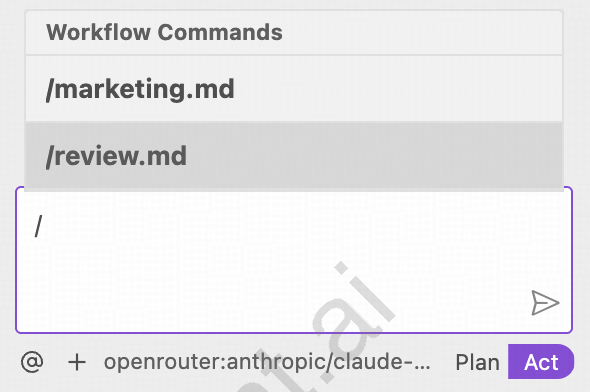
Agent runs the workflow
The Agent automatically executes the pre-configured workflow and generates a detailed report.
Built-in Commands
Currently, SoloEnt provides two official commands:/review and /marketing, each powering a specialized workflow designed by writing professionals.
/review - Quality Assurance
The /review command runs a multi-layered quality assurance process on your chapter:
1. Basic Review
1. Basic Review
- Word count: Checks if chapter length matches your target
- Outline alignment: Verifies the chapter follows your planned outline
2. Consistency Review
2. Consistency Review
- Story continuity: Compares with story outline and act structure
- Chapter flow: Checks consistency with previous chapter
- Character integrity: Verifies characters act according to their profiles
- World rules: Ensures no violations of established world-building
3. Writing Style Review
3. Writing Style Review
- Style guide compliance: Checks against your stylistic guidelines (Section 5 of SOLOENT.md)
- Character voice: Ensures characters speak and act consistently
- Tone consistency: Verifies the chapter maintains the intended atmosphere
4. Chapter Ending Review
4. Chapter Ending Review
- Hook quality: Ensures chapter ends with a compelling hook
- Ending pitfalls: Flags repeated words, long inner monologues, or weak endings
- Next chapter connection: Verifies smooth transition to next chapter
5. AI Writing Pattern Detection
5. AI Writing Pattern Detection
- Originality check: Verifies text doesn’t reproduce copyrighted material
- Repeated phrases: Detects overused words or phrases
- Em dash overuse: Flags unnecessary em dash usage
- List pattern abuse: Catches “word, word, word” patterns common in AI writing
- Word count analysis
- Outline alignment score
- Context consistency findings
- Character consistency check
- Writing style assessment
- Actionable revision suggestions
/marketing - Publishing Strategy
The /marketing command analyzes your completed manuscript and generates a comprehensive publishing strategy:
1. Genre & Market Analysis
1. Genre & Market Analysis
- Primary genre: Identifies your book’s genre and subgenre
- Word count: Calculates per-chapter and total word count
- Market category: Determines MG/YA/Adult and Fiction/Non-fiction classification
2. Story Elements Extraction
2. Story Elements Extraction
- Logline: Crafts a one-sentence hook for your story
- Main selling points: Identifies unique elements that make your book marketable
- Comparable titles: Suggests “comp titles” for query letters
3. Publishing Route Recommendation
3. Publishing Route Recommendation
- Best-fit route: Traditional, Hybrid, Self-publishing, or Fandom platforms
- Rationale: Explains why this route fits your manuscript
- Target platforms: Specific publishers, imprints, or self-publishing platforms
- Next steps: Query letter, editing needs, cover design, etc.
4. Success Benchmarks
4. Success Benchmarks
- Comparable titles: Books similar to yours and their success metrics
- Timeline: Expected timeline to publication
- Budget: Estimated costs (for self-publishing or hybrid routes)
Command Workflow
Here’s what happens behind the scenes when you invoke a command:Context Loading
The Agent reads relevant project files:
SOLOENT.mdfor project overview- Character profiles from
characters/ - World-building documents from
world/ - Your completed chapters
Workflow Execution
The Agent runs the pre-configured workflow with specialized prompts designed by writing professionals.
Analysis & Report Generation
The Agent analyzes your content and generates a structured report with findings and recommendations.
Best Practices
Review Early, Review Often
Don’t wait until the end to run
/review. Catching issues in Chapter 3 prevents cascading problems in Chapters 4-10.Act on Feedback
Commands generate actionable suggestions. Implement the critical ones before moving forward.
Save Reports
All reports are saved to
notes/ directory. Review them periodically to track improvement over time.Iterate on Marketing
Run
/marketing multiple times as your manuscript evolves. Your publishing strategy may shift as the story develops.Example Usage
Running /review on Chapter 3
You type:
Running comprehensive quality review on Chapter 3… Report saved to:notes/review-chapter-3-2026-02-20.mdKey Findings:Revision Suggestions:
- ✅ Word count: 2,847 words (target: 2,500-3,000)
- ✅ Outline alignment: All key beats hit
- ⚠️ Style issue: Detected 8 instances of em dash overuse
- ⚠️ Consistency issue: Character “Sarah” speaks formally in this chapter but was casual in Chapter 2
- ❌ Ending: Current ending is weak—no clear hook for Chapter 4
- Replace 6 of the 8 em dashes with periods or commas
- Revise Sarah’s dialogue to match her casual voice from Chapter 2
- Strengthen ending: Add the mysterious phone call from the outline
Running /marketing on Completed Manuscript
You type:
Analyzing manuscript for publishing strategy… Report saved to:notes/marketing-plan-2026-02-20.mdGenre: Psychological Horror / Supernatural Thriller Recommended Route: Traditional Publishing Target Imprints:Comparable Titles:
- Tor Nightfire (Macmillan)
- Titan Books
- Cemetery Dance Publications
Next Steps:
- “Mexican Gothic” by Silvia Moreno-Garcia
- “The Only Good Indians” by Stephen Graham Jones
- Polish manuscript (currently 87% complete)
- Draft query letter emphasizing psychological horror angle
- Research agents who represent horror at QueryTracker
- Prepare 3-chapter sample for submissions
Future Enhancements
We’re working on exciting new capabilities for the command system:Custom Workflow Builder
Create your own commands and workflows tailored to your unique writing process
Skills Integration
Combine workflows with Agent Skills for even more powerful automation