메인 콘텐츠로 건너뛰기
스킬은 Agent에게 특정 작업에 대한 깊은 전문 지식을 부여하는 Markdown 파일입니다. 단편 소설 창작용 하나, 독서 노트용 하나, 시나리오 형식용 하나를 정의하면 — Agent는 지금 하고 있는 일과 관련된 스킬만 불러옵니다.

스킬 작동 방식

스킬은 컨텍스트를 가볍게 유지하기 위해 점진적 로딩을 사용합니다. 프로젝트를 열면 Agent는 모든 스킬의 이름과 설명만 확인합니다 — 각각 수십 단어 정도입니다. 시작 시 로드되는 것은 이것뿐입니다. 요청이 스킬의 설명과 일치하면 Agent가 해당 스킬을 활성화하고 전체 지시문을 로드합니다. 단편 소설 창작 스킬은 쿼리 레터를 쓰는 동안 휴면 상태를 유지하고, 공포 소설 스킬은 스릴러 아웃라인을 작성할 때 컨텍스트를 소비하지 않습니다.
레벨로드 시점내용
메타데이터항상, 시작 시프론트매터의 이름과 설명
지시문스킬이 활성화될 때SKILL.md 전체 본문
지원 파일필요에 따라템플릿, 스크립트, 참고 문서

스킬 구조와 저장 위치

각 스킬은 SKILL.md 파일을 포함하는 디렉토리입니다. 디렉토리 이름이 스킬 이름이 됩니다. 스킬에는 세 가지 선택적 서브디렉토리에 지원 파일을 포함할 수 있습니다.
your-novel/
├── .soloent/
│   └── skills/                  # 워크스페이스 스킬 (이 프로젝트만)
│       └── short-story/
│           ├── SKILL.md                   # 필수: 이름, 설명, 지시문
│           ├── templates/                 # 선택: 출력 템플릿, 형식 가이드
│           │   ├── chapter-outline.md
│           │   └── character-profile.md
│           ├── docs/                      # 선택: 참고 자료, 조회 테이블
│           │   └── genre-conventions.md
│           └── scripts/                   # 선택: Agent가 실행할 수 있는 처리 스크립트
│               └── word-count.py
├── SOLOENT.md
├── chapters/
└── ...
지원 파일은 지시문에서 참조할 때만 로드됩니다 — 시작 시 컨텍스트를 소비하지 않습니다. 템플릿은 Agent가 해당 단계에 도달할 때까지 휴면 상태이며, 참고 문서는 Agent가 조회해야 할 때만 읽힙니다. 전역 스킬은 시스템 수준의 스킬 디렉토리에 저장되며 모든 프로젝트에서 사용할 수 있습니다. 오프닝 훅을 생성하는 스킬이나 표준 원고 검토 프로세스를 안내하는 스킬 등 일관되게 적용하는 범용 기능에 활용하세요. 워크스페이스 스킬은 프로젝트 루트의 .soloent/skills/ 에 저장됩니다. 이 로맨스 시리즈의 특정 규칙을 기반으로 구축된 스킬이나 현재 작품의 수위와 서술 방식에 맞춰 조정된 스킬 등 특정 프로젝트나 장르에 묶인 기능에 사용하세요.
전역 스킬과 워크스페이스 스킬의 이름이 같을 경우 워크스페이스 스킬이 우선합니다.

스킬 토글

각 스킬에는 파일을 삭제하지 않고 활성화 또는 비활성화할 수 있는 토글이 있습니다. 현재 작업에 필요하지 않은 스킬은 비활성화하면 컨텍스트에서 제외되어 의도치 않은 활성화를 방지합니다.

스킬 만들기

SKILL.md 파일은 프론트매터 블록(메타데이터)과 지시문 본문 두 부분으로 구성됩니다.
---
name: my-skill
description: 이 스킬을 언제 트리거할지 설명합니다. 무엇을 할 수 있는지가 아닙니다.
---

이 스킬이 활성화될 때 Agent가 따를 지시문.
두 가지 필수 프론트매터 필드:
  • name 은 디렉토리 이름과 정확히 일치해야 합니다
  • description 은 Agent에게 이 스킬을 언제 트리거할지 알려줍니다. 무엇을 할 수 있는지가 아닙니다 (1,024자 이내)
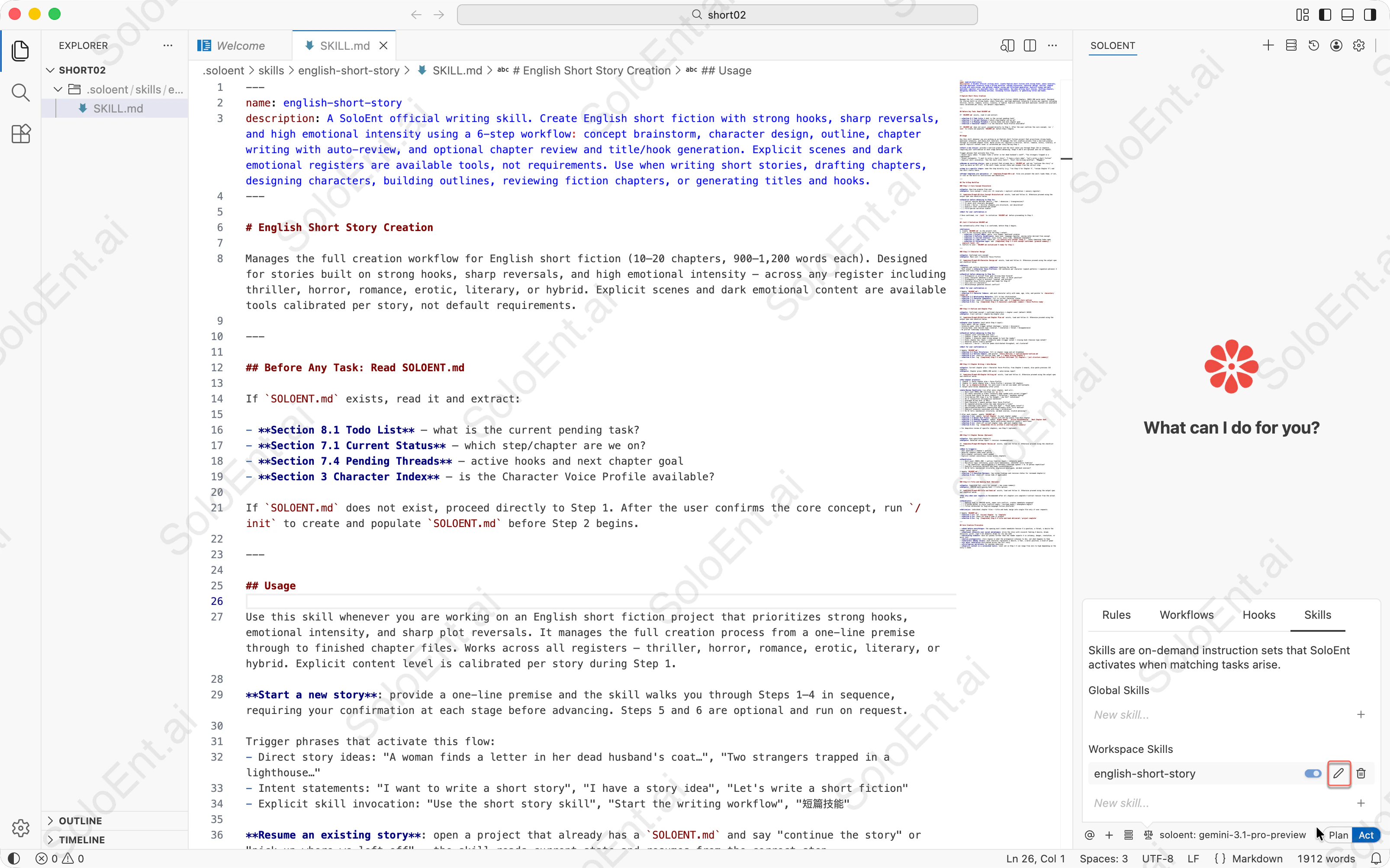
에디터에서 열린 SKILL.md 파일에 name과 description 필드가 표시되고, 오른쪽 Skills 패널에 english-short-story 스킬이 워크스페이스 스킬로 표시된 모습
1

Skills 메뉴 열기

Agent 패널 왼쪽에서 네 번째 아이콘을 클릭하여 Skills 관리자로 전환합니다.
2

새 스킬 만들기

“New skill…”을 클릭하고 이름 (예: short-story)을 입력한 다음 ”+“를 클릭합니다. Agent가 템플릿 SKILL.md 파일이 포함된 스킬 디렉토리를 생성합니다.
3

스킬 지시문 작성하기

SKILL.md 파일을 편집합니다:
  • description 을 업데이트하여 이 스킬의 트리거 조건을 지정합니다
  • 본문에 지시문, 체크리스트, 워크플로우 단계를 추가합니다
  • 선택적으로 templates/ 또는 docs/ 서브디렉토리에 지원 파일을 추가합니다
이것은 공식 english-short-story 스킬 파일입니다 — 완전한 6단계 워크플로우, 체크리스트, 중단 조건을 갖춘 도메인 전문가형 스킬입니다. 그대로 복사해서 사용할 수 있습니다.
---
name: english-short-story
description: A SoloEnt official writing skill. Create English short fiction with strong hooks, sharp reversals, and high emotional intensity using a 6-step workflow: concept brainstorm, character design, outline, chapter writing with auto-review, and optional chapter review and title/hook generation. Explicit scenes and dark emotional registers are available tools, not requirements. Use when writing short stories, drafting chapters, designing characters, building outlines, reviewing fiction chapters, or generating titles and hooks.
---

# English Short Story

Manages the full creation workflow for English short fiction (10–20 chapters, 900–1,200 words each). Designed for stories built on strong hooks, sharp reversals, and high emotional intensity — across any register including thriller, horror, romance, erotic, literary, or hybrid. Explicit scenes and dark emotional content are available tools calibrated per story, not default requirements.

---

## Before Any Task: Read SOLOENT.md

If `SOLOENT.md` exists, read it and extract:

- **Section 8.1 Todo List** — what is the current pending task?
- **Section 7.1 Current Status** — which step/chapter are we on?
- **Section 7.4 Pending Threads** — active hooks and next chapter goal
- **Section 3 Character Index** — is the Character Voice Profile available?

If `SOLOENT.md` does not exist, proceed directly to Step 1. After the user confirms the core concept, run `/init` to create and populate `SOLOENT.md` before Step 2 begins.

---

## Usage

Use this skill whenever you are working on an English short fiction project that prioritizes strong hooks, emotional intensity, and sharp plot reversals. It manages the full creation process from a one-line premise through to finished chapter files. Works across all registers — thriller, horror, romance, erotic, literary, or hybrid. Explicit content level is calibrated per story during Step 1.

**Start a new story**: provide a one-line premise and the skill walks you through Steps 1–4 in sequence, requiring your confirmation at each stage before advancing. Steps 5 and 6 are optional and run on request.

Trigger phrases that activate this flow:
- Direct story ideas: "A woman finds a letter in her dead husband's coat…", "Two strangers trapped in a lighthouse…"
- Intent statements: "I want to write a short story", "I have a story idea", "Let's write a short fiction"
- Explicit skill invocation: "Use the short story skill", "Start the writing workflow", "短篇技能"

**Resume an existing story**: open a project that already has a `SOLOENT.md` and say "continue the story" or "pick up where we left off" — the skill reads current state and resumes from the correct step.

**Jump to a specific step**: name the step directly (e.g. "run Step 4 for Chapter 3", "review Chapter 5") and the skill starts there.

**Prompt templates are optional**: if `templates/Prompt-0X-*.md` files are present the skill loads them; if not, it runs on the built-in instructions and checklists.

---

## The 6-Step Workflow

### Step 1 — Core Concept Brainstorm

**Input**: One-line premise from user
**Output**: Core concept + story arc (3+ reversals + explicit calibration + sensory register)

If `templates/Prompt-01-Core Concept Brainstorm.md` exists, load and follow it. Otherwise proceed using the output spec and checklist below.

**Checklist before advancing to Step 2**:
- [ ] Central tension defined (desire / fear / obsession / transgression)?
- [ ] 3+ major plot reversals designed?
- [ ] Erotic / horror / thriller elements are structural, not decorative?
- [ ] Explicit level calibrated and noted?
- [ ] First-person narration viable?

**Wait for user confirmation.**

→ Once confirmed, run `/init` to initialize `SOLOENT.md` before proceeding to Step 2.

---

## /init — Initialize SOLOENT.md

Run automatically after Step 1 is confirmed, before Step 2 begins.

**Actions**:
1. Create `SOLOENT.md` in the project root.
2. Fill in the following fields from the Step 1 output:
   - **Section 1 Project DNA**: genre, core themes, emotional promise
   - **Section 5 Stylistic Guidelines**: base tone, language register, pacing notes derived from concept
   - **Section 7.1 Current Status**: story title, story time, immediate atmosphere
   - **Section 8.1 Todo List**: check off `[x] Confirm core concept (Step 1)`, leave remaining todos open
   - **Section 8.2 Milestone Log**: add `[Completed] Step 1 — core concept confirmed: [premise summary] / explicit level: [X]`
3. Confirm to user: `SOLOENT.md initialized — ready for Step 2.`

---

### Step 2 — Character Design

**Input**: Confirmed core concept
**Output**: Main cast + Character Voice Profile

If `templates/Prompt-02-Character Design.md` exists, load and follow it. Otherwise proceed using the output spec and checklist below.

**Rules**:
- Complete and confirm characters **before** touching the outline
- Must output a **Character Voice Profile**: 1–2 sentences per character (speech patterns + signature phrases) — pasted into every Step 4 prompt

**Checklist before advancing to Step 3**:
- [ ] Protagonist is active? Clear goal driving them forward?
- [ ] Every character embodies a value, desire, fear, or moral position?
- [ ] Protagonist's voice is distinct, layered, and evolves?
- [ ] Character Voice Profile output and ready for Step 4?
- [ ] Core cast ≤ 4 characters?
- [ ] Relationships generate natural conflict?

**Wait for user confirmation.**

→ Update `SOLOENT.md`:
- **Section 3.1 Character Index**: add each character entry with name, age, role, and pointer to `characters/[name].md`
- **Section 3.2 Relationship Network**: fill in key relationships
- **Section 7.2 Character Snapshot**: fill in current character states
- **Section 8.1**: check off character design todo, add `[ ] Complete story outline`
- **Section 8.2**: log `[Completed] Step 2 — characters confirmed: [names] / Voice Profile ready`

---

### Step 3 — Outline and Chapter Plan

**Input**: Confirmed concept + confirmed characters + chapter count (default 10–20)
**Output**: 3-act outline + chapter-by-chapter plan

If `templates/Prompt-03-Outline and Chapter Plan.md` exists, load and follow it. Otherwise proceed using the output spec and checklist below.

**Chapter plan format** (must match Step 4 input):
- Story beats: 3–5 per chapter
- Intensity peak: note trigger method (dialogue / action / discovery)
- Closing hook: note tension type (reversal / revelation / threat / disappearance)
- No pre-set timestamp transitions

**Checklist before advancing to Step 4**:
- [ ] Chapter count confirmed with user?
- [ ] Chapter 1 opens on immediate conflict?
- [ ] Chapter 1 intensity peak strong enough to lock the reader?
- [ ] Every chapter has: beats + intensity peak (trigger noted) + closing hook (tension type noted)?
- [ ] Reversal points clearly marked?
- [ ] Explicit / horror / thriller peaks distributed throughout, not clustered?

**Wait for user confirmation.**

→ Update `SOLOENT.md`:
- **Section 4.1 Story Structure**: fill in chapter range and act breakdown
- **Section 4.2 Outline Index**: add pointer `[Story Outline] -> outline/master-outline.md`
- **Section 8.1**: check off outline todo, add `[ ] Begin writing Chapter 1`
- **Section 8.2**: log `[Completed] Step 3 — outline confirmed: [X] chapters / [act structure summary]`

---

### Step 4 — Chapter Writing + Auto-Review

**Input**: Current chapter plan + Character Voice Profile; from Chapter 2 onward, also paste previous 1–2 chapters
**Output**: Chapter prose (900–1,200 words) + auto-review report

If `templates/Prompt-04-Chapter Writing.md` exists, load and follow it. Otherwise proceed using the output spec and checklist below.

**Per-chapter process**:
1. Chapter 1: paste chapter plan + Voice Profile
2. Chapter 2+: paste chapter plan + Voice Profile + previous 1–2 chapters
3. Run `wc -w chapters/ch-XX.md` for word count — do not use model self-estimate
4. Output auto-review immediately after prose

**Auto-Review Checklist** (run after every chapter, mark ✅/❌):
- [ ] Word count 900–1,200 (verified via `wc -w`)?
- [ ] All beats executed in order? Intensity peak landed with correct trigger?
- [ ] Closing hook sharp? No moral summary / reflection / epiphany ending?
- [ ] First-person POV clean — no "he thought / she felt" violations?
- [ ] No 3+ consecutive introspective sentences?
- [ ] Dialogue drives plot (≥ 50%)?
- [ ] Each character's speech matches their Voice Profile?
- [ ] No repeated phrasing within the same character's lines?
- [ ] No timestamp scene openers ("The next day…" / "Three weeks later…")?
- [ ] Age/occupation/backstory communicated obliquely after first mention?
- [ ] Explicit intensity consistent with Step 1 calibration?
- [ ] No AI tells (mechanical structures, em-dash overuse, clichéd phrasing)?

→ After each chapter, update `SOLOENT.md`:
- **Section 7.1**: update `Current Chapter` to next chapter number
- **Section 7.3 Recent Plot Flow**: replace with 3–5 key events from this chapter
- **Section 7.4 Pending Threads**: update `Urgent Hooks`, `Active Foreshadowing`, `Next Chapter Goal`
- **Section 7.5 Execution Review**: paste auto-review checklist result + word count
- **Section 8.1**: check off current chapter todo, add next chapter todo
- **Section 8.2**: log `[Completed] Ch-[X] written — [one-line plot summary]`

> For deep-dive review of specific chapters, use Step 5 (optional).

---

### Step 5 — Chapter Review (Optional)

**Input**: User-specified chapter(s)
**Output**: Detailed review report + revision recommendations

If `templates/Prompt-05-Chapter Review.md` exists, load and follow it. Otherwise proceed using the checklist below.

**When to trigger**:
- User questions a chapter's quality
- Reversal chapters need tonal polish
- Multi-chapter continuity check needed
- Explicit content consistency review across chapters

**Checklist**:
- [ ] Word count (900–1,200) + outline fidelity (beats + intensity peak)?
- [ ] Narrative logic continuity, prose style consistency, character voice fidelity?
- [ ] ⚠️ Tag repetition: age/occupation ≤ 2 mentions; timestamp openers = 0; no phrase repetition?
- [ ] Explicit escalation correct? Any tonal inconsistencies?
- [ ] No AI tells (mechanical structures, digressive monologues, em-dash overuse)?

→ Update `SOLOENT.md`:
- **Section 7.5 Execution Review**: log review findings and revision status for reviewed chapter(s)
- **Section 8.1**: check off review todo if applicable

---

### Step 6 — Title and Opening Hook (Optional)

**Input**: Completed full story (or concept + key scene summary)
**Output**: 100–150 word opening hook + 3 title options

If `templates/Prompt-06-Title and Hook.md` exists, load and follow it. Otherwise proceed using the output spec and checklist below.

**Run only when user requests.** Recommended after all chapters are complete — extract tension from the actual draft.

**Checklist**:
- [ ] Opening hook is 100–150 words, names core conflict, creates immediate suspense?
- [ ] 3 titles differ in style (conflict angle / intrigue angle / atmosphere angle)?
- [ ] Titles calibrated for English-language fiction platforms?

**Delivery**: individual chapter files + title and hook; merge into single file only if user requests.

→ Update `SOLOENT.md`:
- **Section 7.1**: set `Current Chapter` to `Complete`
- **Section 8.1**: check off Step 6 todo if present
- **Section 8.2**: log `[Completed] Step 6 — title and hook delivered / project complete`

---

## Core Creative Principles

- **Hook before everything**: the opening must create immediate tension — a question, a threat, a desire the reader cannot ignore
- **Emotional intensity over social melodrama**: drive the story with visceral feeling — desire, dread, obsession, grief, rage — not domestic drama for its own sake
- **Escalating stakes**: each act pushes further than the reader expects — in intimacy, danger, revelation, or moral cost
- **Active protagonist**: story engine is what the protagonist *chooses to do*, not what happens to them
- **Characters embody value**: each character represents a desire, a fear, a moral position, a kind of power
- **3+ major reversals** distributed across the full story
- **First-person narration** for maximum immersion
- **Explicit content is a calibrated tool**: level set in Step 1 — can range from zero to high depending on the story's needs

세 가지 일반적인 스킬 유형

유형 1: 체크리스트형

고정된 시점에서 여러 기준을 한 번에 검증하는 데 최적 — 누락을 방지합니다. 예를 들어 각 챕터 완성 후 제출 전 체크:
---
name: chapter-submission-check
description: Use before finalizing a chapter to verify word count, consistency, and all checklist items.
---

## 제출 전 체크 (모두 통과해야 다음으로 진행)
- [ ] 단어 수 900–1,200 (도구로 확인, 추정 불가)
- [ ] 모든 챕터 비트 실행, 강도 정점 달성
- [ ] 마무리 훅 명확 — 도덕적 요약이나 감상 마무리 없음
- [ ] 캐릭터 이름 일관성 체크 통과
- [ ] SOLOENT.md 업데이트 완료

## 출력
각 항목: 통과 / 미통과. 미통과 항목은 모두 수정 후 계속 진행.

유형 2: 워크플로우형

명확한 단계 순서가 있고 실행 전 확인이 필요한 작업에 최적.
---
name: chapter-rewrite
description: Rewrite a chapter from scratch. Run only when explicitly requested.
---

## 단계
1. 백업: 현재 챕터를 ch-XX-original.md로 저장하여 원고 보존
2. 설명: 이번 재작성의 핵심 조정 방향을 한 문단으로 요약하고, 사용자 확인 후 작성 시작
3. 실행: 새 방향으로 완전한 챕터 작성 (900–1,200 단어)
4. 검증: 원본과 대조하여 챕터 체크리스트를 실행하고 새버전과 구버전의 주요 차이점 출력

유형 3: 도메인 전문가형

Agent가 감으로 추측하지 않고 전문가 경험으로 작업하게 하고 싶을 때 최적. 예를 들어 글쓰기가 막혔을 때의 진단 스킬:
---
name: story-diagnosis
description: Use when a chapter feels flat, pacing is off, or a scene isn't landing.
---

## 증거 수집
1. 문제 챕터 전문 읽기
2. SOLOENT.md 4절의 챕터 비트 계획과 대조
3. 앞뒤 챕터의 감정 곡선 확인

## 결정 매트릭스
| 증상 | 먼저 확인 |
|---|---|
| 페이스가 늘어짐 | 비트 밀도 / 무효 단락 여부 |
| 감정이 부족함 | 캐릭터 보이스 일관성 / 내적 독백 과다 여부 |
| 마무리 훅 실패 | 긴장감 유형 / 챕터 내에서 이미 해소되었는지 여부 |

## 출력 형식
근본 원인 / 영향 범위 / 수정 단계 / 검증 방법

완전한 예시: 도서 요약

이것은 도메인 전문가형 스킬입니다. 콘텐츠 검색 경로(스크립트가 챕터를 온디맨드로 추출), 전문 지식(docs/에 챕터 인식 패턴), 고정 출력 형식(templates/에 노트 템플릿) — 이 세 가지 요소가 도메인 전문가형 스킬의 전형적인 구조입니다. 이 스킬은 로컬 도서 파일에서 구조화된 독서 노트를 추출합니다 — 챕터 요약, 핵심 인사이트, 인용구 — 포맷된 Markdown으로 저장합니다.

디렉토리 구조

book-summary/
├── SKILL.md                    # 워크플로우 지시문
├── templates/
│   └── note-template.md        # 독서 노트의 출력 형식
├── docs/
│   └── chapter-patterns.md     # 중국어와 영어 도서의 챕터 제목 패턴
└── scripts/
    └── analyze-book.py         # Agent가 읽기 전에 도서 파일을 전처리

왜 스크립트가 필요한가

도서는 깁니다. 챕터 구조를 추출하기 위해 전체 소설을 컨텍스트에 로드하는 것은 낭비이고 느립니다. 전처리 스크립트가 이 문제를 해결합니다:
  • info 명령 — 처음 50줄을 읽어 제목, 인코딩, 총 줄 수 파악
  • chapters 명령 — 전문을 읽지 않고 챕터 제목을 스캔하여 줄 번호 반환
  • extract 명령 — 특정 챕터의 줄만 읽어 Agent가 한 챕터씩 처리할 수 있게 함
Agent는 워크플로우의 각 단계에서 스크립트를 호출합니다. 컨텍스트에 들어오는 것은 스크립트 출력뿐이며, 도서 자체는 들어오지 않습니다.

왜 docs 파일이 필요한가

중국어와 영어 도서는 챕터 제목 형식이 크게 다릅니다. 모든 인식 패턴을 SKILL.md에 내장하는 대신 스킬은 docs/chapter-patterns.md에 저장합니다. Agent는 챕터 경계를 식별해야 할 때 이 참고 파일을 읽고, 그 외에는 무시합니다. 참고 자료를 docs/에 두면 두 가지 장점이 있습니다: SKILL.md를 워크플로우 로직에 집중시킬 수 있고, 메인 지시문을 수정하지 않고 패턴을 업데이트할 수 있습니다.

왜 템플릿이 필요한가

출력 형식은 고정되어 있습니다: 모든 독서 노트는 동일한 구조를 따릅니다 — 도서 개요, 챕터별 요약(핵심 관점과 인용구 포함), 전체 도서 하이라이트, 개인 소감. 매번 프롬프트에서 형식을 재지정하는 대신 스킬은 templates/note-template.md에 저장합니다. 5단계(최종 정리)가 실행되면 Agent는 템플릿을 로드하고 플레이스홀더를 채웁니다. 형식은 매번 일관되며 한 곳에서만 관리하면 됩니다.

SKILL.md가 지원 파일을 참조하는 방법

SKILL.md의 지시문은 각 지원 파일을 명시적으로 가리킵니다:
### 1단계: 도서 구조 분석

전처리 스크립트를 실행하여 도서 정보 가져오기:
  python3 scripts/analyze-book.py <파일경로> info

### 5단계: 노트 정리

템플릿을 사용하여 출력: templates/note-template.md

챕터 제목 인식 패턴 참조: docs/chapter-patterns.md

효과적인 스킬 작성하기

”언제 사용하는가”를 쓰고, “무엇을 하는가”를 쓰지 마세요

비슷하게 들리지만 트리거 정확도에 큰 영향을 미칩니다.
# 잘못됨 — 기능을 설명하지만 트리거 조건이 아님
description: This skill helps improve writing quality and checks chapters for common issues.

# 올바름 — 언제 활성화할지를 설명
description: Use when reviewing a completed chapter draft for pacing, voice, and consistency issues.
설명은 항상 컨텍스트에 상주하며, 활성화된 모든 스킬이 지속적으로 토큰 예산을 소비합니다. 짧게, 구체적으로, 트리거 시나리오를 직접 설명하세요:
# 비효율적 (~45 토큰)
description: |
  This skill helps you review and improve your writing chapters.
  It checks for common issues like pacing problems, character voice...
  Use this when you want to ensure your chapter quality before proceeding.

# 효율적 (~9 토큰)
description: Use when reviewing a chapter for quality issues.

완전한 단계, 입력, 출력, 중단 조건을 갖추세요

프로세스의 시작만 작성하고 명확한 완료 신호가 없는 경우, Agent는 언제 멈출지 스스로 결정합니다 — 보통 원하는 곳이 아닙니다. 각 단계에는 다음이 필요합니다:
  • 입력: 이 단계에 필요한 컨텍스트나 파일
  • 출력: 이 단계가 생성하는 것
  • 중단 조건: 확인을 기다리는 시점, 계속 진행하는 시점

본문은 핵심만 유지하고 대용량 자료는 지원 파일로

SKILL.md는 5,000단어 이내로 유지하세요. 스타일 가이드, 인식 패턴, 캐릭터 프로필 등 대용량 참고 자료가 필요한 경우 docs/ 서브디렉토리에 넣고 파일 이름으로 참조하세요. Agent는 필요할 때만 로드하고 그 외에는 컨텍스트를 소비하지 않습니다.

호출 빈도에 따라 자동 트리거 결정

사용 빈도권장 전략
고빈도 (세션당 1회 이상)자동 트리거 유지; 더 정확한 활성화를 위해 설명 최적화
저빈도 (세션당 1회 이하)자동 트리거 비활성화; 수동 호출; 설명은 컨텍스트 밖에 있어도 됨
매우 저빈도 (월 1회 미만)스킬 제거; SOLOENT.md에 문서로 기록

자주 빠지는 함정

문제증상수정 방법
설명이 너무 광범위description: help with writing — 모든 글쓰기 요청이 트리거됨구체적인 시나리오로 좁히고 실제 트리거 문구 포함
본문이 너무 길음수백 줄의 작업 매뉴얼을 SKILL.md 본문에 전부 넣음참고 자료를 docs/로 이동; 지시문에는 골격만 유지
하나의 스킬이 다섯 가지 일같은 스킬이 검토, 속편, 개요, 캐릭터 설계, 진단을 다 커버분리하기; 도메인당 스킬 하나씩, 각각 독립적으로 온/오프 가능

다른 사람의 스킬 사용하기

모든 스킬을 처음부터 작성할 필요는 없습니다. 스킬은 자기 완결적 디렉토리입니다 — 수동으로 설치하거나, 리포지토리에서 클론하거나, 플러그인으로 설치할 수 있습니다.

수동 설치

스킬 디렉토리를 다운로드하거나 복사하여 적절한 위치에 배치합니다:
  • 전역 스킬 → 시스템 수준의 스킬 디렉토리 (모든 프로젝트에서 사용 가능)
  • 워크스페이스 스킬 → 프로젝트 내의 .soloent/skills/
SoloEnt가 디렉토리를 감지하면 스킬이 즉시 활성화됩니다. 재시작 필요 없음.
your-novel/
├── .soloent/
│   └── skills/
│       └── book-summary/      ← 여기에 스킬 디렉토리를 넣으세요
│           ├── SKILL.md
│           ├── templates/
│           ├── docs/
│           └── scripts/

git clone으로 설치

GitHub에서 공개된 스킬은 스킬 디렉토리에 직접 클론할 수 있습니다:
cd your-novel/.soloent/skills/
git clone https://github.com/author/skill-name
이렇게 하면 스킬을 최신 상태로 유지하기도 쉽습니다 — 언제든지 git pull로 리포지토리의 변경 사항을 가져올 수 있습니다.
모든 프로젝트에서 스킬을 사용하려면 워크스페이스 디렉토리가 아닌 전역 스킬 디렉토리에 클론하세요.

플러그인으로 설치

일부 스킬 작성자는 스킬을 패키지된 .vsix 확장 파일로 배포합니다. 확장을 설치하면 번들된 스킬이 자동으로 로드됩니다 — 수동으로 파일을 배치할 필요가 없습니다.
1

.vsix 파일 받기

스킬 작성자의 리포지토리 또는 배포 채널에서 .vsix 파일을 다운로드합니다.
2

확장 설치하기

SoloEnt에서 Extensions 패널을 열고 ··· 메뉴를 클릭한 다음 **VSIX에서 설치…**를 선택합니다. 다운로드한 파일을 선택하세요.
3

스킬 로드 확인

Skills 패널을 엽니다. 확장에 번들된 스킬이 스킬 목록에 나타나며 즉시 사용할 수 있습니다.
스킬을 활성화하기 전에 해당 SKILL.md를 검토하세요. 스킬은 사용자의 권한으로 실행되며 프로젝트 파일을 읽고 수정할 수 있습니다.

문제 해결

가장 가능한 원인: 설명이 충분히 구체적이지 않거나, 스킬이 꺼져 있습니다.
  • Skills 패널에서 스킬이 켜져 있는지 확인
  • description을 다시 작성하여 실제로 사용하는 문구와 작업 유형을 포함 — “글쓰기 돕기”는 거의 올바르게 트리거되지 않음; 워크플로우, 출력 유형, 샘플 호출 문구를 구체적으로 명시
  • 스킬 디렉토리에 유효한 SKILL.md가 있고 namedescription 프론트매터 필드가 모두 포함되어 있는지 확인
  • 프론트매터의 name이 디렉토리 이름과 정확히 일치하는지 확인
설명이 너무 광범위합니다 — 의도하지 않은 요청과도 매칭됩니다.
  • description을 이 스킬이 처리하는 특정 작업만 설명하도록 좁히기
  • 해당 도메인 외의 작업을 할 때는 스킬 끄기
  • 설명이 겹치는 스킬이 여러 개 있다면 각각 언제 활성화되어야 하는지 더 구체적으로 만들기
다음 일반적인 문제를 확인하세요:
  • 지시문이 컨텍스트 한도를 초과했을 수 있음 — SKILL.md를 5,000단어 이내로 유지하고 참고 자료는 docs/ 서브디렉토리로 이동
  • 충돌하는 전역 또는 프로젝트 규칙이 스킬 동작의 일부를 재정의할 수 있음 — 활성 규칙에 모순이 없는지 확인
  • 스킬이 체크리스트를 사용하는 경우 각 항목에 명시적인 “확인 대기” 게이트가 있는지 확인; 없으면 Agent가 자동으로 진행할 수 있음
  • 지시문에서 참조된 지원 파일은 지정된 경로에 존재해야 함 — 파일이 없으면 해당 단계가 조용히 건너뜀
Agent는 지시문에서 명시적으로 참조될 때만 지원 파일을 로드합니다.
  • 지시문의 파일 경로가 실제 위치와 일치하는지 확인 (예: chapter-outline.md가 아닌 templates/chapter-outline.md)
  • 파일이 스킬 디렉토리 내의 올바른 서브디렉토리 (templates/, docs/, 또는 scripts/)에 있는지 확인
  • SKILL.md에서 파일 이름이 참조되지 않으면 Agent가 로드할 이유가 없음
워크스페이스 스킬은 항상 같은 이름의 전역 스킬보다 우선합니다.
  • 이것은 예상된 동작입니다 — 워크스페이스 스킬이 활성화되어 있으면 같은 이름의 전역 스킬은 완전히 무시됨
  • 전역 스킬을 적용하려면 워크스페이스 스킬의 이름을 변경하거나 삭제하세요
  • 둘 다 공존해야 한다면 서로 다른 이름을 지정하고 각각의 설명을 업데이트하세요

더 많은 고급 팁

워크플로우 (Workflows)

워크플로우 파일로 반복적인 다단계 프로세스를 자동화하세요

규칙 (Rules)

글쓰기 선호도를 규칙에 담아 Agent가 항상 당신의 스타일로 쓰게 하세요

규칙 · 워크플로우 · 스킬 비교

세 가지 AI 지시 방법 — 차이점과 각각의 사용 시점을 이해하세요