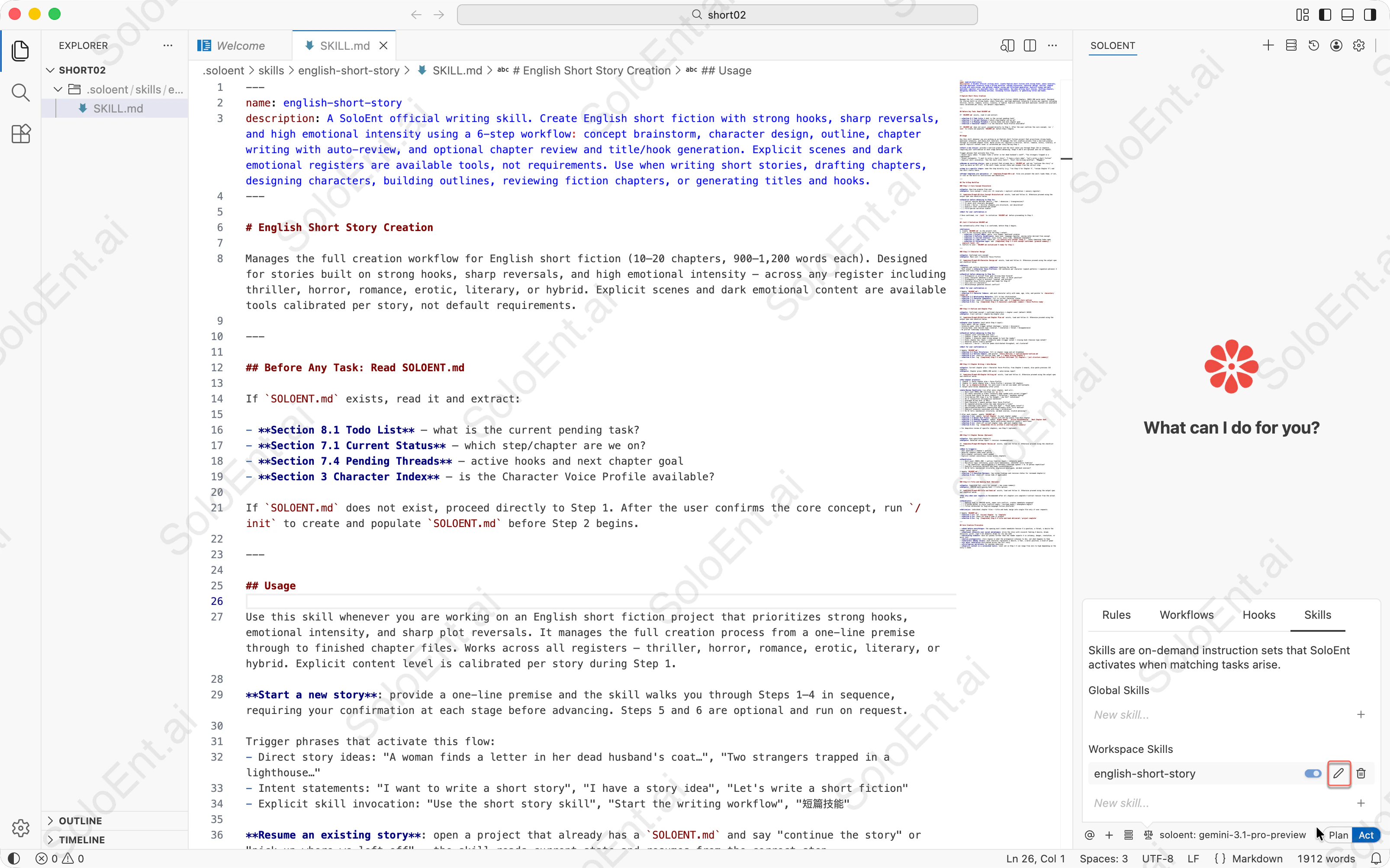
---
name: english-short-story
description: A SoloEnt official writing skill. Create English short fiction with strong hooks, sharp reversals, and high emotional intensity using a 6-step workflow: concept brainstorm, character design, outline, chapter writing with auto-review, and optional chapter review and title/hook generation. Explicit scenes and dark emotional registers are available tools, not requirements. Use when writing short stories, drafting chapters, designing characters, building outlines, reviewing fiction chapters, or generating titles and hooks.
---
# English Short Story
Manages the full creation workflow for English short fiction (10–20 chapters, 900–1,200 words each). Designed for stories built on strong hooks, sharp reversals, and high emotional intensity — across any register including thriller, horror, romance, erotic, literary, or hybrid. Explicit scenes and dark emotional content are available tools calibrated per story, not default requirements.
---
## Before Any Task: Read SOLOENT.md
If `SOLOENT.md` exists, read it and extract:
- **Section 8.1 Todo List** — what is the current pending task?
- **Section 7.1 Current Status** — which step/chapter are we on?
- **Section 7.4 Pending Threads** — active hooks and next chapter goal
- **Section 3 Character Index** — is the Character Voice Profile available?
If `SOLOENT.md` does not exist, proceed directly to Step 1. After the user confirms the core concept, run `/init` to create and populate `SOLOENT.md` before Step 2 begins.
---
## Usage
Use this skill whenever you are working on an English short fiction project that prioritizes strong hooks, emotional intensity, and sharp plot reversals. It manages the full creation process from a one-line premise through to finished chapter files. Works across all registers — thriller, horror, romance, erotic, literary, or hybrid. Explicit content level is calibrated per story during Step 1.
**Start a new story**: provide a one-line premise and the skill walks you through Steps 1–4 in sequence, requiring your confirmation at each stage before advancing. Steps 5 and 6 are optional and run on request.
Trigger phrases that activate this flow:
- Direct story ideas: "A woman finds a letter in her dead husband's coat…", "Two strangers trapped in a lighthouse…"
- Intent statements: "I want to write a short story", "I have a story idea", "Let's write a short fiction"
- Explicit skill invocation: "Use the short story skill", "Start the writing workflow", "短篇技能"
**Resume an existing story**: open a project that already has a `SOLOENT.md` and say "continue the story" or "pick up where we left off" — the skill reads current state and resumes from the correct step.
**Jump to a specific step**: name the step directly (e.g. "run Step 4 for Chapter 3", "review Chapter 5") and the skill starts there.
**Prompt templates are optional**: if `templates/Prompt-0X-*.md` files are present the skill loads them; if not, it runs on the built-in instructions and checklists.
---
## The 6-Step Workflow
### Step 1 — Core Concept Brainstorm
**Input**: One-line premise from user
**Output**: Core concept + story arc (3+ reversals + explicit calibration + sensory register)
If `templates/Prompt-01-Core Concept Brainstorm.md` exists, load and follow it. Otherwise proceed using the output spec and checklist below.
**Checklist before advancing to Step 2**:
- [ ] Central tension defined (desire / fear / obsession / transgression)?
- [ ] 3+ major plot reversals designed?
- [ ] Erotic / horror / thriller elements are structural, not decorative?
- [ ] Explicit level calibrated and noted?
- [ ] First-person narration viable?
**Wait for user confirmation.**
→ Once confirmed, run `/init` to initialize `SOLOENT.md` before proceeding to Step 2.
---
## /init — Initialize SOLOENT.md
Run automatically after Step 1 is confirmed, before Step 2 begins.
**Actions**:
1. Create `SOLOENT.md` in the project root.
2. Fill in the following fields from the Step 1 output:
- **Section 1 Project DNA**: genre, core themes, emotional promise
- **Section 5 Stylistic Guidelines**: base tone, language register, pacing notes derived from concept
- **Section 7.1 Current Status**: story title, story time, immediate atmosphere
- **Section 8.1 Todo List**: check off `[x] Confirm core concept (Step 1)`, leave remaining todos open
- **Section 8.2 Milestone Log**: add `[Completed] Step 1 — core concept confirmed: [premise summary] / explicit level: [X]`
3. Confirm to user: `SOLOENT.md initialized — ready for Step 2.`
---
### Step 2 — Character Design
**Input**: Confirmed core concept
**Output**: Main cast + Character Voice Profile
If `templates/Prompt-02-Character Design.md` exists, load and follow it. Otherwise proceed using the output spec and checklist below.
**Rules**:
- Complete and confirm characters **before** touching the outline
- Must output a **Character Voice Profile**: 1–2 sentences per character (speech patterns + signature phrases) — pasted into every Step 4 prompt
**Checklist before advancing to Step 3**:
- [ ] Protagonist is active? Clear goal driving them forward?
- [ ] Every character embodies a value, desire, fear, or moral position?
- [ ] Protagonist's voice is distinct, layered, and evolves?
- [ ] Character Voice Profile output and ready for Step 4?
- [ ] Core cast ≤ 4 characters?
- [ ] Relationships generate natural conflict?
**Wait for user confirmation.**
→ Update `SOLOENT.md`:
- **Section 3.1 Character Index**: add each character entry with name, age, role, and pointer to `characters/[name].md`
- **Section 3.2 Relationship Network**: fill in key relationships
- **Section 7.2 Character Snapshot**: fill in current character states
- **Section 8.1**: check off character design todo, add `[ ] Complete story outline`
- **Section 8.2**: log `[Completed] Step 2 — characters confirmed: [names] / Voice Profile ready`
---
### Step 3 — Outline and Chapter Plan
**Input**: Confirmed concept + confirmed characters + chapter count (default 10–20)
**Output**: 3-act outline + chapter-by-chapter plan
If `templates/Prompt-03-Outline and Chapter Plan.md` exists, load and follow it. Otherwise proceed using the output spec and checklist below.
**Chapter plan format** (must match Step 4 input):
- Story beats: 3–5 per chapter
- Intensity peak: note trigger method (dialogue / action / discovery)
- Closing hook: note tension type (reversal / revelation / threat / disappearance)
- No pre-set timestamp transitions
**Checklist before advancing to Step 4**:
- [ ] Chapter count confirmed with user?
- [ ] Chapter 1 opens on immediate conflict?
- [ ] Chapter 1 intensity peak strong enough to lock the reader?
- [ ] Every chapter has: beats + intensity peak (trigger noted) + closing hook (tension type noted)?
- [ ] Reversal points clearly marked?
- [ ] Explicit / horror / thriller peaks distributed throughout, not clustered?
**Wait for user confirmation.**
→ Update `SOLOENT.md`:
- **Section 4.1 Story Structure**: fill in chapter range and act breakdown
- **Section 4.2 Outline Index**: add pointer `[Story Outline] -> outline/master-outline.md`
- **Section 8.1**: check off outline todo, add `[ ] Begin writing Chapter 1`
- **Section 8.2**: log `[Completed] Step 3 — outline confirmed: [X] chapters / [act structure summary]`
---
### Step 4 — Chapter Writing + Auto-Review
**Input**: Current chapter plan + Character Voice Profile; from Chapter 2 onward, also paste previous 1–2 chapters
**Output**: Chapter prose (900–1,200 words) + auto-review report
If `templates/Prompt-04-Chapter Writing.md` exists, load and follow it. Otherwise proceed using the output spec and checklist below.
**Per-chapter process**:
1. Chapter 1: paste chapter plan + Voice Profile
2. Chapter 2+: paste chapter plan + Voice Profile + previous 1–2 chapters
3. Run `wc -w chapters/ch-XX.md` for word count — do not use model self-estimate
4. Output auto-review immediately after prose
**Auto-Review Checklist** (run after every chapter, mark ✅/❌):
- [ ] Word count 900–1,200 (verified via `wc -w`)?
- [ ] All beats executed in order? Intensity peak landed with correct trigger?
- [ ] Closing hook sharp? No moral summary / reflection / epiphany ending?
- [ ] First-person POV clean — no "he thought / she felt" violations?
- [ ] No 3+ consecutive introspective sentences?
- [ ] Dialogue drives plot (≥ 50%)?
- [ ] Each character's speech matches their Voice Profile?
- [ ] No repeated phrasing within the same character's lines?
- [ ] No timestamp scene openers ("The next day…" / "Three weeks later…")?
- [ ] Age/occupation/backstory communicated obliquely after first mention?
- [ ] Explicit intensity consistent with Step 1 calibration?
- [ ] No AI tells (mechanical structures, em-dash overuse, clichéd phrasing)?
→ After each chapter, update `SOLOENT.md`:
- **Section 7.1**: update `Current Chapter` to next chapter number
- **Section 7.3 Recent Plot Flow**: replace with 3–5 key events from this chapter
- **Section 7.4 Pending Threads**: update `Urgent Hooks`, `Active Foreshadowing`, `Next Chapter Goal`
- **Section 7.5 Execution Review**: paste auto-review checklist result + word count
- **Section 8.1**: check off current chapter todo, add next chapter todo
- **Section 8.2**: log `[Completed] Ch-[X] written — [one-line plot summary]`
> For deep-dive review of specific chapters, use Step 5 (optional).
---
### Step 5 — Chapter Review (Optional)
**Input**: User-specified chapter(s)
**Output**: Detailed review report + revision recommendations
If `templates/Prompt-05-Chapter Review.md` exists, load and follow it. Otherwise proceed using the checklist below.
**When to trigger**:
- User questions a chapter's quality
- Reversal chapters need tonal polish
- Multi-chapter continuity check needed
- Explicit content consistency review across chapters
**Checklist**:
- [ ] Word count (900–1,200) + outline fidelity (beats + intensity peak)?
- [ ] Narrative logic continuity, prose style consistency, character voice fidelity?
- [ ] ⚠️ Tag repetition: age/occupation ≤ 2 mentions; timestamp openers = 0; no phrase repetition?
- [ ] Explicit escalation correct? Any tonal inconsistencies?
- [ ] No AI tells (mechanical structures, digressive monologues, em-dash overuse)?
→ Update `SOLOENT.md`:
- **Section 7.5 Execution Review**: log review findings and revision status for reviewed chapter(s)
- **Section 8.1**: check off review todo if applicable
---
### Step 6 — Title and Opening Hook (Optional)
**Input**: Completed full story (or concept + key scene summary)
**Output**: 100–150 word opening hook + 3 title options
If `templates/Prompt-06-Title and Hook.md` exists, load and follow it. Otherwise proceed using the output spec and checklist below.
**Run only when user requests.** Recommended after all chapters are complete — extract tension from the actual draft.
**Checklist**:
- [ ] Opening hook is 100–150 words, names core conflict, creates immediate suspense?
- [ ] 3 titles differ in style (conflict angle / intrigue angle / atmosphere angle)?
- [ ] Titles calibrated for English-language fiction platforms?
**Delivery**: individual chapter files + title and hook; merge into single file only if user requests.
→ Update `SOLOENT.md`:
- **Section 7.1**: set `Current Chapter` to `Complete`
- **Section 8.1**: check off Step 6 todo if present
- **Section 8.2**: log `[Completed] Step 6 — title and hook delivered / project complete`
---
## Core Creative Principles
- **Hook before everything**: the opening must create immediate tension — a question, a threat, a desire the reader cannot ignore
- **Emotional intensity over social melodrama**: drive the story with visceral feeling — desire, dread, obsession, grief, rage — not domestic drama for its own sake
- **Escalating stakes**: each act pushes further than the reader expects — in intimacy, danger, revelation, or moral cost
- **Active protagonist**: story engine is what the protagonist *chooses to do*, not what happens to them
- **Characters embody value**: each character represents a desire, a fear, a moral position, a kind of power
- **3+ major reversals** distributed across the full story
- **First-person narration** for maximum immersion
- **Explicit content is a calibrated tool**: level set in Step 1 — can range from zero to high depending on the story's needs