メインコンテンツへスキップ
スキルは、Agentに深い、タスク固有の知識を与えるMarkdownファイルです。短編小説の執筆用に一つ、読書ノート用に一つ、脚本フォーマット用に一つ定義する——Agentは今やっていることに関係するスキルだけを読み込みます。

スキルの仕組み

スキルはプログレッシブローディングを使ってコンテキストを軽く保ちます。プロジェクトを開くと、Agentはすべてのスキルの名前と説明だけを見ます——それぞれ数十文字程度です。起動時に読み込まれるのはこれだけです。 あなたのリクエストがスキルの説明と一致すると、Agentはそのスキルを起動して完全な指示を読み込みます。短編小説創作スキルはクエリーレターを書いている間は休眠状態にあり、ホラー小説スキルはスリラーのアウトラインを作成中にコンテキストを消費しません。
レベルロードのタイミング内容
メタデータ常時(起動時)フロントマターの名前と説明
指示スキルが起動したときSKILL.md の全文
サポートファイル必要に応じてテンプレート、スクリプト、参照ドキュメント

スキルの構造と保存場所

各スキルは SKILL.md ファイルを含むディレクトリです。ディレクトリ名がスキル名になります。スキルには3つのオプションサブディレクトリにサポートファイルを含めることもできます。
your-novel/
├── .soloent/
│   └── skills/                  # ワークスペーススキル(このプロジェクトのみ)
│       └── short-story/
│           ├── SKILL.md                   # 必須:名前、説明、指示
│           ├── templates/                 # 任意:出力テンプレート、フォーマットガイド
│           │   ├── chapter-outline.md
│           │   └── character-profile.md
│           ├── docs/                      # 任意:参照資料、ルックアップテーブル
│           │   └── genre-conventions.md
│           └── scripts/                   # 任意:Agentが実行できる処理スクリプト
│               └── word-count.py
├── SOLOENT.md
├── chapters/
└── ...
サポートファイルは指示が参照したときだけ読み込まれます——起動時にコンテキストを消費しません。テンプレートはAgentがそのステップに到達するまで休眠状態であり、参照ドキュメントはAgentが調べる必要があるときだけ読み込まれます。 グローバルスキルはシステムレベルのスキルディレクトリに保存され、すべてのプロジェクトで使用できます。オープニングフックを生成するスキルや、標準的な原稿レビュープロセスを案内するスキルなど、一貫して使用する汎用的な機能に活用してください。 ワークスペーススキルはプロジェクトルートの .soloent/skills/ に保存されます。このロマンスシリーズの特定のルールに基づいて作られたスキルや、現在の作品の尺度と語りの質感に合わせたスキルなど、特定のプロジェクトやジャンルに紐づく機能に使ってください。
グローバルスキルとワークスペーススキルが同名の場合、ワークスペーススキルが優先されます。

スキルのオン・オフ切り替え

各スキルにはファイルを削除せずに有効・無効を切り替えるトグルがあります。現在のタスクに必要でないスキルは無効にしておくと、コンテキストから外れて意図しない起動を避けられます。

スキルを作成する

SKILL.md ファイルはフロントマターブロック(メタデータ)と指示本文の2つの部分で構成されます。
---
name: my-skill
description: このスキルをいつトリガーするかを説明する。何ができるかではなく。
---

このスキルが起動したときにAgentが従う指示。
2つの必須フロントマターフィールド:
  • name はディレクトリ名と完全に一致する必要があります
  • description はAgentにいつこのスキルをトリガーするかを伝えます。何ができるかではありません(1,024文字以内)
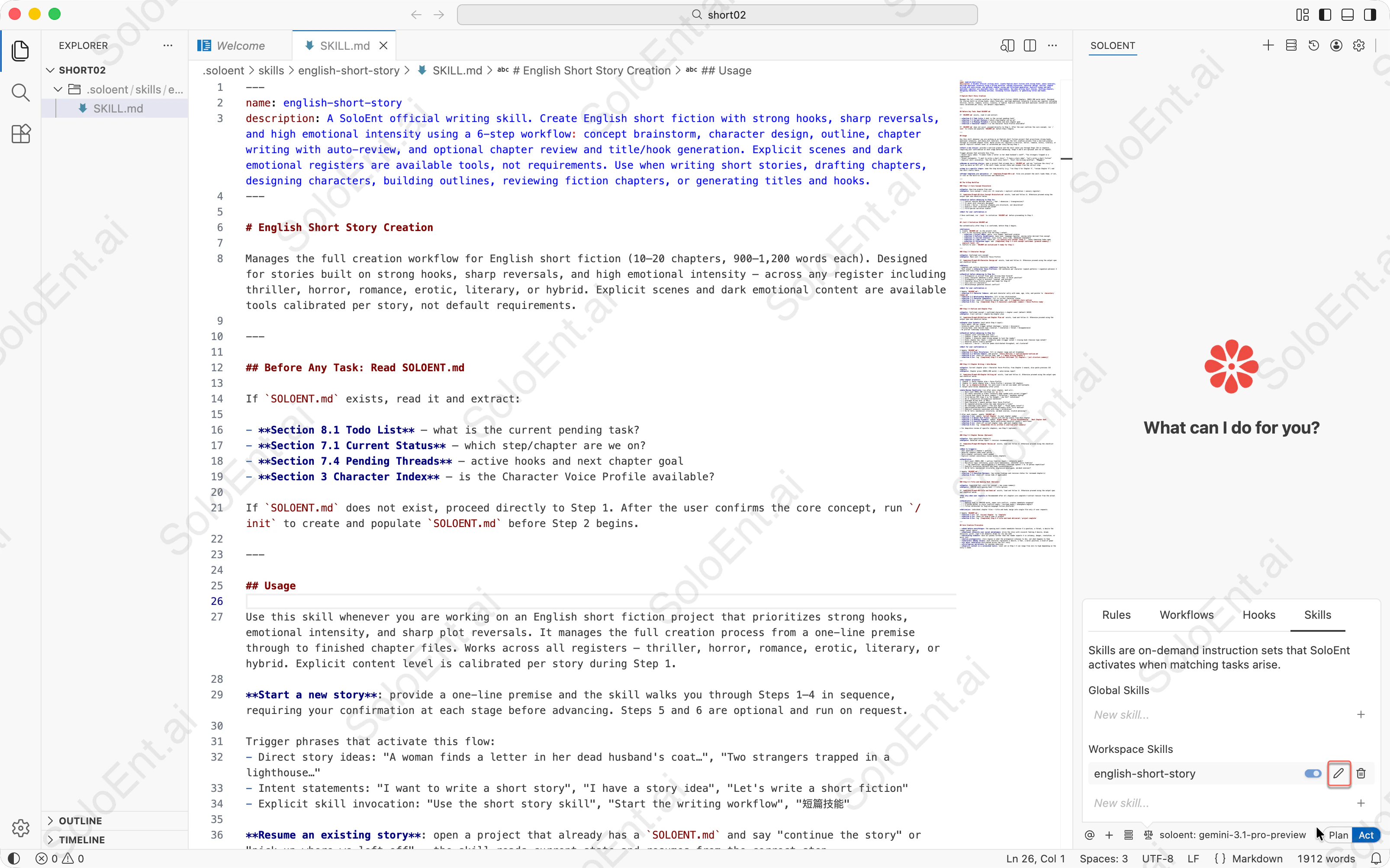
エディターで開いたSKILL.mdファイルにnameとdescriptionフィールドが表示され、右のSkillsパネルにenglish-short-storyスキルがワークスペーススキルとして表示されている
1

Skillsメニューを開く

Agentパネルの左から4番目のアイコンをクリックして、Skillsマネージャーに切り替えます。
2

新しいスキルを作成する

「New skill…」をクリックして名前を入力(例:short-story)し、「+」をクリックします。Agentがテンプレートの SKILL.md ファイルを含むスキルディレクトリを作成します。
3

スキルの指示を書く

SKILL.md ファイルを編集します:
  • description を更新して、このスキルのトリガー条件を指定する
  • 本文に指示、チェックリスト、ワークフローのステップを追加する
  • 必要に応じて templates/docs/ サブディレクトリにサポートファイルを追加する
これは公式の english-short-story スキルファイルです——ドメインエキスパート型スキルで、完全な6ステップのワークフロー、チェックリスト、停止条件を含んでいます。そのままコピーして使用できます。
---
name: english-short-story
description: A SoloEnt official writing skill. Create English short fiction with strong hooks, sharp reversals, and high emotional intensity using a 6-step workflow: concept brainstorm, character design, outline, chapter writing with auto-review, and optional chapter review and title/hook generation. Explicit scenes and dark emotional registers are available tools, not requirements. Use when writing short stories, drafting chapters, designing characters, building outlines, reviewing fiction chapters, or generating titles and hooks.
---

# English Short Story

Manages the full creation workflow for English short fiction (10–20 chapters, 900–1,200 words each). Designed for stories built on strong hooks, sharp reversals, and high emotional intensity — across any register including thriller, horror, romance, erotic, literary, or hybrid. Explicit scenes and dark emotional content are available tools calibrated per story, not default requirements.

---

## Before Any Task: Read SOLOENT.md

If `SOLOENT.md` exists, read it and extract:

- **Section 8.1 Todo List** — what is the current pending task?
- **Section 7.1 Current Status** — which step/chapter are we on?
- **Section 7.4 Pending Threads** — active hooks and next chapter goal
- **Section 3 Character Index** — is the Character Voice Profile available?

If `SOLOENT.md` does not exist, proceed directly to Step 1. After the user confirms the core concept, run `/init` to create and populate `SOLOENT.md` before Step 2 begins.

---

## Usage

Use this skill whenever you are working on an English short fiction project that prioritizes strong hooks, emotional intensity, and sharp plot reversals. It manages the full creation process from a one-line premise through to finished chapter files. Works across all registers — thriller, horror, romance, erotic, literary, or hybrid. Explicit content level is calibrated per story during Step 1.

**Start a new story**: provide a one-line premise and the skill walks you through Steps 1–4 in sequence, requiring your confirmation at each stage before advancing. Steps 5 and 6 are optional and run on request.

Trigger phrases that activate this flow:
- Direct story ideas: "A woman finds a letter in her dead husband's coat…", "Two strangers trapped in a lighthouse…"
- Intent statements: "I want to write a short story", "I have a story idea", "Let's write a short fiction"
- Explicit skill invocation: "Use the short story skill", "Start the writing workflow", "短篇技能"

**Resume an existing story**: open a project that already has a `SOLOENT.md` and say "continue the story" or "pick up where we left off" — the skill reads current state and resumes from the correct step.

**Jump to a specific step**: name the step directly (e.g. "run Step 4 for Chapter 3", "review Chapter 5") and the skill starts there.

**Prompt templates are optional**: if `templates/Prompt-0X-*.md` files are present the skill loads them; if not, it runs on the built-in instructions and checklists.

---

## The 6-Step Workflow

### Step 1 — Core Concept Brainstorm

**Input**: One-line premise from user
**Output**: Core concept + story arc (3+ reversals + explicit calibration + sensory register)

If `templates/Prompt-01-Core Concept Brainstorm.md` exists, load and follow it. Otherwise proceed using the output spec and checklist below.

**Checklist before advancing to Step 2**:
- [ ] Central tension defined (desire / fear / obsession / transgression)?
- [ ] 3+ major plot reversals designed?
- [ ] Erotic / horror / thriller elements are structural, not decorative?
- [ ] Explicit level calibrated and noted?
- [ ] First-person narration viable?

**Wait for user confirmation.**

→ Once confirmed, run `/init` to initialize `SOLOENT.md` before proceeding to Step 2.

---

## /init — Initialize SOLOENT.md

Run automatically after Step 1 is confirmed, before Step 2 begins.

**Actions**:
1. Create `SOLOENT.md` in the project root.
2. Fill in the following fields from the Step 1 output:
   - **Section 1 Project DNA**: genre, core themes, emotional promise
   - **Section 5 Stylistic Guidelines**: base tone, language register, pacing notes derived from concept
   - **Section 7.1 Current Status**: story title, story time, immediate atmosphere
   - **Section 8.1 Todo List**: check off `[x] Confirm core concept (Step 1)`, leave remaining todos open
   - **Section 8.2 Milestone Log**: add `[Completed] Step 1 — core concept confirmed: [premise summary] / explicit level: [X]`
3. Confirm to user: `SOLOENT.md initialized — ready for Step 2.`

---

### Step 2 — Character Design

**Input**: Confirmed core concept
**Output**: Main cast + Character Voice Profile

If `templates/Prompt-02-Character Design.md` exists, load and follow it. Otherwise proceed using the output spec and checklist below.

**Rules**:
- Complete and confirm characters **before** touching the outline
- Must output a **Character Voice Profile**: 1–2 sentences per character (speech patterns + signature phrases) — pasted into every Step 4 prompt

**Checklist before advancing to Step 3**:
- [ ] Protagonist is active? Clear goal driving them forward?
- [ ] Every character embodies a value, desire, fear, or moral position?
- [ ] Protagonist's voice is distinct, layered, and evolves?
- [ ] Character Voice Profile output and ready for Step 4?
- [ ] Core cast ≤ 4 characters?
- [ ] Relationships generate natural conflict?

**Wait for user confirmation.**

→ Update `SOLOENT.md`:
- **Section 3.1 Character Index**: add each character entry with name, age, role, and pointer to `characters/[name].md`
- **Section 3.2 Relationship Network**: fill in key relationships
- **Section 7.2 Character Snapshot**: fill in current character states
- **Section 8.1**: check off character design todo, add `[ ] Complete story outline`
- **Section 8.2**: log `[Completed] Step 2 — characters confirmed: [names] / Voice Profile ready`

---

### Step 3 — Outline and Chapter Plan

**Input**: Confirmed concept + confirmed characters + chapter count (default 10–20)
**Output**: 3-act outline + chapter-by-chapter plan

If `templates/Prompt-03-Outline and Chapter Plan.md` exists, load and follow it. Otherwise proceed using the output spec and checklist below.

**Chapter plan format** (must match Step 4 input):
- Story beats: 3–5 per chapter
- Intensity peak: note trigger method (dialogue / action / discovery)
- Closing hook: note tension type (reversal / revelation / threat / disappearance)
- No pre-set timestamp transitions

**Checklist before advancing to Step 4**:
- [ ] Chapter count confirmed with user?
- [ ] Chapter 1 opens on immediate conflict?
- [ ] Chapter 1 intensity peak strong enough to lock the reader?
- [ ] Every chapter has: beats + intensity peak (trigger noted) + closing hook (tension type noted)?
- [ ] Reversal points clearly marked?
- [ ] Explicit / horror / thriller peaks distributed throughout, not clustered?

**Wait for user confirmation.**

→ Update `SOLOENT.md`:
- **Section 4.1 Story Structure**: fill in chapter range and act breakdown
- **Section 4.2 Outline Index**: add pointer `[Story Outline] -> outline/master-outline.md`
- **Section 8.1**: check off outline todo, add `[ ] Begin writing Chapter 1`
- **Section 8.2**: log `[Completed] Step 3 — outline confirmed: [X] chapters / [act structure summary]`

---

### Step 4 — Chapter Writing + Auto-Review

**Input**: Current chapter plan + Character Voice Profile; from Chapter 2 onward, also paste previous 1–2 chapters
**Output**: Chapter prose (900–1,200 words) + auto-review report

If `templates/Prompt-04-Chapter Writing.md` exists, load and follow it. Otherwise proceed using the output spec and checklist below.

**Per-chapter process**:
1. Chapter 1: paste chapter plan + Voice Profile
2. Chapter 2+: paste chapter plan + Voice Profile + previous 1–2 chapters
3. Run `wc -w chapters/ch-XX.md` for word count — do not use model self-estimate
4. Output auto-review immediately after prose

**Auto-Review Checklist** (run after every chapter, mark ✅/❌):
- [ ] Word count 900–1,200 (verified via `wc -w`)?
- [ ] All beats executed in order? Intensity peak landed with correct trigger?
- [ ] Closing hook sharp? No moral summary / reflection / epiphany ending?
- [ ] First-person POV clean — no "he thought / she felt" violations?
- [ ] No 3+ consecutive introspective sentences?
- [ ] Dialogue drives plot (≥ 50%)?
- [ ] Each character's speech matches their Voice Profile?
- [ ] No repeated phrasing within the same character's lines?
- [ ] No timestamp scene openers ("The next day…" / "Three weeks later…")?
- [ ] Age/occupation/backstory communicated obliquely after first mention?
- [ ] Explicit intensity consistent with Step 1 calibration?
- [ ] No AI tells (mechanical structures, em-dash overuse, clichéd phrasing)?

→ After each chapter, update `SOLOENT.md`:
- **Section 7.1**: update `Current Chapter` to next chapter number
- **Section 7.3 Recent Plot Flow**: replace with 3–5 key events from this chapter
- **Section 7.4 Pending Threads**: update `Urgent Hooks`, `Active Foreshadowing`, `Next Chapter Goal`
- **Section 7.5 Execution Review**: paste auto-review checklist result + word count
- **Section 8.1**: check off current chapter todo, add next chapter todo
- **Section 8.2**: log `[Completed] Ch-[X] written — [one-line plot summary]`

> For deep-dive review of specific chapters, use Step 5 (optional).

---

### Step 5 — Chapter Review (Optional)

**Input**: User-specified chapter(s)
**Output**: Detailed review report + revision recommendations

If `templates/Prompt-05-Chapter Review.md` exists, load and follow it. Otherwise proceed using the checklist below.

**When to trigger**:
- User questions a chapter's quality
- Reversal chapters need tonal polish
- Multi-chapter continuity check needed
- Explicit content consistency review across chapters

**Checklist**:
- [ ] Word count (900–1,200) + outline fidelity (beats + intensity peak)?
- [ ] Narrative logic continuity, prose style consistency, character voice fidelity?
- [ ] ⚠️ Tag repetition: age/occupation ≤ 2 mentions; timestamp openers = 0; no phrase repetition?
- [ ] Explicit escalation correct? Any tonal inconsistencies?
- [ ] No AI tells (mechanical structures, digressive monologues, em-dash overuse)?

→ Update `SOLOENT.md`:
- **Section 7.5 Execution Review**: log review findings and revision status for reviewed chapter(s)
- **Section 8.1**: check off review todo if applicable

---

### Step 6 — Title and Opening Hook (Optional)

**Input**: Completed full story (or concept + key scene summary)
**Output**: 100–150 word opening hook + 3 title options

If `templates/Prompt-06-Title and Hook.md` exists, load and follow it. Otherwise proceed using the output spec and checklist below.

**Run only when user requests.** Recommended after all chapters are complete — extract tension from the actual draft.

**Checklist**:
- [ ] Opening hook is 100–150 words, names core conflict, creates immediate suspense?
- [ ] 3 titles differ in style (conflict angle / intrigue angle / atmosphere angle)?
- [ ] Titles calibrated for English-language fiction platforms?

**Delivery**: individual chapter files + title and hook; merge into single file only if user requests.

→ Update `SOLOENT.md`:
- **Section 7.1**: set `Current Chapter` to `Complete`
- **Section 8.1**: check off Step 6 todo if present
- **Section 8.2**: log `[Completed] Step 6 — title and hook delivered / project complete`

---

## Core Creative Principles

- **Hook before everything**: the opening must create immediate tension — a question, a threat, a desire the reader cannot ignore
- **Emotional intensity over social melodrama**: drive the story with visceral feeling — desire, dread, obsession, grief, rage — not domestic drama for its own sake
- **Escalating stakes**: each act pushes further than the reader expects — in intimacy, danger, revelation, or moral cost
- **Active protagonist**: story engine is what the protagonist *chooses to do*, not what happens to them
- **Characters embody value**: each character represents a desire, a fear, a moral position, a kind of power
- **3+ major reversals** distributed across the full story
- **First-person narration** for maximum immersion
- **Explicit content is a calibrated tool**: level set in Step 1 — can range from zero to high depending on the story's needs

3つのよくあるスキルタイプ

タイプ1:チェックリスト型

固定のタイミングで複数の基準を一度に確認するのに最適——漏れを防ぎます。例えば、章を書き終えた後の提出前チェック:
---
name: chapter-submission-check
description: Use before finalizing a chapter to verify word count, consistency, and all checklist items.
---

## 提出前チェック(すべて通過してから次へ)
- [ ] 字数 900–1,200(ツールで確認済み、推定不可)
- [ ] すべての章のビートを実行し、強度のピークを達成
- [ ] 締めのフックが明確——道徳的まとめや反省での終わりはNG
- [ ] 人物名の一貫性チェック通過
- [ ] SOLOENT.md 更新済み

## 出力
各項目:合格 / 不合格。不合格項目はすべて修正してから続行。

タイプ2:ワークフロー型

明確なステップ順序があり、実行前に確認が必要な操作に最適。
---
name: chapter-rewrite
description: Rewrite a chapter from scratch. Run only when explicitly requested.
---

## ステップ
1. バックアップ:現在の章を ch-XX-original.md として保存し、原稿を保持する
2. 説明:今回の書き直しの核心的な調整方向を1段落でまとめ、ユーザーの確認を待ってから書き始める
3. 実行:新しい方向性で完全な章を書く(900–1,200 語)
4. 検証:原版に対してチェックリストを実行し、新旧バージョンの主な違いを出力する

タイプ3:ドメインエキスパート型

Agentに勘ではなく専門的な経験に基づいて作業させたい場合に最適。例えば、執筆が行き詰まったときの診断スキル:
---
name: story-diagnosis
description: Use when a chapter feels flat, pacing is off, or a scene isn't landing.
---

## 証拠収集
1. 問題の章の全文を読む
2. SOLOENT.md 第4節の章のビート計画と照合する
3. 前後の章の感情曲線を確認する

## 決定マトリクス
| 症状 | まず確認 |
|---|---|
| ペースが遅い | ビート密度 / 無効な段落がないか |
| 感情が薄い | キャラクターの声の一貫性 / 内的独白が多すぎないか |
| 締めのフックが失敗 | 緊張の種類 / 張力が章内で解放されていないか |

## 出力フォーマット
根本原因 / 影響範囲 / 修正ステップ / 検証方法

完全な例:読書ノート

これはドメインエキスパート型スキルです。 コンテンツ取得パス(スクリプトが章をオンデマンドで抽出)、専門知識(docs/ に章識別パターン)、固定出力フォーマット(templates/ にノートテンプレート)——これらの3要素がドメインエキスパート型スキルの典型的な構造です。 このスキルはローカルの書籍ファイルから構造化された読書ノートを抽出します——章のまとめ、重要な洞察、名言——フォーマットされたMarkdownとして保存します。

ディレクトリ構造

book-summary/
├── SKILL.md                    # ワークフローの指示
├── templates/
│   └── note-template.md        # 読書ノートの出力フォーマット
├── docs/
│   └── chapter-patterns.md     # 中国語と英語の書籍の章見出しパターン
└── scripts/
    └── analyze-book.py         # Agentが読む前に書籍ファイルを前処理する

なぜスクリプトが必要か

書籍は長いです。章構造を抽出するために本全体をコンテキストに読み込むのは無駄で遅い。前処理スクリプトがこの問題を解決します:
  • info コマンド — 最初の50行を読んでタイトル、エンコーディング、総行数を特定する
  • chapters コマンド — 全文を読まずに章見出しをスキャンして行番号を返す
  • extract コマンド — 特定の章の行だけを読んで、Agentが1章ずつ処理できるようにする
Agentはワークフローの各段階でスクリプトを呼び出します。コンテキストに入るのはスクリプトの出力だけで、書籍本体は入りません。

なぜdocsファイルが必要か

中国語と英語の書籍では章見出しのフォーマットが大きく異なります。すべての認識パターンを SKILL.md に埋め込む代わりに、スキルは docs/chapter-patterns.md に保存します。Agentは章の境界を識別する必要があるときにこの参照ファイルを読み、それ以外は無視します。 参照資料を docs/ に置くことには2つのメリットがあります:SKILL.md をワークフローロジックに集中させられること、そしてメインの指示を変えずにパターンを更新できることです。

なぜテンプレートが必要か

出力フォーマットは固定されています:すべての読書ノートは同じ構造に従います——書籍の概要、章ごとのまとめ(重要な観点と名言を含む)、書籍全体のハイライト、個人的な考察。毎回のプロンプトでこのフォーマットを再指定する代わりに、スキルは templates/note-template.md に保存します。 ステップ5(最終まとめ)が実行されると、Agentはテンプレートを読み込んでプレースホルダーを埋めます。フォーマットは毎回一貫していて、1か所だけ管理すればいいです。

SKILL.mdがサポートファイルを参照する方法

SKILL.md の指示は各サポートファイルを明示的に指しています:
### ステップ1:書籍構造を分析する

前処理スクリプトを実行して書籍情報を取得する:
  python3 scripts/analyze-book.py <ファイルパス> info

### ステップ5:ノートをまとめる

テンプレートを使って出力する:templates/note-template.md

章見出し認識パターンの参照:docs/chapter-patterns.md

効果的なスキルの書き方

「いつ使うか」を書き、「何をするか」を書かない

似ているようで、トリガーの精度に大きく影響します。
# 誤り——機能を説明しているが、トリガー条件ではない
description: This skill helps improve writing quality and checks chapters for common issues.

# 正しい——いつ起動するかを説明している
description: Use when reviewing a completed chapter draft for pacing, voice, and consistency issues.
説明文は常にコンテキストに常駐しており、有効なスキルはすべて継続的にトークン予算を消費します。短く、具体的に、トリガーシナリオを直接述べてください:
# 非効率(約45トークン)
description: |
  This skill helps you review and improve your writing chapters.
  It checks for common issues like pacing problems, character voice...
  Use this when you want to ensure your chapter quality before proceeding.

# 効率的(約9トークン)
description: Use when reviewing a chapter for quality issues.

完全なステップ、入力、出力、停止条件を持つ

プロセスの冒頭だけ書いて明確な完了シグナルがない場合、Agentはいつ止まるかを自分で決めます——それは通常あなたが期待する場所ではありません。各ステップには以下が必要です:
  • 入力:このステップに必要なコンテキストやファイル
  • 出力:このステップが生成するもの
  • 停止条件:確認を待つタイミング、続行するタイミング

本文は骨格だけに抑え、大量データはサポートファイルへ

SKILL.md は5,000語以内に抑えてください。スタイルガイド、識別パターン、キャラクタープロフィールなど大量の参照資料が必要な場合は docs/ サブディレクトリに入れてファイル名で参照してください。Agentは必要なときだけ読み込み、そうでなければコンテキストを消費しません。

呼び出し頻度に基づいてオートトリガーを決める

使用頻度推奨戦略
高頻度(セッションあたり1回以上)オートトリガーをオンにしたまま、描述符を最適化してより正確にトリガーする
低頻度(セッションあたり1回以下)オートトリガーをオフにして手動で起動。描述符はコンテキストから外れてもよい
極低頻度(月1回以下)スキルを削除し、SOLOENT.md にドキュメントとして記録する

よくある失敗

問題症状修正方法
説明が広すぎるdescription: help with writing——どんな執筆リクエストもトリガーしてしまう具体的なシナリオに絞り込み、実際のトリガーフレーズを入れる
本文が長すぎる何百行もの作業マニュアルを SKILL.md 本文に詰め込む参照資料を docs/ に移し、指示には骨格だけ残す
1つのスキルが5つのことをしている同じスキルが審稿、続き、アウトライン、キャラクター設計、診断をカバー分割する。1ドメインに1スキル、それぞれ個別にオン・オフできる

他者のスキルを使う

すべてのスキルをゼロから書く必要はありません。スキルは自己完結したディレクトリです——手動でインストールしたり、リポジトリからクローンしたり、プラグインとしてインストールすることができます。

手動インストール

スキルディレクトリをダウンロードまたはコピーして、適切な場所に配置します:
  • グローバルスキル → システムレベルのスキルディレクトリ(すべてのプロジェクトで使用可能)
  • ワークスペーススキル → プロジェクト内の .soloent/skills/
SoloEntがディレクトリを検出するとすぐにスキルが有効になります。再起動は不要です。
your-novel/
├── .soloent/
│   └── skills/
│       └── book-summary/      ← ここにスキルディレクトリを置く
│           ├── SKILL.md
│           ├── templates/
│           ├── docs/
│           └── scripts/

git clone で入手する

GitHubで公開されているスキルはスキルディレクトリに直接クローンできます:
cd your-novel/.soloent/skills/
git clone https://github.com/author/skill-name
これでスキルを最新の状態に保つことも簡単になります——いつでも git pull でリポジトリから変更を取り込めます。
すべてのプロジェクトでスキルを使えるようにしたい場合は、ワークスペースディレクトリではなくグローバルスキルディレクトリにクローンしてください。

プラグイン経由

スキルを .vsix 拡張ファイルとして配布しているスキル作成者もいます。拡張機能をインストールするとバンドルされたスキルが自動的に読み込まれます——手動でファイルを配置する必要はありません。
1

.vsix ファイルを入手する

スキル作成者のリポジトリまたは配布チャンネルから .vsix ファイルをダウンロードします。
2

拡張機能をインストールする

SoloEntで拡張機能パネルを開き、··· メニューをクリックして**VSIXからインストール…**を選択します。ダウンロードしたファイルを選んでください。
3

スキルが読み込まれたことを確認する

Skillsパネルを開きます。拡張機能にバンドルされたスキルがスキルリストに表示され、すぐに使用できます。
スキルを有効化する前に SKILL.md を確認してください。スキルはあなたの権限で実行され、プロジェクトファイルの読み取りと変更が可能です。

トラブルシューティング

最も考えられる原因:説明が十分に具体的でないか、スキルがオフになっている。
  • Skills パネルでスキルがオンになっているか確認する
  • description を書き直し、実際に使うフレーズやタスクタイプを含める——「執筆を助ける」ではほとんど正しくトリガーされない;ワークフロー、出力タイプ、サンプルの起動フレーズを具体的に記述する
  • スキルディレクトリに有効な SKILL.md があり、namedescription の両方のフロントマターフィールドが含まれているか確認する
  • フロントマターの name がディレクトリ名と完全に一致しているか確認する
説明が広すぎます——意図していないリクエストにもマッチしてしまっている。
  • description をこのスキルが処理する特定のタスクのみを説明するよう絞り込む
  • そのドメイン以外の作業をしているときはスキルをオフにする
  • 説明が重複するスキルが複数ある場合は、それぞれの起動条件をより具体的にする
よくある原因を確認してください:
  • 指示がコンテキスト制限を超えている可能性がある——SKILL.md を5,000語以内に抑え、参考資料は docs/ サブディレクトリに移動する
  • 競合するグローバルまたはプロジェクトルールがスキルの動作の一部を上書きしている可能性がある——アクティブなルールに矛盾がないか確認する
  • スキルがチェックリストを使用している場合、各チェックリスト項目に明示的な「確認待ち」ゲートがあるか確認する;ない場合、Agentは自動的に進んでしまう
  • 指示で参照されているサポートファイルは指定のパスに存在する必要がある——ファイルが見つからないとそのステップは黙って省略される
Agentはサポートファイルを、指示で明示的に参照されている場合のみ読み込みます。
  • 指示内のファイルパスが実際の場所と一致しているか確認する(例:chapter-outline.md ではなく templates/chapter-outline.md
  • ファイルがスキルディレクトリ内の正しいサブディレクトリ(templates/docs/、または scripts/)に存在するか確認する
  • SKILL.md でそのファイル名が参照されていない場合、Agentはそれを読み込む理由がない
ワークスペーススキルは常に同名のグローバルスキルより優先されます。
  • これは想定された動作です——ワークスペーススキルがアクティブな場合、同名のグローバルスキルは完全に無視される
  • グローバルスキルを有効にしたい場合は、ワークスペーススキルの名前を変更するか削除する
  • 両方を共存させたい場合は、異なる名前をつけてそれぞれの説明を更新する

より高度なヒント

ワークフロー

ワークフローファイルで繰り返しの多段階プロセスを自動化する

ルール

執筆の好みをルールに記録して、Agentが常にあなたのスタイルで書けるようにする

ルール・ワークフロー・スキルの違い

3つのAI指示方法——それぞれの違いと使い分けを理解する