

Two types of rules
Global rules
Global rules apply to every writing project you open. Use them for personal habits that you carry from project to project:- Your natural sentence rhythm preferences
- Punctuation style (Oxford comma, em dash usage, etc.)
- Common anti-AI writing constraints that you apply universally
- Any defaults you always want the Agent to start from
Project rules
Project rules live inside a specific project and only apply when you’re working on it. Use them for:- This project’s POV and narrative distance
- Tense (past / present) and person (first / third)
- Project-specific stylistic goals or genre conventions
- Writing constraints specific to this story’s tone
Where rules live
.md files inside .soloent/rules/, combining them with any active global rules into a unified set of instructions for the Agent.
Creating rules
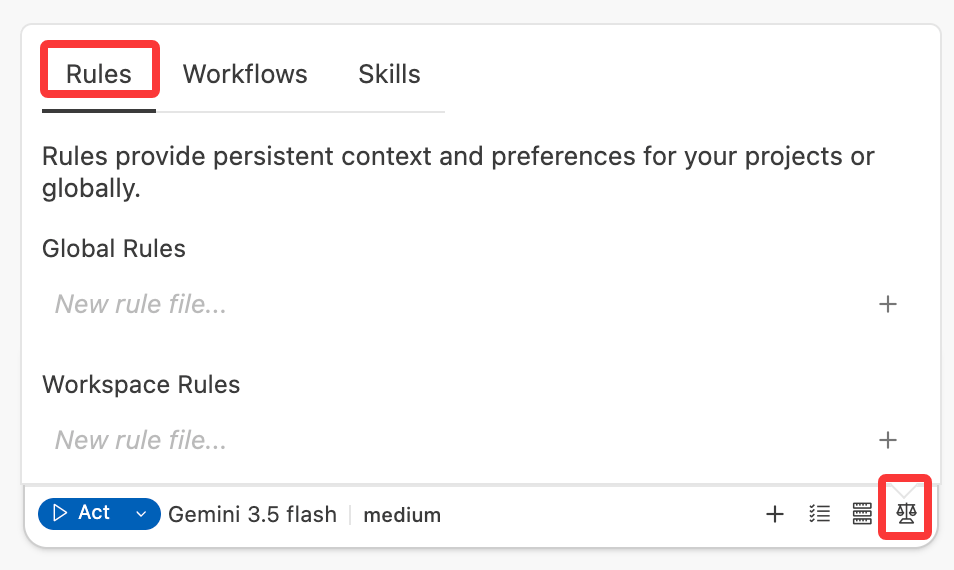
1
Open the Rules panel
Click the fourth icon from the left in the Agent panel,and switch the Rules manager.
2
Choose global or project
Select where the rule should live — globally (all projects) or just in the current project.
3
Create a new rule file
Click “New rule file…”, enter a filename (e.g.,
my-style) and click on ”+”. The file will be created with a .md extension.4
Write your rule
Add your instructions in markdown format. Keep each rule file focused on a single concern.
Rules vs. SOLOENT.md
Rules are designed for your habits and preferences — the things that stay true regardless of which story you’re working on. Story-specific content like world-building details, character profiles, and plot structure lives inSOLOENT.md, where the Agent can manage and update them as your project evolves.
These two systems are complementary:
Toggling rules
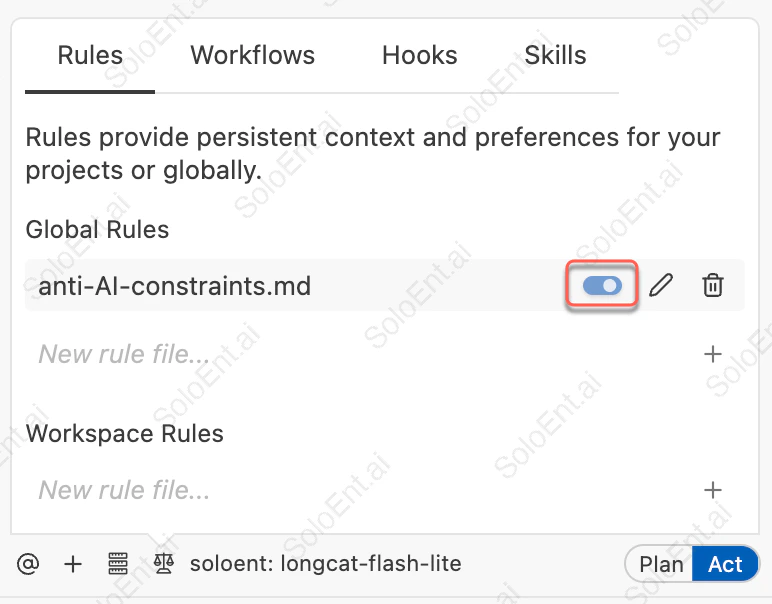
What to put in Rules
Personal style habits (global)
These are the writing instincts you’ve developed as a writer. They should feel like second nature to you, even if you’ve never written them down before. Sentence rhythm example:Anti-AI writing constraints (global)
AI models have recognizable default patterns that flatten prose and signal non-human authorship. Add the ones that bother you most as standing constraints.Project POV and narrative basics (project)
Every project has a fixed set of foundational writing decisions that the Agent should never deviate from.Project-specific style requirements (project)
Use this for genre conventions, tonal targets, or stylistic goals that are particular to this story.Writing effective rules
- Be specific, not aspirational. “Write beautifully” tells the Agent nothing. “Prefer concrete sensory detail over abstract emotional labeling” is actionable.
- State prohibitions directly. The most useful rules are often negative: “never do X.” The Agent responds well to clear constraints.
- Include the why when it’s not obvious. “Avoid em dashes (they read as an AI writing signature)” helps the Agent understand the intent and generalize it correctly.
- Keep rules short. Rules consume context tokens. A rule file that runs to five pages will crowd out your actual writing. If a rule needs extensive explanation, it’s probably better handled in SOLOENT.md or a dedicated reference document.
- One concern per file. Split rules by topic so you can toggle individual concerns on and off without affecting the rest.
Conditional rules
Conditional rules activate only when you’re working with files that match a path pattern. This lets you apply different writing constraints at different stages of a project without having to manually toggle rules each time. As your rule library grows, loading every rule for every request wastes context tokens. Conditional rules keep the Agent focused on only the instructions that matter for the files you are currently working with. A common use case: applying sentence rhythm and anti-AI constraints only when writing chapter files, so they don’t interfere with notes or outlines.How it works
Add YAML frontmatter at the top of any rule file. The Agent evaluates each rule’spaths against the files you’re currently working with, and activates matching rules automatically.
Rules without frontmatter are always active — the right choice for your universal style habits and anti-AI constraints.
Troubleshooting
The Agent keeps writing in patterns I've told it to avoid
The Agent keeps writing in patterns I've told it to avoid
Most likely cause: The rule is either toggled off or the instruction isn’t specific enough.
- Check that the rule file is toggled on in the Rules panel
- Rewrite the constraint as a direct prohibition: “Do not…” rather than “Try to avoid…”
- If it’s a global rule, verify it’s not being overridden by a project rule with conflicting instructions
A conditional rule isn't activating
A conditional rule isn't activating
Check the following:
- The file you’re editing must match the
pathsglob pattern - The YAML frontmatter must have proper
---delimiters on both sides - The rule must be toggled on in the Rules panel
Rules and SOLOENT.md seem to be giving the Agent conflicting instructions
Rules and SOLOENT.md seem to be giving the Agent conflicting instructions
This usually means there’s overlap — you’ve defined something in both places.
- Keep story content (who a character is, what the world’s rules are) in SOLOENT.md
- Keep your writing preferences (how prose should feel, what patterns to avoid) in Rules
- If you have stylistic requirements specific to this story’s tone, a project rule is fine — just make sure it doesn’t contradict SOLOENT.md’s Section 5 (Stylistic Guidelines)
Too many rules are slowing things down or causing the Agent to miss instructions
Too many rules are slowing things down or causing the Agent to miss instructions
Rules consume context tokens. If you have many active rules:
- Toggle off rules that don’t apply to your current task
- Consolidate overlapping rules into a single file
- Move any story-specific content that’s crept into Rules back into SOLOENT.md where it belongs
More Advanced Tips
SOLOENT.md Guide
Understand what belongs in SOLOENT.md vs. Rules
Commands
Use
/review to check whether your latest chapter follows your active rules