

/ in the SoloEnt chat box gives you quick access to the default commands, installed skills, and installed workflows available in the current project.
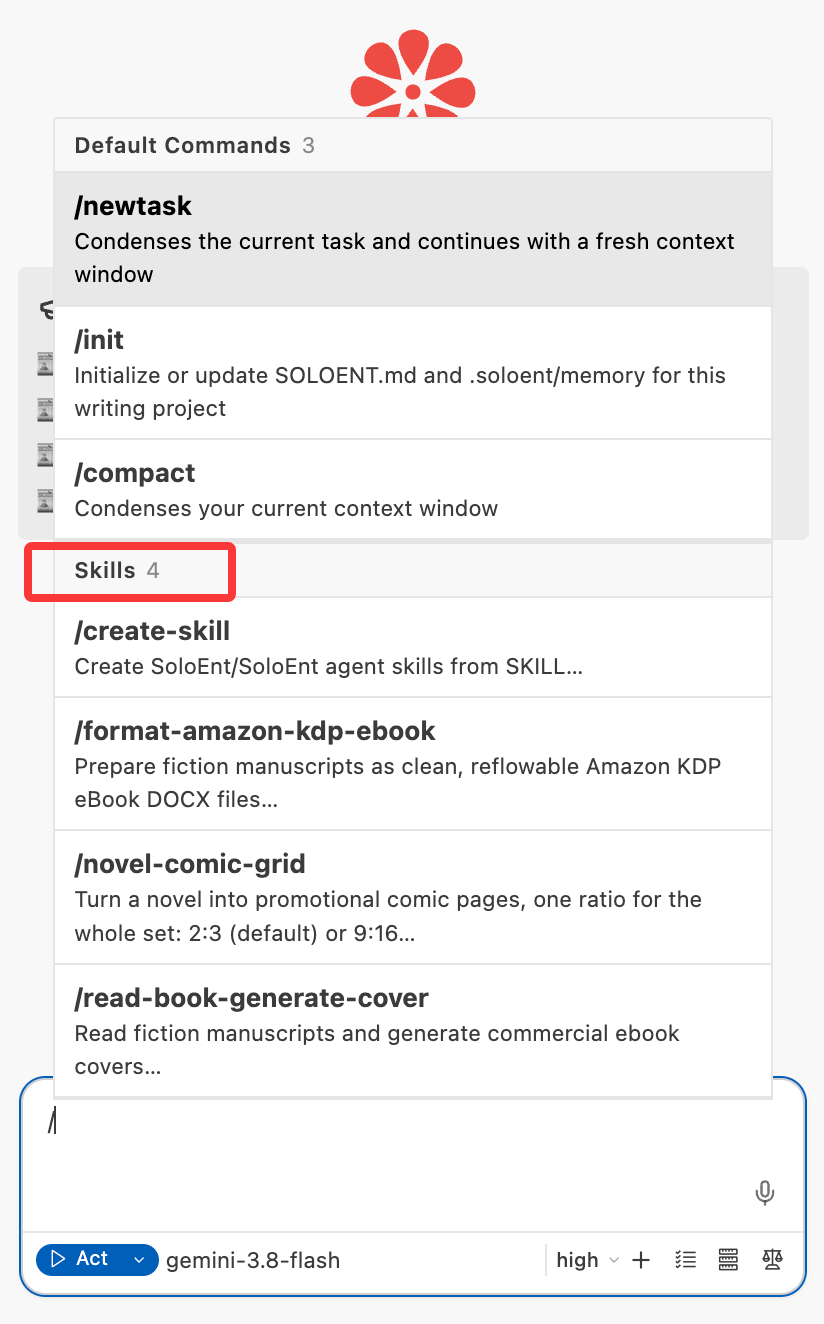
Default commands
/init — initialize SOLOENT.md
SOLOENT.md is the control panel for a writing project, and the AI’s long-term memory: it records your story DNA, tracks progress, and keeps a long work consistent.
To keep everyday writing lean, SoloEnt no longer generates
SOLOENT.md for every project. Create it by hand when the project needs it. Short works and non-fiction can do without./compact — compact the context by hand
Above the chat box you can see how much context the current window has used, for example 38.5k / 128.0k — used on the left, the session’s ceiling on the right.
The Agent compacts automatically as you approach that ceiling, and you can run /compact yourself at any time.
Preinstalled skills
/create-skill — the skill that builds skills
In any situation, you can ask SoloEnt to turn what you just did into a reusable Skill, and the Agent calls this preinstalled skill to create it.
Installed skills and workflows
Plugins installed from the Marketplace add their skills and workflows to the/ list automatically.
To activate one, pick it from the list — it stays at the head of the input box as a tag — then write your prompt after it and send them together.
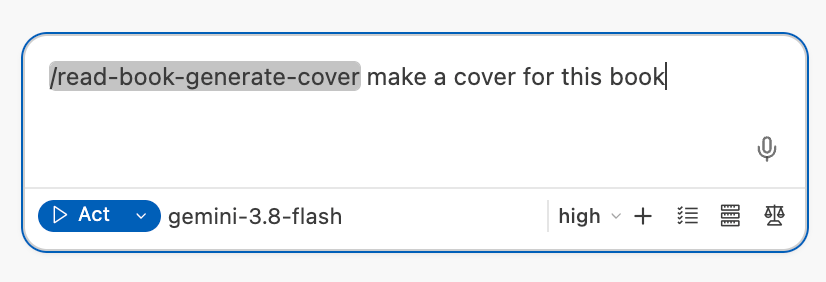
/read-book-generate-cover and write “make a cover for this book”, and the Agent follows that skill’s process to read the manuscript and generate a cover.
Built-in workflows
The two processes below ship as built-in workflows. They are retiring along with workflows in general, and plugins will take over:/review - Quality Assurance
The /review command runs a multi-layered quality assurance process on your chapter:
1. Basic Review
1. Basic Review
- Word count: Checks if chapter length matches your target
- Outline alignment: Verifies the chapter follows your planned outline
2. Consistency Review
2. Consistency Review
- Story continuity: Compares with story outline and act structure
- Chapter flow: Checks consistency with previous chapter
- Character integrity: Verifies characters act according to their profiles
- World rules: Ensures no violations of established world-building
3. Writing Style Review
3. Writing Style Review
- Style guide compliance: Checks against your stylistic guidelines (Section 5 of SOLOENT.md)
- Character voice: Ensures characters speak and act consistently
- Tone consistency: Verifies the chapter maintains the intended atmosphere
4. Chapter Ending Review
4. Chapter Ending Review
- Hook quality: Ensures chapter ends with a compelling hook
- Ending pitfalls: Flags repeated words, long inner monologues, or weak endings
- Next chapter connection: Verifies smooth transition to next chapter
5. AI Writing Pattern Detection
5. AI Writing Pattern Detection
- Originality check: Verifies text doesn’t reproduce copyrighted material
- Repeated phrases: Detects overused words or phrases
- Em dash overuse: Flags unnecessary em dash usage
- List pattern abuse: Catches “word, word, word” patterns common in AI writing
/market - Publishing Strategy
The /market command analyzes your completed manuscript and generates a comprehensive publishing strategy:
1. Genre & Market Analysis
1. Genre & Market Analysis
- Primary genre: Identifies your book’s genre and subgenre
- Word count: Calculates per-chapter and total word count
- Market category: Determines MG/YA/Adult and Fiction/Non-fiction classification
2. Story Elements Extraction
2. Story Elements Extraction
- Logline: Crafts a one-sentence hook for your story
- Main selling points: Identifies unique elements that make your book marketable
- Comparable titles: Suggests “comp titles” for query letters
3. Publishing Route Recommendation
3. Publishing Route Recommendation
- Best-fit route: Traditional, Hybrid, Self-publishing, or Fandom platforms
- Rationale: Explains why this route fits your manuscript
- Target platforms: Specific publishers, imprints, or self-publishing platforms
- Next steps: Query letter, editing needs, cover design, etc.
4. Success Benchmarks
4. Success Benchmarks
- Comparable titles: Books similar to yours and their success metrics
- Timeline: Expected timeline to publication
- Budget: Estimated costs (for self-publishing or hybrid routes)
More Advanced Tips
SOLOENT.md Guide
Learn how commands interact with your project constitution
Plan Mode
Use Plan Mode to structure your story before writing