

How skills work
Skills use progressive loading to keep context lean. When you open a project, the Agent sees a list of available skills with their names and descriptions — a few dozen words each. That is all it loads at startup. When you ask for something that matches a skill’s description, the Agent activates that skill and loads its full instructions. A skill for short story creation stays dormant while you are working on a query letter. A skill for horror fiction does not consume context when you are outlining a thriller.Where skills live
Every skill is a directory containing aSKILL.md file. The directory name becomes the skill name. Skills can also include supporting files in three optional subdirectories.
.soloent/skills/ at your project root. Use them for capabilities tied to a specific project or genre — a skill built around the particular rules of your romance series, or one calibrated to the explicit level and narrative register of your current story.
Toggling skills
Every skill has a toggle to enable or disable it without deleting the file. Disable a skill when you do not need it for the current task — this keeps it out of context and avoids unintended activation.Creating a skill
Two ways: let the Agent generate one for you, or write it by hand.With /create-skill (recommended)
SoloEnt ships with a built-in /create-skill command, so you can create a local Skill from natural language in the chat.
In any situation, you can ask SoloEnt to turn the steps you just went through into a reusable Skill, and the Agent calls this preinstalled skill to build it — you never have to remember the SKILL.md format.
By hand
TheSKILL.md file has two parts: a frontmatter block (metadata) and the instruction body.
namemust exactly match the directory namedescriptiondescribes when to trigger this skill, not what it does (under 1,024 characters)
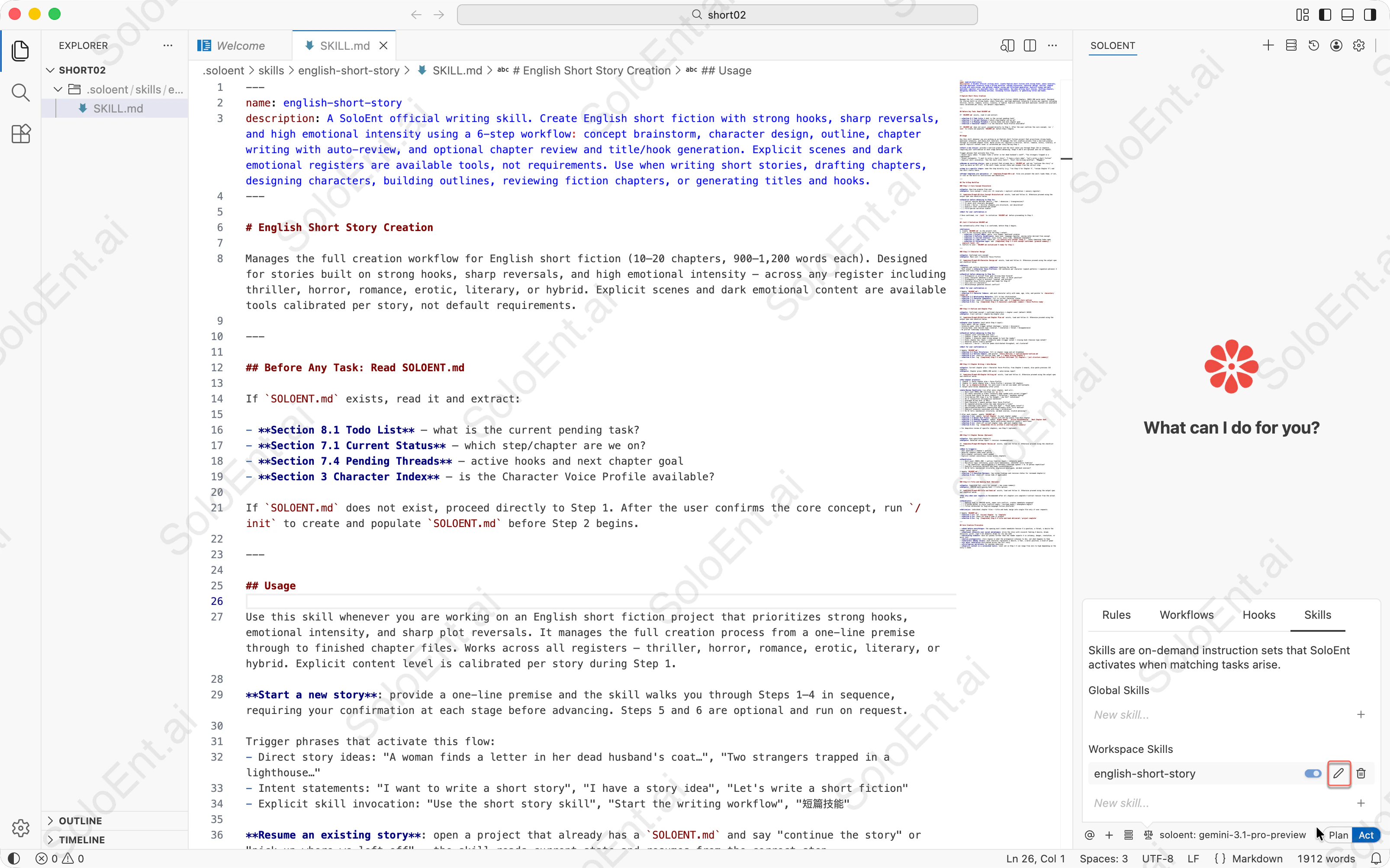
1
Open the Skills menu
Click the fourth icon from the left in the Agent panel,and switch the Skills manager.
2
Create a new skill
Click “New skill…” and enter a name (e.g.,
short-story) and click on ”+” . The Agent creates a skill directory with a template SKILL.md file.3
Write your skill instructions
Edit the
SKILL.md file:- Update the
descriptionto specify when this skill should trigger - Add your instructions, checklists, and workflow steps in the body
- Optionally add supporting files in
templates/ordocs/subdirectories
Get full english-short-story skill — click to expand and copy
Get full english-short-story skill — click to expand and copy
Three common skill types
Type 1: Checklist type
Best for verifying multiple criteria at a fixed point — so nothing gets missed. For example, a pre-submission check after each chapter is done:Type 2: Workflow type
Best for operations with a fixed sequence of steps and a confirmation step before execution.Type 3: Domain expert type
Best for situations where you want the Agent to work from expert experience rather than guessing. For example, a diagnosis skill for when the writing gets stuck:Full example: Book summary
This is a domain expert skill. It defines a content-retrieval path (a script extracts chapters on demand), specialized knowledge (chapter recognition patterns indocs/), and a fixed output format (a note template in templates/) — the three elements that characterize a domain expert skill.
This skill extracts structured reading notes from a local book file — chapter summaries, key insights, and quotations — and saves them as formatted Markdown.
Directory structure
Why this skill needs a script
Books are long. Loading an entire novel into context to extract its chapter structure would be wasteful and slow. The preprocessing script solves this:infocommand — reads the first 50 lines to identify the title, encoding, and total line countchapterscommand — scans the file for chapter headings and returns their line numbers, without reading the full textextractcommand — reads only the lines for a specific chapter, so the Agent processes one chapter at a time
Why this skill needs a docs file
Chapter heading formats vary widely across Chinese and English books. Rather than embedding all the recognition patterns inSKILL.md, the skill stores them in docs/chapter-patterns.md. The Agent reads this reference file when it needs to identify chapter boundaries — and ignores it otherwise.
Keeping reference material in docs/ has two benefits: it keeps SKILL.md focused on workflow logic, and it lets you update the patterns without touching the main instructions.
Why this skill needs a template
The output format is fixed: every set of reading notes follows the same structure — book overview, chapter summaries with key points and quotations, book-wide highlights, and a personal reflection section. Rather than re-specifying this format in every prompt, the skill stores it intemplates/note-template.md.
When Step 5 (final assembly) runs, the Agent loads the template and fills in the placeholders. The format is consistent every time, and you only need to maintain it in one place.
How the SKILL.md references supporting files
The instructions inSKILL.md point to each supporting file explicitly:
Writing effective skills
Write “when to use me”, not “what I do”
These sound similar, but they have a significant impact on trigger accuracy.Complete steps, inputs, outputs, and stop conditions
A skill instruction that only writes the beginning of a process — with no clear completion signal — leaves the Agent to decide when to stop. That is rarely where you want it to stop. Every step should have:- Input: what context or files this step needs
- Output: what this step produces
- Stop condition: when to wait for confirmation, when to continue
Keep the body lean — move bulk material to supporting files
KeepSKILL.md under 5,000 words. If you need large reference material — style guides, recognition patterns, character profiles — put them in the docs/ subdirectory and reference them by filename. The Agent loads them only when needed, keeping them out of context otherwise.
Decide auto-trigger based on call frequency
Common pitfalls
Troubleshooting
A skill isn't activating when I expect it to
A skill isn't activating when I expect it to
Most likely cause: The description isn’t specific enough, or the skill is toggled off.
- Check that the skill is toggled on in the Skills panel
- Rewrite the
descriptionto include the exact phrases and task types you use — “helps with writing” rarely triggers correctly; name the workflow, the output, and sample invocation phrases - Make sure the skill directory contains a valid
SKILL.mdwith bothnameanddescriptionfrontmatter fields - Verify that
namein the frontmatter exactly matches the directory name
A skill keeps activating when I don't want it to
A skill keeps activating when I don't want it to
The description is too broad — it matches requests you didn’t intend it for.
- Narrow the
descriptionto describe only the specific tasks this skill handles - Toggle the skill off when you’re working outside its domain
- If you have multiple skills with overlapping descriptions, make each one more specific about when it should and shouldn’t activate
The skill's instructions are being ignored or only partially followed
The skill's instructions are being ignored or only partially followed
Check for these common issues:
- The instructions may exceed the context limit — keep
SKILL.mdunder 5,000 words and move reference material intodocs/subdirectories - A conflicting global or project rule may be overriding part of the skill’s behavior — check your active rules for contradictions
- If the skill uses checklists, ensure each checklist item has an explicit “wait for confirmation” gate; without it the Agent may advance automatically
- Supporting files referenced in the instructions must exist at the specified paths — a missing file causes that step to be skipped silently
Supporting files (templates, docs, scripts) aren't being loaded
Supporting files (templates, docs, scripts) aren't being loaded
The Agent only loads supporting files when the instructions explicitly reference them.
- Check that the file path in the instruction matches the actual location (e.g.,
templates/chapter-outline.md, not justchapter-outline.md) - Verify the file exists inside the skill directory under the correct subdirectory (
templates/,docs/, orscripts/) - If the file is never referenced by name in
SKILL.md, the Agent has no reason to load it
A workspace skill and a global skill with the same name are conflicting
A workspace skill and a global skill with the same name are conflicting
Workspace skills always take precedence over global skills of the same name.
- This is expected behavior — if a workspace skill is active, the global skill with the same name is ignored entirely
- If you want the global skill to apply, rename or remove the workspace skill
- If both should coexist, give them distinct names and update their descriptions accordingly
More advanced tips
Commands
Use
/create-skill to turn a process you like straight into a skillRules
Capture your writing preferences so the Agent always writes in your voice
Rules vs. Workflows vs. Skills
Three ways to instruct your Agent — learn the differences and when to use each